You have already completed the Test before. Hence you can not start it again.
Test is loading...
You must sign in or sign up to start the Test.
You have to finish following quiz, to start this Test:
Your results are here!! for" CompTIA Server+ Practice Test 12 "
0 of 18 questions answered correctly
Your time:
Time has elapsed
Your Final Score is : 0
You have attempted : 0
Number of Correct Questions : 0 and scored 0
Number of Incorrect Questions : 0 and Negative marks 0
Average score
Your score
CompTIA Server+
You have attempted: 0
Number of Correct Questions: 0 and scored 0
Number of Incorrect Questions: 0 and Negative marks 0
You can review your answers by clicking on “View Answers” option. Important Note : Open Reference Documentation Links in New Tab (Right Click and Open in New Tab).
Answer Review
1
2
3
4
5
6
7
8
9
10
11
12
13
14
15
16
17
18
Answer
Review
Unattempted
Correct
Incorrect
Unattempted
Every question in this attempt was answered correctly.
Question 1 of 18
1. Question
A technician is configuring a server that requires secure remote access. Which of the following ports should the technician use?
Correct
Correct
Option D. 443
Correct because:
Port 443 is used for HTTPS (Hypertext Transfer Protocol Secure), which encrypts communication using SSL/TLS.
When secure remote access is required, HTTPS provides a confidential and integrity-protected channel for administrative access to web-based management interfaces.
This ensures that sensitive credentials and data are not exposed during transmission.
Incorrect
Option A. 21
Incorrect because port 21 is used for FTP (File Transfer Protocol), which transmits data in clear text unless explicitly secured with FTPS.
It does not provide secure remote access for server administration.
Option B. 22
Incorrect in this context because port 22 is used for SSH (Secure Shell), which is indeed secure for remote access.
However, the exam question emphasizes secure remote access via a web-based interface, making 443 (HTTPS) the best answer. SSH is secure but not the primary choice for web-based remote administration.
Option C. 23
Incorrect because port 23 is used for Telnet, which transmits data in plain text and is considered insecure.
It should never be used for secure remote access.
Incorrect
Correct
Option D. 443
Correct because:
Port 443 is used for HTTPS (Hypertext Transfer Protocol Secure), which encrypts communication using SSL/TLS.
When secure remote access is required, HTTPS provides a confidential and integrity-protected channel for administrative access to web-based management interfaces.
This ensures that sensitive credentials and data are not exposed during transmission.
Incorrect
Option A. 21
Incorrect because port 21 is used for FTP (File Transfer Protocol), which transmits data in clear text unless explicitly secured with FTPS.
It does not provide secure remote access for server administration.
Option B. 22
Incorrect in this context because port 22 is used for SSH (Secure Shell), which is indeed secure for remote access.
However, the exam question emphasizes secure remote access via a web-based interface, making 443 (HTTPS) the best answer. SSH is secure but not the primary choice for web-based remote administration.
Option C. 23
Incorrect because port 23 is used for Telnet, which transmits data in plain text and is considered insecure.
It should never be used for secure remote access.
Unattempted
Correct
Option D. 443
Correct because:
Port 443 is used for HTTPS (Hypertext Transfer Protocol Secure), which encrypts communication using SSL/TLS.
When secure remote access is required, HTTPS provides a confidential and integrity-protected channel for administrative access to web-based management interfaces.
This ensures that sensitive credentials and data are not exposed during transmission.
Incorrect
Option A. 21
Incorrect because port 21 is used for FTP (File Transfer Protocol), which transmits data in clear text unless explicitly secured with FTPS.
It does not provide secure remote access for server administration.
Option B. 22
Incorrect in this context because port 22 is used for SSH (Secure Shell), which is indeed secure for remote access.
However, the exam question emphasizes secure remote access via a web-based interface, making 443 (HTTPS) the best answer. SSH is secure but not the primary choice for web-based remote administration.
Option C. 23
Incorrect because port 23 is used for Telnet, which transmits data in plain text and is considered insecure.
It should never be used for secure remote access.
Question 2 of 18
2. Question
Which of the following documents would be useful when trying to restore IT infrastructure operations after a non-planned interruption?
Correct
Correct
Option C. Business impact analysis
Correct because:
A Business Impact Analysis (BIA) identifies critical systems, processes, and the impact of downtime.
It helps prioritize recovery efforts by showing which services are most essential to restore first.
During an unplanned interruption, the BIA guides decision-making to minimize business disruption.
Incorrect
Option A. Service-level agreement
Incorrect because an SLA defines performance expectations and responsibilities between a provider and customer.
While useful for accountability, it does not directly guide restoration of IT operations after an outage.
Option B. Disaster recovery plan
Incorrect in this context because a DRP provides detailed steps for recovering systems after a disaster.
The question emphasizes documents useful for analysis and prioritization during restoration, which is the role of the BIA.
Option D. Business continuity plan
Incorrect because a BCP outlines how the business will continue operating during and after a disruption.
It is broader than IT infrastructure restoration and focuses on overall organizational resilience, not the immediate technical recovery steps.
Incorrect
Correct
Option C. Business impact analysis
Correct because:
A Business Impact Analysis (BIA) identifies critical systems, processes, and the impact of downtime.
It helps prioritize recovery efforts by showing which services are most essential to restore first.
During an unplanned interruption, the BIA guides decision-making to minimize business disruption.
Incorrect
Option A. Service-level agreement
Incorrect because an SLA defines performance expectations and responsibilities between a provider and customer.
While useful for accountability, it does not directly guide restoration of IT operations after an outage.
Option B. Disaster recovery plan
Incorrect in this context because a DRP provides detailed steps for recovering systems after a disaster.
The question emphasizes documents useful for analysis and prioritization during restoration, which is the role of the BIA.
Option D. Business continuity plan
Incorrect because a BCP outlines how the business will continue operating during and after a disruption.
It is broader than IT infrastructure restoration and focuses on overall organizational resilience, not the immediate technical recovery steps.
Unattempted
Correct
Option C. Business impact analysis
Correct because:
A Business Impact Analysis (BIA) identifies critical systems, processes, and the impact of downtime.
It helps prioritize recovery efforts by showing which services are most essential to restore first.
During an unplanned interruption, the BIA guides decision-making to minimize business disruption.
Incorrect
Option A. Service-level agreement
Incorrect because an SLA defines performance expectations and responsibilities between a provider and customer.
While useful for accountability, it does not directly guide restoration of IT operations after an outage.
Option B. Disaster recovery plan
Incorrect in this context because a DRP provides detailed steps for recovering systems after a disaster.
The question emphasizes documents useful for analysis and prioritization during restoration, which is the role of the BIA.
Option D. Business continuity plan
Incorrect because a BCP outlines how the business will continue operating during and after a disruption.
It is broader than IT infrastructure restoration and focuses on overall organizational resilience, not the immediate technical recovery steps.
Question 3 of 18
3. Question
Which of the following is the MOST appropriate scripting language to use for a logon script for a Linux box?
Correct
Correct
Option B. Shell
Correct because:
Linux systems natively use shell scripting (e.g., Bash, sh) for automation tasks, including logon scripts.
Shell scripts integrate seamlessly with the Linux environment, allowing execution of commands, environment variable setup, and permissions management.
It is the most appropriate and efficient scripting language for Linux logon scripts.
Incorrect
Option A. VBS (Visual Basic Script)
Incorrect because VBS is a Windows-only scripting language.
It is not supported on Linux systems and cannot be used for logon scripts in that environment.
Option C. Java
Incorrect because Java is a programming language, not a scripting language designed for logon automation.
Using Java for logon scripts would be unnecessarily complex and inefficient compared to shell scripting.
Option D. PowerShell
Incorrect because PowerShell is primarily used in Windows environments.
While PowerShell Core can run cross-platform, it is not the standard or most appropriate choice for Linux logon scripts.
Option E. Batch
Incorrect because batch scripting is specific to Windows command-line environments.
It is not compatible with Linux systems.
Incorrect
Correct
Option B. Shell
Correct because:
Linux systems natively use shell scripting (e.g., Bash, sh) for automation tasks, including logon scripts.
Shell scripts integrate seamlessly with the Linux environment, allowing execution of commands, environment variable setup, and permissions management.
It is the most appropriate and efficient scripting language for Linux logon scripts.
Incorrect
Option A. VBS (Visual Basic Script)
Incorrect because VBS is a Windows-only scripting language.
It is not supported on Linux systems and cannot be used for logon scripts in that environment.
Option C. Java
Incorrect because Java is a programming language, not a scripting language designed for logon automation.
Using Java for logon scripts would be unnecessarily complex and inefficient compared to shell scripting.
Option D. PowerShell
Incorrect because PowerShell is primarily used in Windows environments.
While PowerShell Core can run cross-platform, it is not the standard or most appropriate choice for Linux logon scripts.
Option E. Batch
Incorrect because batch scripting is specific to Windows command-line environments.
It is not compatible with Linux systems.
Unattempted
Correct
Option B. Shell
Correct because:
Linux systems natively use shell scripting (e.g., Bash, sh) for automation tasks, including logon scripts.
Shell scripts integrate seamlessly with the Linux environment, allowing execution of commands, environment variable setup, and permissions management.
It is the most appropriate and efficient scripting language for Linux logon scripts.
Incorrect
Option A. VBS (Visual Basic Script)
Incorrect because VBS is a Windows-only scripting language.
It is not supported on Linux systems and cannot be used for logon scripts in that environment.
Option C. Java
Incorrect because Java is a programming language, not a scripting language designed for logon automation.
Using Java for logon scripts would be unnecessarily complex and inefficient compared to shell scripting.
Option D. PowerShell
Incorrect because PowerShell is primarily used in Windows environments.
While PowerShell Core can run cross-platform, it is not the standard or most appropriate choice for Linux logon scripts.
Option E. Batch
Incorrect because batch scripting is specific to Windows command-line environments.
It is not compatible with Linux systems.
Question 4 of 18
4. Question
A systems administrator is setting up a new server that will be used as a DHCP server. The administrator installs the OS but is then unable to log on using Active Directory credentials. The administrator logs on using the local administrator account and verifies the server has the correct IP address, subnet mask, and default gateway. The administrator then gets on another server and can ping the new server. Which of the following is causing the issue?
Correct
Incorrect
Unattempted
Question 5 of 18
5. Question
A systems administrator is preparing to install two servers in a single rack. The administrator is concerned that having both servers in one rack will increase the chance of power issues due to the increased load. Which of the following should the administrator implement FIRST to address the issue?
Correct
Incorrect
Unattempted
Question 6 of 18
6. Question
Which of the following is a method that is used to prevent motor vehicles from getting too close to building entrances and exits?
Which of the following is typical of software licensing in the cloud?
Correct
Incorrect
Unattempted
Question 10 of 18
10. Question
A server administrator wants to run a performance monitor for optimal system utilization. Which of the following metrics can the administrator use for monitoring? (Choose two.)
Correct
Incorrect
Unattempted
Question 11 of 18
11. Question
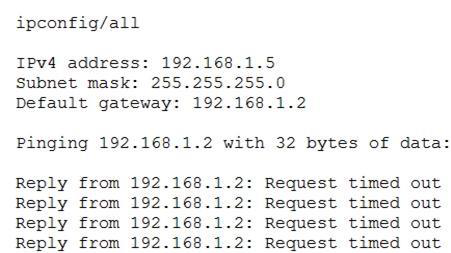
After configuring IP networking on a newly commissioned server, a server administrator installs a straight-through network cable from the patch panel to the switch. The administrator then returns to the server to test network connectivity using the ping command. The partial output of the ping and ipconfig commands are displayed below:
The administrator returns to the switch and notices an amber link light on the port where the server is connected. Which of the following is the MOST likely reason for the lack of network connectivity?
Correct
Incorrect
Unattempted
Question 12 of 18
12. Question
A user cannot save large files to a directory on a Linux server that was accepting smaller files a few minutes ago. Which of the following commands should a technician use to identify the issue?
Correct
Incorrect
Unattempted
Question 13 of 18
13. Question
Following a recent power outage, a server in the datacenter has been constantly going offline and losing its configuration. Users have been experiencing access issues while using the application on the server. The server technician notices the data and time are incorrect when the server is online. All other servers are working. Which of the following would MOST likely cause this issue? (Choose two.)
Correct
Incorrect
Unattempted
Question 14 of 18
14. Question
A systems administrator is setting up a server on a LAN that uses an address space that follows the RFC 1918 standard. Which of the following IP addresses should the administrator use to be in compliance with the standard?
An administrator needs to perform bare-metal maintenance on a server in a remote datacenter. Which of the following should the administrator use to access the servers console?
A company has implemented a requirement to encrypt all the hard drives on its servers as part of a data loss prevention strategy. Which of the following should the company also perform as a data loss prevention method?
Correct
Correct:
C. Block the servers from using an encrypted USB
This is the most defensible DLP method because DLP primarily targets data exfiltration—the unauthorized transfer of data outside the organization.
Even if a USB drive is encrypted, it still provides a physical pathway for a malicious actor or a negligent employee to copy sensitive AI models or training data and remove them from the secure server environment.
In an AI governance context, the “loss” in Data Loss Prevention refers not just to the destruction of data, but to the loss of control over that data.
Blocking peripheral ports (like USBs) is a standard “Endpoint DLP” control that prevents the physical movement of data to external media, which is a critical risk for high-value AI assets.
Incorrect:
A. Encrypt all network traffic
While encrypting network traffic (Data in Motion) is a fundamental security practice, it is technically a Data Protection or Privacy control rather than a specific “Loss Prevention” method in this context.
Encryption protects the confidentiality of the data while it moves, but it does not inherently prevent an authorized user from sending that data to an unauthorized destination.
A DLP solution would typically inspect the traffic to see if sensitive data is being moved, whereas encryption simply hides the content of the move.
B. Implement MFA on all the servers with encrypted data
Multi-Factor Authentication (MFA) is an Access Control mechanism. It ensures that the person logging into the server is who they claim to be.
While MFA is vital for preventing unauthorized access to the server, it does not prevent a legitimately authenticated user from accidentally or intentionally leaking data once they are inside the system.
DLP specifically addresses the movement and usage of data, whereas MFA addresses the identity of the user.
D. Implement port security on the switches
Port security is a Network Security control that limits which devices (based on MAC addresses) can connect to specific physical ports on a network switch.
This helps prevent “rogue” devices from joining the network, but it does not monitor or control the data flowing from the servers themselves.
Like MFA, this is a barrier to entry, whereas DLP is focused on the egress (exit) and movement of the information assets.
Incorrect
Correct:
C. Block the servers from using an encrypted USB
This is the most defensible DLP method because DLP primarily targets data exfiltration—the unauthorized transfer of data outside the organization.
Even if a USB drive is encrypted, it still provides a physical pathway for a malicious actor or a negligent employee to copy sensitive AI models or training data and remove them from the secure server environment.
In an AI governance context, the “loss” in Data Loss Prevention refers not just to the destruction of data, but to the loss of control over that data.
Blocking peripheral ports (like USBs) is a standard “Endpoint DLP” control that prevents the physical movement of data to external media, which is a critical risk for high-value AI assets.
Incorrect:
A. Encrypt all network traffic
While encrypting network traffic (Data in Motion) is a fundamental security practice, it is technically a Data Protection or Privacy control rather than a specific “Loss Prevention” method in this context.
Encryption protects the confidentiality of the data while it moves, but it does not inherently prevent an authorized user from sending that data to an unauthorized destination.
A DLP solution would typically inspect the traffic to see if sensitive data is being moved, whereas encryption simply hides the content of the move.
B. Implement MFA on all the servers with encrypted data
Multi-Factor Authentication (MFA) is an Access Control mechanism. It ensures that the person logging into the server is who they claim to be.
While MFA is vital for preventing unauthorized access to the server, it does not prevent a legitimately authenticated user from accidentally or intentionally leaking data once they are inside the system.
DLP specifically addresses the movement and usage of data, whereas MFA addresses the identity of the user.
D. Implement port security on the switches
Port security is a Network Security control that limits which devices (based on MAC addresses) can connect to specific physical ports on a network switch.
This helps prevent “rogue” devices from joining the network, but it does not monitor or control the data flowing from the servers themselves.
Like MFA, this is a barrier to entry, whereas DLP is focused on the egress (exit) and movement of the information assets.
Unattempted
Correct:
C. Block the servers from using an encrypted USB
This is the most defensible DLP method because DLP primarily targets data exfiltration—the unauthorized transfer of data outside the organization.
Even if a USB drive is encrypted, it still provides a physical pathway for a malicious actor or a negligent employee to copy sensitive AI models or training data and remove them from the secure server environment.
In an AI governance context, the “loss” in Data Loss Prevention refers not just to the destruction of data, but to the loss of control over that data.
Blocking peripheral ports (like USBs) is a standard “Endpoint DLP” control that prevents the physical movement of data to external media, which is a critical risk for high-value AI assets.
Incorrect:
A. Encrypt all network traffic
While encrypting network traffic (Data in Motion) is a fundamental security practice, it is technically a Data Protection or Privacy control rather than a specific “Loss Prevention” method in this context.
Encryption protects the confidentiality of the data while it moves, but it does not inherently prevent an authorized user from sending that data to an unauthorized destination.
A DLP solution would typically inspect the traffic to see if sensitive data is being moved, whereas encryption simply hides the content of the move.
B. Implement MFA on all the servers with encrypted data
Multi-Factor Authentication (MFA) is an Access Control mechanism. It ensures that the person logging into the server is who they claim to be.
While MFA is vital for preventing unauthorized access to the server, it does not prevent a legitimately authenticated user from accidentally or intentionally leaking data once they are inside the system.
DLP specifically addresses the movement and usage of data, whereas MFA addresses the identity of the user.
D. Implement port security on the switches
Port security is a Network Security control that limits which devices (based on MAC addresses) can connect to specific physical ports on a network switch.
This helps prevent “rogue” devices from joining the network, but it does not monitor or control the data flowing from the servers themselves.
Like MFA, this is a barrier to entry, whereas DLP is focused on the egress (exit) and movement of the information assets.
Question 17 of 18
17. Question
A server administrator is using remote access to update a server. The administrator notices numerous error messages when using YUM to update the applications on a server. Which of the following should the administrator check FIRST?
Correct
Correct:
C. Disk space in the /var directory
This is the most defensible “first check” because the /var directory is the default location for the YUM cache (/var/cache/yum) and system logs.
If the /var partition is full, YUM will be unable to download new headers, metadata, or package files, resulting in “numerous error messages” that may seem vague or unrelated to disk space at first glance.
In AI governance, resource availability is a component of system reliability. A failure to maintain sufficient disk space can lead to a “Denial of Service” for system updates, preventing critical security patches from being applied to the AI infrastructure.
Checking disk space is a low-effort, high-impact diagnostic step (using commands like df -h) that frequently resolves “broken” package manager states before investigating more complex issues.
Incorrect:
A. Network connectivity on the server
While network issues would certainly cause YUM to fail, the prompt specifies that the administrator is using remote access to update the server.
If the administrator is currently logged in via SSH or a remote console to see these error messages, the server already has established network connectivity.
While it is possible that the server lacks external internet access to reach the repositories, disk space (Option C) is a more fundamental local check to perform first when the application itself is throwing numerous internal errors.
B. LVM status on the server
Logical Volume Manager (LVM) status relates to the health and configuration of the storage volumes.
While an LVM issue could theoretically cause disk errors, it is a much more complex and less common failure point than simple partition exhaustion.
AIGP troubleshooting principles follow the “Occam’s Razor” approach: check for the most common and easily verifiable physical or logical limitations (like a full disk) before auditing volume management layers.
D. YUM dependencies
YUM is designed specifically to resolve dependencies automatically. If there is a dependency conflict, YUM usually provides a specific “Dependency Resolution” error rather than “numerous” generic error messages during the update initiation.
Investigating dependencies is a time-consuming task that should only be performed after ensuring the basic environment (disk space and connectivity) is functional.
If the disk is full, the dependency check itself will often fail or produce errors because it cannot write temporary transaction files.
Incorrect
Correct:
C. Disk space in the /var directory
This is the most defensible “first check” because the /var directory is the default location for the YUM cache (/var/cache/yum) and system logs.
If the /var partition is full, YUM will be unable to download new headers, metadata, or package files, resulting in “numerous error messages” that may seem vague or unrelated to disk space at first glance.
In AI governance, resource availability is a component of system reliability. A failure to maintain sufficient disk space can lead to a “Denial of Service” for system updates, preventing critical security patches from being applied to the AI infrastructure.
Checking disk space is a low-effort, high-impact diagnostic step (using commands like df -h) that frequently resolves “broken” package manager states before investigating more complex issues.
Incorrect:
A. Network connectivity on the server
While network issues would certainly cause YUM to fail, the prompt specifies that the administrator is using remote access to update the server.
If the administrator is currently logged in via SSH or a remote console to see these error messages, the server already has established network connectivity.
While it is possible that the server lacks external internet access to reach the repositories, disk space (Option C) is a more fundamental local check to perform first when the application itself is throwing numerous internal errors.
B. LVM status on the server
Logical Volume Manager (LVM) status relates to the health and configuration of the storage volumes.
While an LVM issue could theoretically cause disk errors, it is a much more complex and less common failure point than simple partition exhaustion.
AIGP troubleshooting principles follow the “Occam’s Razor” approach: check for the most common and easily verifiable physical or logical limitations (like a full disk) before auditing volume management layers.
D. YUM dependencies
YUM is designed specifically to resolve dependencies automatically. If there is a dependency conflict, YUM usually provides a specific “Dependency Resolution” error rather than “numerous” generic error messages during the update initiation.
Investigating dependencies is a time-consuming task that should only be performed after ensuring the basic environment (disk space and connectivity) is functional.
If the disk is full, the dependency check itself will often fail or produce errors because it cannot write temporary transaction files.
Unattempted
Correct:
C. Disk space in the /var directory
This is the most defensible “first check” because the /var directory is the default location for the YUM cache (/var/cache/yum) and system logs.
If the /var partition is full, YUM will be unable to download new headers, metadata, or package files, resulting in “numerous error messages” that may seem vague or unrelated to disk space at first glance.
In AI governance, resource availability is a component of system reliability. A failure to maintain sufficient disk space can lead to a “Denial of Service” for system updates, preventing critical security patches from being applied to the AI infrastructure.
Checking disk space is a low-effort, high-impact diagnostic step (using commands like df -h) that frequently resolves “broken” package manager states before investigating more complex issues.
Incorrect:
A. Network connectivity on the server
While network issues would certainly cause YUM to fail, the prompt specifies that the administrator is using remote access to update the server.
If the administrator is currently logged in via SSH or a remote console to see these error messages, the server already has established network connectivity.
While it is possible that the server lacks external internet access to reach the repositories, disk space (Option C) is a more fundamental local check to perform first when the application itself is throwing numerous internal errors.
B. LVM status on the server
Logical Volume Manager (LVM) status relates to the health and configuration of the storage volumes.
While an LVM issue could theoretically cause disk errors, it is a much more complex and less common failure point than simple partition exhaustion.
AIGP troubleshooting principles follow the “Occam’s Razor” approach: check for the most common and easily verifiable physical or logical limitations (like a full disk) before auditing volume management layers.
D. YUM dependencies
YUM is designed specifically to resolve dependencies automatically. If there is a dependency conflict, YUM usually provides a specific “Dependency Resolution” error rather than “numerous” generic error messages during the update initiation.
Investigating dependencies is a time-consuming task that should only be performed after ensuring the basic environment (disk space and connectivity) is functional.
If the disk is full, the dependency check itself will often fail or produce errors because it cannot write temporary transaction files.
Question 18 of 18
18. Question
A technician is installing a variety of servers in a rack. Which of the following is the BEST course of action for the technician to take while loading the rack?
Correct
Correct:
B. Install the heaviest server at the bottom of the rack
According to industry safety standards recognized within the AIGP body of knowledge, placing the heaviest equipment at the bottom of the rack lowers the center of gravity.
This is a critical safety measure to prevent the rack from becoming top-heavy, which significantly reduces the risk of the rack tipping over when a server is pulled out on its rails for maintenance.
In AI governance, Safety is a core pillar. This includes not only the digital safety of the model’s outputs but also the physical safety of the personnel and infrastructure that support the AI system.
A stable, bottom-weighted rack ensures the Availability (part of the CIA triad) of the AI system by minimizing the risk of hardware damage caused by mechanical instability or accidental falls.
Incorrect:
A. Alternate the direction of the airflow
Alternating airflow directions within a single rack is generally a poor practice. Standard data center design utilizes Hot Aisle/Cold Aisle containment.
Servers should all pull cool air from the front (cold aisle) and exhaust hot air out the back (hot aisle).
Alternating directions would cause “thermal recirculation,” where one server’s hot exhaust is sucked in as another server’s cold intake, leading to overheating and potential hardware failure for the AI infrastructure.
C. Place a UPS at the top of the rack
An Uninterruptible Power Supply (UPS) contains heavy lead-acid or lithium batteries and is typically one of the heaviest components in a rack.
Placing a UPS at the top makes the rack extremely top-heavy and dangerous, violating basic occupational safety and health (OSHA) principles and infrastructure best practices.
Like Option B, the UPS should almost always be installed at the very bottom of the rack for maximum stability.
D. Leave 1U of space between each server
While this might seem to help with cooling, it is actually inefficient. Modern rack-mount servers are designed for front-to-back airflow.
Leaving gaps between servers without using blanking panels allows hot air from the back of the rack to leak back to the front (bypass air), reducing the efficiency of the cooling system.
From a governance perspective, this is an inefficient use of physical resources and space, and it does not provide the same critical safety benefit as proper weight distribution (Option B).
Incorrect
Correct:
B. Install the heaviest server at the bottom of the rack
According to industry safety standards recognized within the AIGP body of knowledge, placing the heaviest equipment at the bottom of the rack lowers the center of gravity.
This is a critical safety measure to prevent the rack from becoming top-heavy, which significantly reduces the risk of the rack tipping over when a server is pulled out on its rails for maintenance.
In AI governance, Safety is a core pillar. This includes not only the digital safety of the model’s outputs but also the physical safety of the personnel and infrastructure that support the AI system.
A stable, bottom-weighted rack ensures the Availability (part of the CIA triad) of the AI system by minimizing the risk of hardware damage caused by mechanical instability or accidental falls.
Incorrect:
A. Alternate the direction of the airflow
Alternating airflow directions within a single rack is generally a poor practice. Standard data center design utilizes Hot Aisle/Cold Aisle containment.
Servers should all pull cool air from the front (cold aisle) and exhaust hot air out the back (hot aisle).
Alternating directions would cause “thermal recirculation,” where one server’s hot exhaust is sucked in as another server’s cold intake, leading to overheating and potential hardware failure for the AI infrastructure.
C. Place a UPS at the top of the rack
An Uninterruptible Power Supply (UPS) contains heavy lead-acid or lithium batteries and is typically one of the heaviest components in a rack.
Placing a UPS at the top makes the rack extremely top-heavy and dangerous, violating basic occupational safety and health (OSHA) principles and infrastructure best practices.
Like Option B, the UPS should almost always be installed at the very bottom of the rack for maximum stability.
D. Leave 1U of space between each server
While this might seem to help with cooling, it is actually inefficient. Modern rack-mount servers are designed for front-to-back airflow.
Leaving gaps between servers without using blanking panels allows hot air from the back of the rack to leak back to the front (bypass air), reducing the efficiency of the cooling system.
From a governance perspective, this is an inefficient use of physical resources and space, and it does not provide the same critical safety benefit as proper weight distribution (Option B).
Unattempted
Correct:
B. Install the heaviest server at the bottom of the rack
According to industry safety standards recognized within the AIGP body of knowledge, placing the heaviest equipment at the bottom of the rack lowers the center of gravity.
This is a critical safety measure to prevent the rack from becoming top-heavy, which significantly reduces the risk of the rack tipping over when a server is pulled out on its rails for maintenance.
In AI governance, Safety is a core pillar. This includes not only the digital safety of the model’s outputs but also the physical safety of the personnel and infrastructure that support the AI system.
A stable, bottom-weighted rack ensures the Availability (part of the CIA triad) of the AI system by minimizing the risk of hardware damage caused by mechanical instability or accidental falls.
Incorrect:
A. Alternate the direction of the airflow
Alternating airflow directions within a single rack is generally a poor practice. Standard data center design utilizes Hot Aisle/Cold Aisle containment.
Servers should all pull cool air from the front (cold aisle) and exhaust hot air out the back (hot aisle).
Alternating directions would cause “thermal recirculation,” where one server’s hot exhaust is sucked in as another server’s cold intake, leading to overheating and potential hardware failure for the AI infrastructure.
C. Place a UPS at the top of the rack
An Uninterruptible Power Supply (UPS) contains heavy lead-acid or lithium batteries and is typically one of the heaviest components in a rack.
Placing a UPS at the top makes the rack extremely top-heavy and dangerous, violating basic occupational safety and health (OSHA) principles and infrastructure best practices.
Like Option B, the UPS should almost always be installed at the very bottom of the rack for maximum stability.
D. Leave 1U of space between each server
While this might seem to help with cooling, it is actually inefficient. Modern rack-mount servers are designed for front-to-back airflow.
Leaving gaps between servers without using blanking panels allows hot air from the back of the rack to leak back to the front (bypass air), reducing the efficiency of the cooling system.
From a governance perspective, this is an inefficient use of physical resources and space, and it does not provide the same critical safety benefit as proper weight distribution (Option B).
X
Use Last Page number to navigate to Master Cheat Sheet