You have already completed the Test before. Hence you can not start it again.
Test is loading...
You must sign in or sign up to start the Test.
You have to finish following quiz, to start this Test:
Your results are here!! for" UiPath ADPv1 Practice Test 9 "
0 of 65 questions answered correctly
Your time:
Time has elapsed
Your Final Score is : 0
You have attempted : 0
Number of Correct Questions : 0 and scored 0
Number of Incorrect Questions : 0 and Negative marks 0
Average score
Your score
Not categorized
You have attempted: 0
Number of Correct Questions: 0 and scored 0
Number of Incorrect Questions: 0 and Negative marks 0
UiARD
You have attempted: 0
Number of Correct Questions: 0 and scored 0
Number of Incorrect Questions: 0 and Negative marks 0
You can review your answers by clicking on “View Answers” option. Important Note : Open Reference Documentation Links in New Tab (Right Click and Open in New Tab).
Answer Review
1
2
3
4
5
6
7
8
9
10
11
12
13
14
15
16
17
18
19
20
21
22
23
24
25
26
27
28
29
30
31
32
33
34
35
36
37
38
39
40
41
42
43
44
45
46
47
48
49
50
51
52
53
54
55
56
57
58
59
60
61
62
63
64
65
Answer
Review
Unattempted
Correct
Incorrect
Unattempted
Every question in this attempt was answered correctly.
Question 1 of 65
1. Question
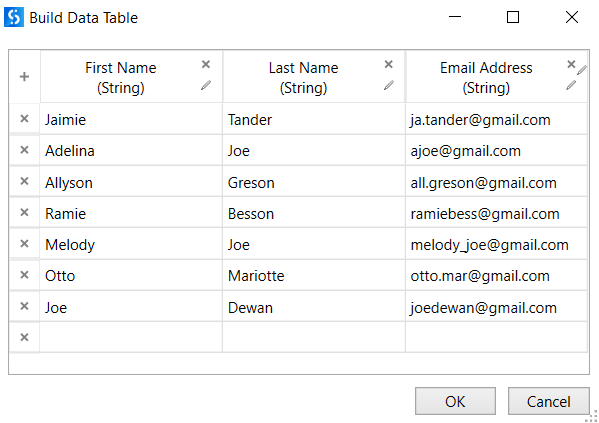
A developer uses a For Each Row in Data Table activity to iterate through a sampleDataTable that stores current prices of the product and price at the discount. The developer wants to remove some rows (please see the condition in the If activity) and display, how many rows were left in the datatable. What will be the result of the processing?
Please find the BuildDataTable wizard below:
Correct
When you try to delete a row inside a For Each Row in Data Table activity, Collection was modified; enumeration operation might not execute error will be displayed, as it is not allowed to modify the structure of the datatable (e.g. change positions of datarows, remove them etc.) during iteration.
UiPath Forum UiPath Documentation Exam Topic: Describe how to work with complex data structures and data manipulation; for example, datatables and collections.
Incorrect
When you try to delete a row inside a For Each Row in Data Table activity, Collection was modified; enumeration operation might not execute error will be displayed, as it is not allowed to modify the structure of the datatable (e.g. change positions of datarows, remove them etc.) during iteration.
UiPath Forum UiPath Documentation Exam Topic: Describe how to work with complex data structures and data manipulation; for example, datatables and collections.
Unattempted
When you try to delete a row inside a For Each Row in Data Table activity, Collection was modified; enumeration operation might not execute error will be displayed, as it is not allowed to modify the structure of the datatable (e.g. change positions of datarows, remove them etc.) during iteration.
UiPath Forum UiPath Documentation Exam Topic: Describe how to work with complex data structures and data manipulation; for example, datatables and collections.
Question 2 of 65
2. Question
What tags are verified in Internet Explorer to assess if an application is in the Interactive or Complete state?
Correct
To assess if an application is in the Interactive or Complete state, the following tags are verified: 1. Desktop applications – A wm_null message is sent to check the existence of the , , , or tags. If they exist, the activity is executed. 2. Web applications: a. Internet Explorer – The tag is used to check if the Ready state of the HTML document is set to Complete. Additionally, the Busy state has to be set to “False“. b. Others – The tag is used to check if the Ready state of the HTML document is Complete. 3. SAP applications – First the presence of the tag verified, after which a SAP specific API is used to detect if the session is busy or not. UiPath Documentation Exam Topic: Describe the use of various Classic UI synchronization activities; for example, ElementExists, FindElement, and FindText
Incorrect
To assess if an application is in the Interactive or Complete state, the following tags are verified: 1. Desktop applications – A wm_null message is sent to check the existence of the , , , or tags. If they exist, the activity is executed. 2. Web applications: a. Internet Explorer – The tag is used to check if the Ready state of the HTML document is set to Complete. Additionally, the Busy state has to be set to “False“. b. Others – The tag is used to check if the Ready state of the HTML document is Complete. 3. SAP applications – First the presence of the tag verified, after which a SAP specific API is used to detect if the session is busy or not. UiPath Documentation Exam Topic: Describe the use of various Classic UI synchronization activities; for example, ElementExists, FindElement, and FindText
Unattempted
To assess if an application is in the Interactive or Complete state, the following tags are verified: 1. Desktop applications – A wm_null message is sent to check the existence of the , , , or tags. If they exist, the activity is executed. 2. Web applications: a. Internet Explorer – The tag is used to check if the Ready state of the HTML document is set to Complete. Additionally, the Busy state has to be set to “False“. b. Others – The tag is used to check if the Ready state of the HTML document is Complete. 3. SAP applications – First the presence of the tag verified, after which a SAP specific API is used to detect if the session is busy or not. UiPath Documentation Exam Topic: Describe the use of various Classic UI synchronization activities; for example, ElementExists, FindElement, and FindText
Question 3 of 65
3. Question
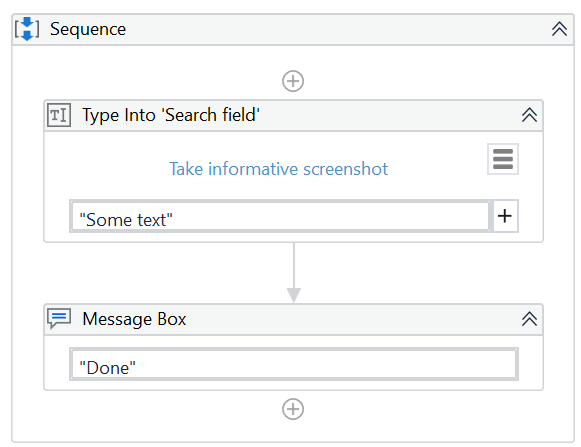
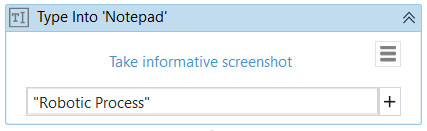
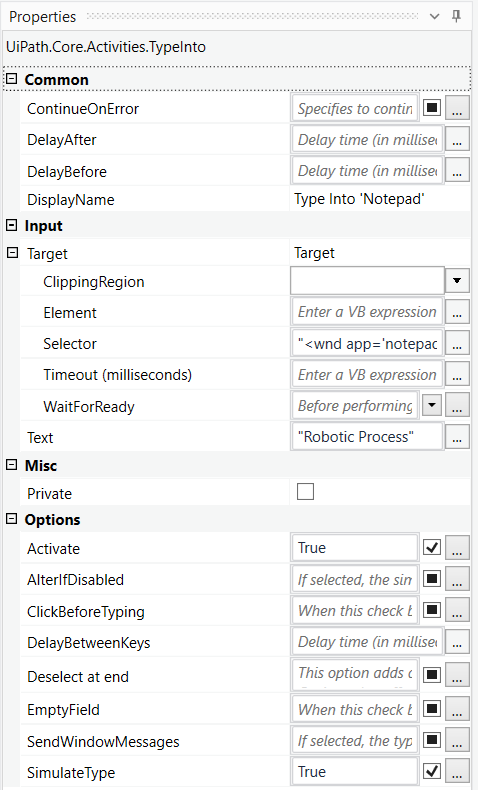
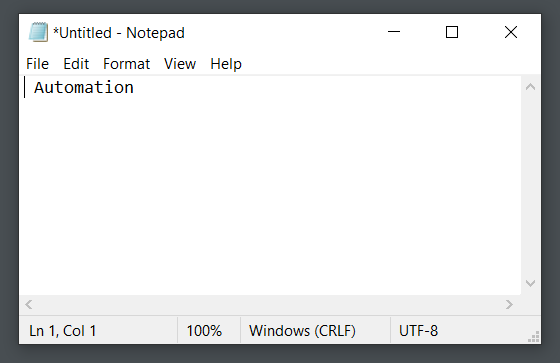
What activities will be executed if the following Try Catch activity if the Notepad application is not running?
Catch block contains catches in the following order:
1. System.InvalidOperationException
2. System.SelectorNotFoundException
Please find properties of Type Into activity below:
Correct
If Type Into activity is included in Try Catch and the value of the ContinueOnError property is True, no error occurs when the project is executed. Activities in Finally to be performed after the Try and Catches blocks are executed. This section is executed only when no exceptions are thrown or when an error occurs and is caught in the Catches section. So in this case, Finally block is executed, as the exception was not thrown. UiPath Documentation Exam Topic: Identify and describe the use of the error handling activities such as Try Catch, Throw, Rethrow, Retry Scope, and Global Exception Handler.
Incorrect
If Type Into activity is included in Try Catch and the value of the ContinueOnError property is True, no error occurs when the project is executed. Activities in Finally to be performed after the Try and Catches blocks are executed. This section is executed only when no exceptions are thrown or when an error occurs and is caught in the Catches section. So in this case, Finally block is executed, as the exception was not thrown. UiPath Documentation Exam Topic: Identify and describe the use of the error handling activities such as Try Catch, Throw, Rethrow, Retry Scope, and Global Exception Handler.
Unattempted
If Type Into activity is included in Try Catch and the value of the ContinueOnError property is True, no error occurs when the project is executed. Activities in Finally to be performed after the Try and Catches blocks are executed. This section is executed only when no exceptions are thrown or when an error occurs and is caught in the Catches section. So in this case, Finally block is executed, as the exception was not thrown. UiPath Documentation Exam Topic: Identify and describe the use of the error handling activities such as Try Catch, Throw, Rethrow, Retry Scope, and Global Exception Handler.
Question 4 of 65
4. Question
A developer uses Read Range and Write Range activities to copy data from one worksheet to another. What will be the value of A1 cell in Sheet2 worksheet when the following sequence is executed?
\
Please find below the properties of the Read Range activity
Please find below the properties of the Write Range activity
Please find below the data in Sheet1
Correct
In the Read Range activity, when AddHeaders is selected, the column headers from the specified spreadsheet range are also extracted and set as the column names for the output datatable. In the Write Range activity, when AddHeaders is selected, column headers are also written to the specified range. Otherwise, everything starting from the first row of the datatable is written to the worksheet (headers are not written). In this case, robot first sets Drug Name, Drug Company, State and Phone as column names for the output datatable, however doesn‘t write them in Sheet2, as AddHeaders is not selected in the Write Range activity. UiPath Documentation Read Range UiPath Documentation Write Range Exam Topic: Identify and describe how activities are used to automate actions in Excel, e-mail, and .pdfs
Incorrect
In the Read Range activity, when AddHeaders is selected, the column headers from the specified spreadsheet range are also extracted and set as the column names for the output datatable. In the Write Range activity, when AddHeaders is selected, column headers are also written to the specified range. Otherwise, everything starting from the first row of the datatable is written to the worksheet (headers are not written). In this case, robot first sets Drug Name, Drug Company, State and Phone as column names for the output datatable, however doesn‘t write them in Sheet2, as AddHeaders is not selected in the Write Range activity. UiPath Documentation Read Range UiPath Documentation Write Range Exam Topic: Identify and describe how activities are used to automate actions in Excel, e-mail, and .pdfs
Unattempted
In the Read Range activity, when AddHeaders is selected, the column headers from the specified spreadsheet range are also extracted and set as the column names for the output datatable. In the Write Range activity, when AddHeaders is selected, column headers are also written to the specified range. Otherwise, everything starting from the first row of the datatable is written to the worksheet (headers are not written). In this case, robot first sets Drug Name, Drug Company, State and Phone as column names for the output datatable, however doesn‘t write them in Sheet2, as AddHeaders is not selected in the Write Range activity. UiPath Documentation Read Range UiPath Documentation Write Range Exam Topic: Identify and describe how activities are used to automate actions in Excel, e-mail, and .pdfs
Question 5 of 65
5. Question
A developer uses an Anchor Base activity to search for the required selector. In the Anchor Position property, the Auto option is selected. If multiple elements are found at equal distance from the anchor, in which order the target is selected?
Correct
If multiple elements are found at equal distance from the anchor when the “Auto“ option is marked, the target is selected in this order: Right, Left, Bottom. UiPath Documentation Exam Topic: Describe how Tags and Attributes, Dynamic Selectors, Anchor Base, etc. are used in UI Explorer to create a robust selector in the Default, Active Accessibility, or UI Automation frameworks
Incorrect
If multiple elements are found at equal distance from the anchor when the “Auto“ option is marked, the target is selected in this order: Right, Left, Bottom. UiPath Documentation Exam Topic: Describe how Tags and Attributes, Dynamic Selectors, Anchor Base, etc. are used in UI Explorer to create a robust selector in the Default, Active Accessibility, or UI Automation frameworks
Unattempted
If multiple elements are found at equal distance from the anchor when the “Auto“ option is marked, the target is selected in this order: Right, Left, Bottom. UiPath Documentation Exam Topic: Describe how Tags and Attributes, Dynamic Selectors, Anchor Base, etc. are used in UI Explorer to create a robust selector in the Default, Active Accessibility, or UI Automation frameworks
Question 6 of 65
6. Question
A developer wants to use a Read PDF With OCR activity to extract required data from a PDF file. According to requirements from the client, the PDF file should be protected by a password, as it stores sensitive information. What should be done in order to ensure that the robot is able to read data from this file?
Correct
To read a protected PDF file, a password needs to be provided in a String format in the Password property. This property is available both for Read PDF With OCR and Read PDF Text activities. It is a bad practice to first save the file as unprotected, as the file stores sensitive information and that would violate the requirements of the client. UiPath Documentation Exam Topic: Identify and describe how activities are used to automate actions in Excel, e-mail, and .pdfs
Incorrect
To read a protected PDF file, a password needs to be provided in a String format in the Password property. This property is available both for Read PDF With OCR and Read PDF Text activities. It is a bad practice to first save the file as unprotected, as the file stores sensitive information and that would violate the requirements of the client. UiPath Documentation Exam Topic: Identify and describe how activities are used to automate actions in Excel, e-mail, and .pdfs
Unattempted
To read a protected PDF file, a password needs to be provided in a String format in the Password property. This property is available both for Read PDF With OCR and Read PDF Text activities. It is a bad practice to first save the file as unprotected, as the file stores sensitive information and that would violate the requirements of the client. UiPath Documentation Exam Topic: Identify and describe how activities are used to automate actions in Excel, e-mail, and .pdfs
Question 7 of 65
7. Question
A developer is working with a variable named sampleDataTable of type DataTable in the following sequence. In the Invoke Code activity, the developer wants to sum up all values from column Price in the sampleDataTable. What will be the result of the processing?
Please find below the Build Data Table wizard.
Please find below the Invoke Code parameters.
Correct
In the “Invoke Code“ activity, the robot tries to convert each price to an integer to calculate the sum of all values. In the “Price“ column of the sampleDataTable, a “$“ sign is present next to each price, hence the robot will fail to make a conversion. That will result in an error: “Exception has been thrown by the target of an invocation.
“ UiPath Documentation Exam Topic: Explain how to use the Invoke Code, Invoke Method, and Invoke Workflow activities and how arguments are used to pass data.
Incorrect
In the “Invoke Code“ activity, the robot tries to convert each price to an integer to calculate the sum of all values. In the “Price“ column of the sampleDataTable, a “$“ sign is present next to each price, hence the robot will fail to make a conversion. That will result in an error: “Exception has been thrown by the target of an invocation.
“ UiPath Documentation Exam Topic: Explain how to use the Invoke Code, Invoke Method, and Invoke Workflow activities and how arguments are used to pass data.
Unattempted
In the “Invoke Code“ activity, the robot tries to convert each price to an integer to calculate the sum of all values. In the “Price“ column of the sampleDataTable, a “$“ sign is present next to each price, hence the robot will fail to make a conversion. That will result in an error: “Exception has been thrown by the target of an invocation.
“ UiPath Documentation Exam Topic: Explain how to use the Invoke Code, Invoke Method, and Invoke Workflow activities and how arguments are used to pass data.
Question 8 of 65
8. Question
What will be the value of isEven variable at the breakpoint, once the robot runs in Debug mode?
Correct
The default value of a Boolean variable is False. As 10 mod 2 = 0 is True, robot will assign True to the isEven variable. However, the processing is paused before executing the activity with a breakpoint. So at the moment of the breakpoint, the value of isEven will still be False, and will be changed once Continue or Step Into button is pressed. UiPath Documentation Exam Topic: Examine and describe the activities and/or features used to troubleshoot, debug, and modify processes
Incorrect
The default value of a Boolean variable is False. As 10 mod 2 = 0 is True, robot will assign True to the isEven variable. However, the processing is paused before executing the activity with a breakpoint. So at the moment of the breakpoint, the value of isEven will still be False, and will be changed once Continue or Step Into button is pressed. UiPath Documentation Exam Topic: Examine and describe the activities and/or features used to troubleshoot, debug, and modify processes
Unattempted
The default value of a Boolean variable is False. As 10 mod 2 = 0 is True, robot will assign True to the isEven variable. However, the processing is paused before executing the activity with a breakpoint. So at the moment of the breakpoint, the value of isEven will still be False, and will be changed once Continue or Step Into button is pressed. UiPath Documentation Exam Topic: Examine and describe the activities and/or features used to troubleshoot, debug, and modify processes
Question 9 of 65
9. Question
A developer uses REFramework to create a complex automation project. In the Settings sheet of the Config file, the developer writes fileName in the Name column and Fin_Excel_FileName in the Value column. In Orchestrator, the developer creates an asset named Fin_Excel_FileName with the value Report_Udemy2021.xlsx. What will be the value of Config(fileName).ToString?
Correct
In the InitAllSettings state, the robot reads the Settings sheet and adds key-value pairs directly from the Name and Value columns. When reading the Assets sheet, the key is extracted from the Name column, while the value is taken from Orchestrator based on the Asset column. So in this case, “Fin_Excel_FileName“ is recognized as the value, not the value of asset Fin_Excel_FileName in Orchestrator. UiPath Forum Exam Topic: Differentiate between using the Settings fields and the Assets fields in the configuration file
Incorrect
In the InitAllSettings state, the robot reads the Settings sheet and adds key-value pairs directly from the Name and Value columns. When reading the Assets sheet, the key is extracted from the Name column, while the value is taken from Orchestrator based on the Asset column. So in this case, “Fin_Excel_FileName“ is recognized as the value, not the value of asset Fin_Excel_FileName in Orchestrator. UiPath Forum Exam Topic: Differentiate between using the Settings fields and the Assets fields in the configuration file
Unattempted
In the InitAllSettings state, the robot reads the Settings sheet and adds key-value pairs directly from the Name and Value columns. When reading the Assets sheet, the key is extracted from the Name column, while the value is taken from Orchestrator based on the Asset column. So in this case, “Fin_Excel_FileName“ is recognized as the value, not the value of asset Fin_Excel_FileName in Orchestrator. UiPath Forum Exam Topic: Differentiate between using the Settings fields and the Assets fields in the configuration file
Question 10 of 65
10. Question
A developer has created a process that gathers a listing of stock market prices in the following format _USD ().
How should the third line in RegEx Builder be modified to ensure that only items with prices of at least 100 are identified?
Correct
Exactly 3 digits would ensure that the price is at least 100 USD, as any price below would have only up to 2 digits.
UiPath Documentation Exam Topic: Identify how methods, activities, and the RegEx Builder are used for string manipulation and regular expressions.
Incorrect
Exactly 3 digits would ensure that the price is at least 100 USD, as any price below would have only up to 2 digits.
UiPath Documentation Exam Topic: Identify how methods, activities, and the RegEx Builder are used for string manipulation and regular expressions.
Unattempted
Exactly 3 digits would ensure that the price is at least 100 USD, as any price below would have only up to 2 digits.
UiPath Documentation Exam Topic: Identify how methods, activities, and the RegEx Builder are used for string manipulation and regular expressions.
Question 11 of 65
11. Question
A developer needs to implement the following logic for each row in the Excel table: if the value in column Price is above 130$, then apply a discount of 10% if the value in column Price is above 250$ then apply a discount of 7% and store the row in a separate table if the date in the column Deadline is less than 15 days from now, send a mail notification to the analyst mentioned column Contact person if the value in the column Region is ELAMA, apply an additional tax of 3,5% if the value in the column Additional comments is not empty, send the item for review to a responsible team What is best suited to implement the above-mentioned logic?
Correct
Flowcharts can be used in a variety of settings, from large jobs to small projects that you can reuse in other projects. The most important aspect of flowcharts is that, unlike sequences, they present multiple branching logical operators, that enable you to create complex business processes and connect activities in multiple ways. UiPath Documentation UiPath Forum Exam Topic: Describe how to use state machines versus flowcharts and sequences.
Incorrect
Flowcharts can be used in a variety of settings, from large jobs to small projects that you can reuse in other projects. The most important aspect of flowcharts is that, unlike sequences, they present multiple branching logical operators, that enable you to create complex business processes and connect activities in multiple ways. UiPath Documentation UiPath Forum Exam Topic: Describe how to use state machines versus flowcharts and sequences.
Unattempted
Flowcharts can be used in a variety of settings, from large jobs to small projects that you can reuse in other projects. The most important aspect of flowcharts is that, unlike sequences, they present multiple branching logical operators, that enable you to create complex business processes and connect activities in multiple ways. UiPath Documentation UiPath Forum Exam Topic: Describe how to use state machines versus flowcharts and sequences.
Question 12 of 65
12. Question
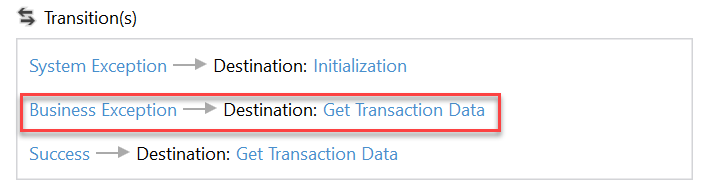
A process is created using UiPath REFramework. During the processing of a queue item, a Business Exception occurs. What will be the destination of transition?
Correct
By default, if a Business Exception occurs during the processing of a queue item, a transition leads to “Get Transaction Data“.
UiPath Documentation Exam Topic: Differentiate between using Application Exceptions and Business Rule Exceptions.
Incorrect
By default, if a Business Exception occurs during the processing of a queue item, a transition leads to “Get Transaction Data“.
UiPath Documentation Exam Topic: Differentiate between using Application Exceptions and Business Rule Exceptions.
Unattempted
By default, if a Business Exception occurs during the processing of a queue item, a transition leads to “Get Transaction Data“.
UiPath Documentation Exam Topic: Differentiate between using Application Exceptions and Business Rule Exceptions.
Question 13 of 65
13. Question
Which of the following Rules belongs to the Design Best Practices category?
Correct
NMG – shows that the rule is part of the Naming Rules category. Rules part of Project Anatomy Rules category have the ANA abbreviation, those part of Design Best Practices the DBP, and so on. UiPath Documentation Exam Topic: Describe the functionality of the Workflow Analyzer and how to create new rules
Incorrect
NMG – shows that the rule is part of the Naming Rules category. Rules part of Project Anatomy Rules category have the ANA abbreviation, those part of Design Best Practices the DBP, and so on. UiPath Documentation Exam Topic: Describe the functionality of the Workflow Analyzer and how to create new rules
Unattempted
NMG – shows that the rule is part of the Naming Rules category. Rules part of Project Anatomy Rules category have the ANA abbreviation, those part of Design Best Practices the DBP, and so on. UiPath Documentation Exam Topic: Describe the functionality of the Workflow Analyzer and how to create new rules
Question 14 of 65
14. Question
A developer runs the process in Debug mode. Which panel allows to see, which activity will be executed next?
Correct
The Call Stack panel displays the next activity to be executed and its parent containers when the project is paused in debugging. The panel is displayed during execution in debug mode and it gets populated after using Step Into, Break, Slow Step, or after the execution was paused because an error or a breakpoint was encountered. UiPath Documentation Exam Topic: Examine and describe the activities and/or features used to troubleshoot, debug, and modify processes
Incorrect
The Call Stack panel displays the next activity to be executed and its parent containers when the project is paused in debugging. The panel is displayed during execution in debug mode and it gets populated after using Step Into, Break, Slow Step, or after the execution was paused because an error or a breakpoint was encountered. UiPath Documentation Exam Topic: Examine and describe the activities and/or features used to troubleshoot, debug, and modify processes
Unattempted
The Call Stack panel displays the next activity to be executed and its parent containers when the project is paused in debugging. The panel is displayed during execution in debug mode and it gets populated after using Step Into, Break, Slow Step, or after the execution was paused because an error or a breakpoint was encountered. UiPath Documentation Exam Topic: Examine and describe the activities and/or features used to troubleshoot, debug, and modify processes
Question 15 of 65
15. Question
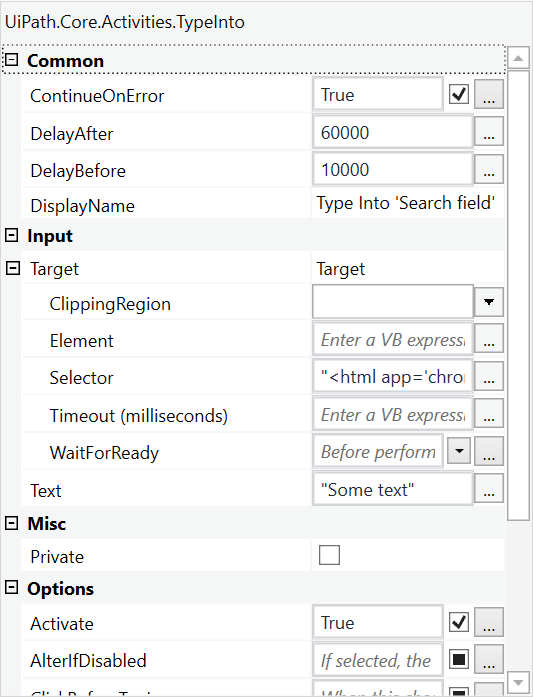
A developer configured the properties for a Type Into activity on an element inside a web page as shown in the following graphic. During runtime, the selector is invalid and does not match any element on the web page. What occurs during the execution of the sequence?
Correct
1. Even if the activity is executed as the first one, the robot waits before its execution. By default, for 200 milliseconds, but in this case, the value in DelayBefore is set for 10 seconds. 2. If the corresponding selector cannot be found on the screen, the robot waits by default for 30 seconds for it to appear. If the corresponding selector cannot be found during those 30 seconds, an error is thrown. If ContinueOnError is set to True, then the error is ignored and the error message does not appear. 3. After executing the activity, the robot waits before executing the following activity. By default, for 300 milliseconds, but in this case, the value in DelayAfter is set for 1 minute. However, as the corresponding selector is not found, an error is thrown and the robot does not wait for DelayAfter, even if ContinueOnError is set to True. UiPath Documentation Exam Topic: Identify and describe the key Classic UI Activities‘ properties; for example, ContinueOnError, DelayBefore, DelayAfter, and Target.
Incorrect
1. Even if the activity is executed as the first one, the robot waits before its execution. By default, for 200 milliseconds, but in this case, the value in DelayBefore is set for 10 seconds. 2. If the corresponding selector cannot be found on the screen, the robot waits by default for 30 seconds for it to appear. If the corresponding selector cannot be found during those 30 seconds, an error is thrown. If ContinueOnError is set to True, then the error is ignored and the error message does not appear. 3. After executing the activity, the robot waits before executing the following activity. By default, for 300 milliseconds, but in this case, the value in DelayAfter is set for 1 minute. However, as the corresponding selector is not found, an error is thrown and the robot does not wait for DelayAfter, even if ContinueOnError is set to True. UiPath Documentation Exam Topic: Identify and describe the key Classic UI Activities‘ properties; for example, ContinueOnError, DelayBefore, DelayAfter, and Target.
Unattempted
1. Even if the activity is executed as the first one, the robot waits before its execution. By default, for 200 milliseconds, but in this case, the value in DelayBefore is set for 10 seconds. 2. If the corresponding selector cannot be found on the screen, the robot waits by default for 30 seconds for it to appear. If the corresponding selector cannot be found during those 30 seconds, an error is thrown. If ContinueOnError is set to True, then the error is ignored and the error message does not appear. 3. After executing the activity, the robot waits before executing the following activity. By default, for 300 milliseconds, but in this case, the value in DelayAfter is set for 1 minute. However, as the corresponding selector is not found, an error is thrown and the robot does not wait for DelayAfter, even if ContinueOnError is set to True. UiPath Documentation Exam Topic: Identify and describe the key Classic UI Activities‘ properties; for example, ContinueOnError, DelayBefore, DelayAfter, and Target.
Question 16 of 65
16. Question
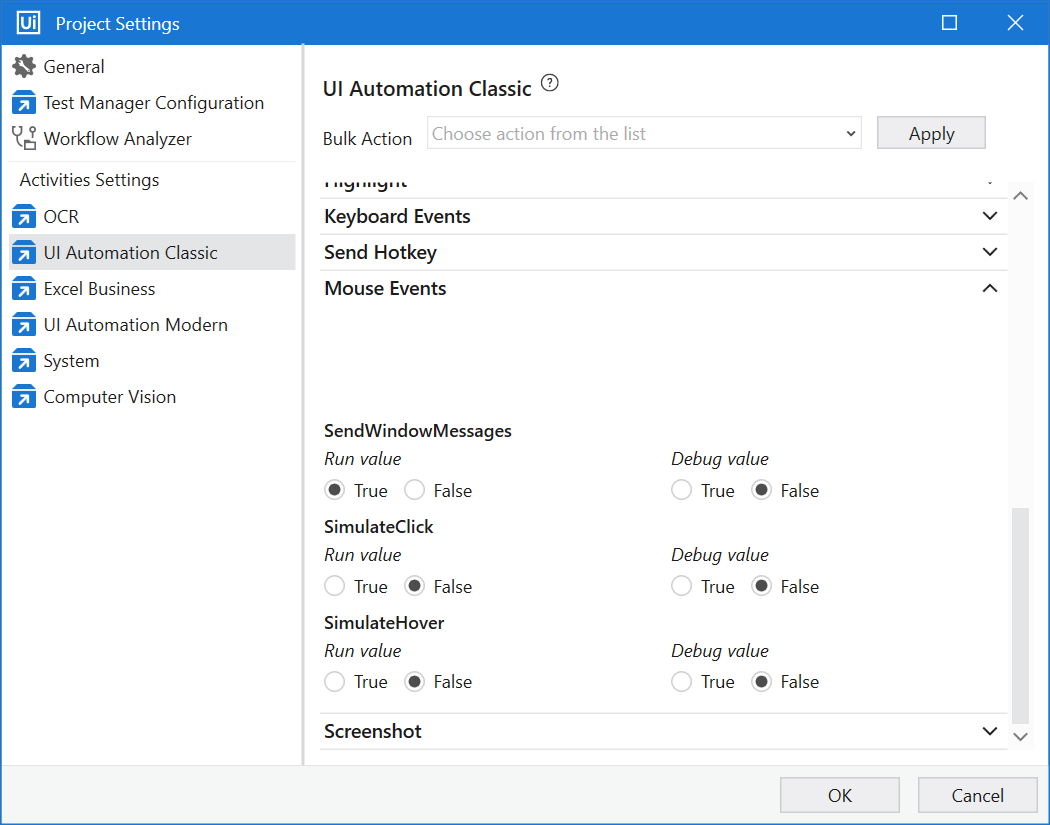
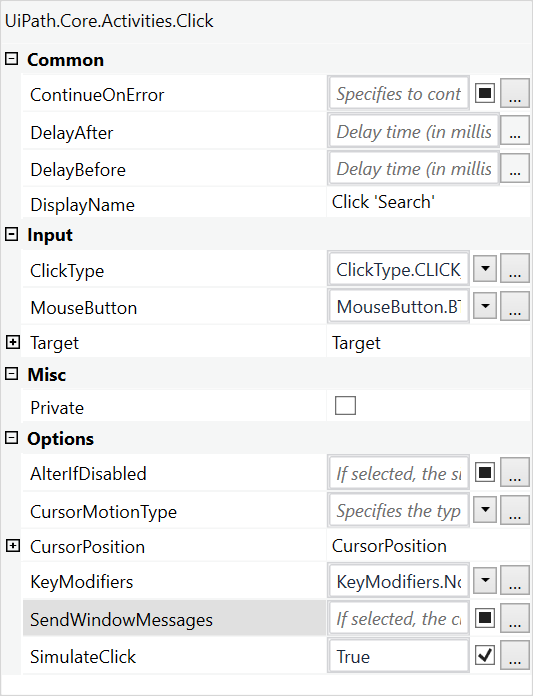
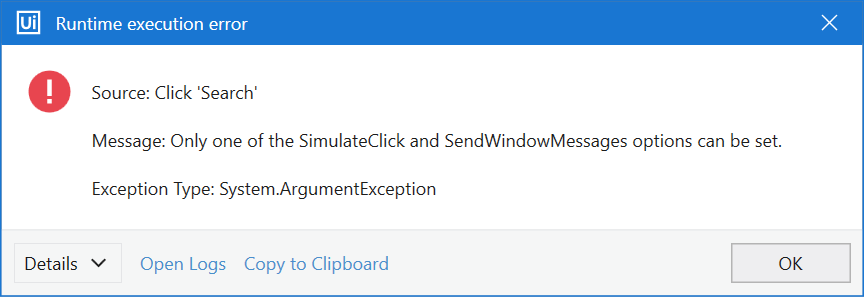
A developer has configured the Activity Project Settings for UI automation and a Click activity as shown below. What will be the result of executing the Click activity in Run mode?
Correct
Settings changed in Project Settings take effect if the corresponding property is left blank in the activity. However, please note that SendWindowMessages and SimulateType are mutually exclusive and selecting them both throws an error at Runtime. So in this scenario, SendWindowMessages is set to True in Project Settings, and SimulateType is set to True directly in the Click activity. Such contradiction will result in an error.
UiPath Documentation Exam Topic: Describe how to use and configure Activity Project Settings and Libraries.
Incorrect
Settings changed in Project Settings take effect if the corresponding property is left blank in the activity. However, please note that SendWindowMessages and SimulateType are mutually exclusive and selecting them both throws an error at Runtime. So in this scenario, SendWindowMessages is set to True in Project Settings, and SimulateType is set to True directly in the Click activity. Such contradiction will result in an error.
UiPath Documentation Exam Topic: Describe how to use and configure Activity Project Settings and Libraries.
Unattempted
Settings changed in Project Settings take effect if the corresponding property is left blank in the activity. However, please note that SendWindowMessages and SimulateType are mutually exclusive and selecting them both throws an error at Runtime. So in this scenario, SendWindowMessages is set to True in Project Settings, and SimulateType is set to True directly in the Click activity. Such contradiction will result in an error.
UiPath Documentation Exam Topic: Describe how to use and configure Activity Project Settings and Libraries.
Question 17 of 65
17. Question
Category: UiARD: UiPath Certified Advanced RPA Developer A developer wants to run a VBA code in Excel using the Execute Macro activity. The developer wants to pass 3 arguments: string value, a value from a Config file and a boolean value. What is the correct setting in the MacroParameters property?
Correct
To pass parameters to a VBA macro, place values into curly brackets { } in the format that is accepted in the macro (string, integer, boolean and so on). Example: Write {“Hello“, 5} if the macro accepts a string variable and an integer variable. UiPath Forum UiPath Documentation Exam Topic: Identify and describe how activities are used to automate actions in Excel, e-mail, and .pdfs.
Incorrect
To pass parameters to a VBA macro, place values into curly brackets { } in the format that is accepted in the macro (string, integer, boolean and so on). Example: Write {“Hello“, 5} if the macro accepts a string variable and an integer variable. UiPath Forum UiPath Documentation Exam Topic: Identify and describe how activities are used to automate actions in Excel, e-mail, and .pdfs.
Unattempted
To pass parameters to a VBA macro, place values into curly brackets { } in the format that is accepted in the macro (string, integer, boolean and so on). Example: Write {“Hello“, 5} if the macro accepts a string variable and an integer variable. UiPath Forum UiPath Documentation Exam Topic: Identify and describe how activities are used to automate actions in Excel, e-mail, and .pdfs.
Question 18 of 65
18. Question
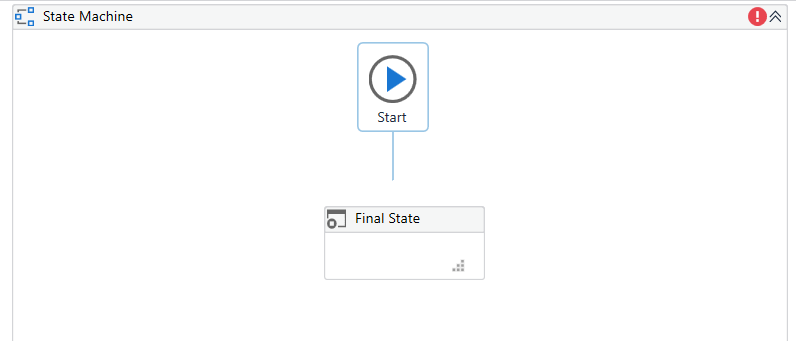
A developer creates a process using a State Machine. What section(s) does the Final State activity contain?
Correct
The State activity contains three sections, Entry, Exit and Transition(s), while the Final State only contains one section, Entry. UiPath Documentation Exam Topic: Describe how to use state machines versus flowcharts and sequences
Incorrect
The State activity contains three sections, Entry, Exit and Transition(s), while the Final State only contains one section, Entry. UiPath Documentation Exam Topic: Describe how to use state machines versus flowcharts and sequences
Unattempted
The State activity contains three sections, Entry, Exit and Transition(s), while the Final State only contains one section, Entry. UiPath Documentation Exam Topic: Describe how to use state machines versus flowcharts and sequences
Question 19 of 65
19. Question
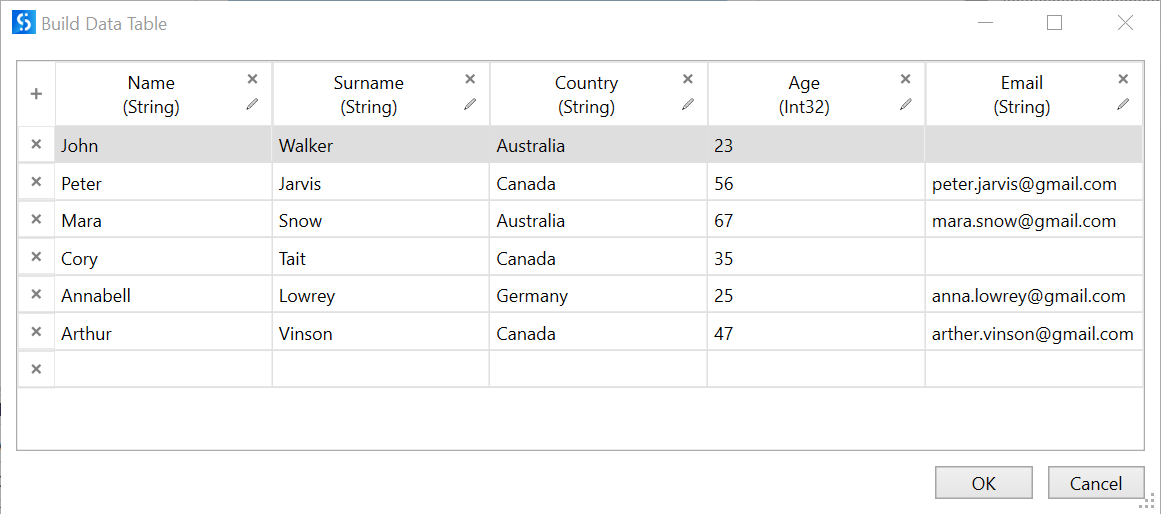
A developer wants to filter the following datatable to get all rows with people from Canada younger than 50 years old who provided their email address. Which expression provides the required results?
Correct
To filter a datatable using .Select method, follow the rules: 1. Place column name in square brackets e.g. [Country] 2. Next, place a comparison sign (=, <=, >=, or <>) e.g. [Country] = 3. Place all string values in a single quotation ‘ ‘ e.g. [Country] = ‘Canada‘ 4. Join all required conditions using keywords like AND, OR e.g. [Country] = ‘Canada‘ AND [Age] < 50 AND [Email] <> ‘‘ 5. Surround all conditions in double quotes “ “ and place the final string in brackets after .Select e.g. DataTable.Select(“[Country] = ‘Canada‘ AND [Age] < 50 AND [Email] <> ‘‘“) UiPath forum Exam Topic: Describe how to initialize variables such as lists and datatables, and how to filter datatables.
Incorrect
To filter a datatable using .Select method, follow the rules: 1. Place column name in square brackets e.g. [Country] 2. Next, place a comparison sign (=, <=, >=, or <>) e.g. [Country] = 3. Place all string values in a single quotation ‘ ‘ e.g. [Country] = ‘Canada‘ 4. Join all required conditions using keywords like AND, OR e.g. [Country] = ‘Canada‘ AND [Age] < 50 AND [Email] <> ‘‘ 5. Surround all conditions in double quotes “ “ and place the final string in brackets after .Select e.g. DataTable.Select(“[Country] = ‘Canada‘ AND [Age] < 50 AND [Email] <> ‘‘“) UiPath forum Exam Topic: Describe how to initialize variables such as lists and datatables, and how to filter datatables.
Unattempted
To filter a datatable using .Select method, follow the rules: 1. Place column name in square brackets e.g. [Country] 2. Next, place a comparison sign (=, <=, >=, or <>) e.g. [Country] = 3. Place all string values in a single quotation ‘ ‘ e.g. [Country] = ‘Canada‘ 4. Join all required conditions using keywords like AND, OR e.g. [Country] = ‘Canada‘ AND [Age] < 50 AND [Email] <> ‘‘ 5. Surround all conditions in double quotes “ “ and place the final string in brackets after .Select e.g. DataTable.Select(“[Country] = ‘Canada‘ AND [Age] < 50 AND [Email] <> ‘‘“) UiPath forum Exam Topic: Describe how to initialize variables such as lists and datatables, and how to filter datatables.
Question 20 of 65
20. Question
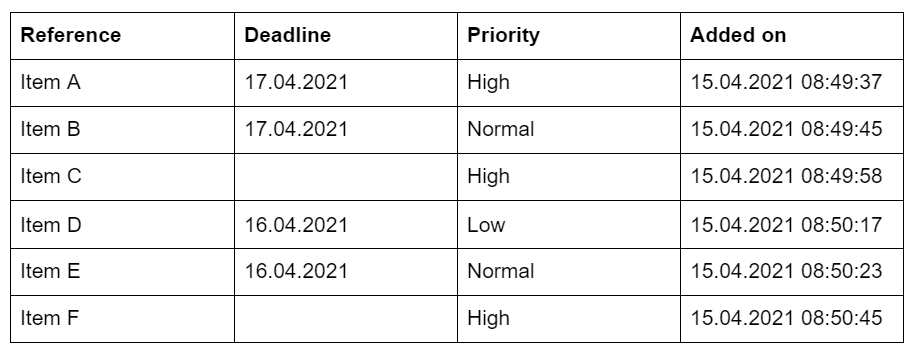
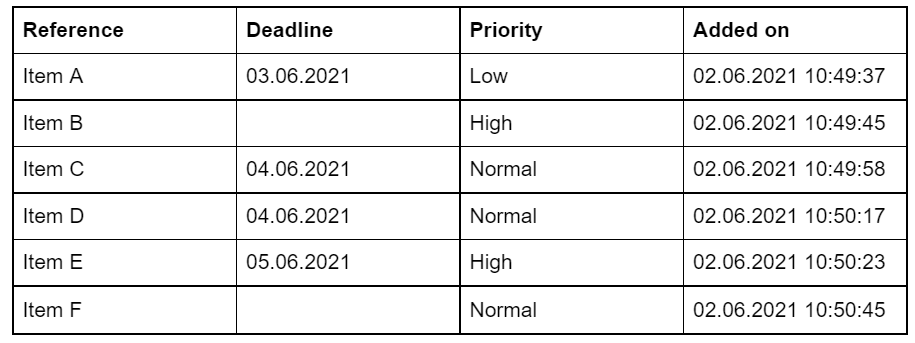
A developer added six Queue Items to your queue on 15.04.2021. What is the correct sequence in which these Queue Items will be processed?
Correct
Within any given queue the transactions are processed in a hierarchical manner, according to this order: Items that have a Deadline, as follows: a. in order of Priority; and b. according to the set Deadline for items with the same Priority. Items with no Deadline, in order of Priority, and a. according to the rule First In, First Out for items with the same Priority. UiPath Documentation Exam Topic: Describe how to work with Orchestrator queues and assets
Incorrect
Within any given queue the transactions are processed in a hierarchical manner, according to this order: Items that have a Deadline, as follows: a. in order of Priority; and b. according to the set Deadline for items with the same Priority. Items with no Deadline, in order of Priority, and a. according to the rule First In, First Out for items with the same Priority. UiPath Documentation Exam Topic: Describe how to work with Orchestrator queues and assets
Unattempted
Within any given queue the transactions are processed in a hierarchical manner, according to this order: Items that have a Deadline, as follows: a. in order of Priority; and b. according to the set Deadline for items with the same Priority. Items with no Deadline, in order of Priority, and a. according to the rule First In, First Out for items with the same Priority. UiPath Documentation Exam Topic: Describe how to work with Orchestrator queues and assets
Question 21 of 65
21. Question
Which activity uses the SimulateType property by default and this setting cannot be changed?
Correct
Set Text activity uses the “SimulateType“ property by default and can not be changed, which means disabled elements are altered by default. UiPath Documentation Exam Topic: Differentiate between using Simulate versus Send Window Message versus Default in the Classic Design experience.
Incorrect
Set Text activity uses the “SimulateType“ property by default and can not be changed, which means disabled elements are altered by default. UiPath Documentation Exam Topic: Differentiate between using Simulate versus Send Window Message versus Default in the Classic Design experience.
Unattempted
Set Text activity uses the “SimulateType“ property by default and can not be changed, which means disabled elements are altered by default. UiPath Documentation Exam Topic: Differentiate between using Simulate versus Send Window Message versus Default in the Classic Design experience.
Question 22 of 65
22. Question
A developer is using UiExplorer to modify selectors. The Repair button is present in UiExplorer. What is its functionality and when does this button appear?
Correct
Repair enables you to re-indicate the same target UI element and repair the selector. This operation does not completely replace the previous selector. The button is available only when the selector is invalid. To indicate a totally different selector and replace the previous one use Indicate Element. UiPath Documentation Exam Topic: Describe how Tags and Attributes, Dynamic Selectors, Anchor Base, etc. are used in UI Explorer to create a robust selector in the Default, Active Accessibility, or UI Automation frameworks
Incorrect
Repair enables you to re-indicate the same target UI element and repair the selector. This operation does not completely replace the previous selector. The button is available only when the selector is invalid. To indicate a totally different selector and replace the previous one use Indicate Element. UiPath Documentation Exam Topic: Describe how Tags and Attributes, Dynamic Selectors, Anchor Base, etc. are used in UI Explorer to create a robust selector in the Default, Active Accessibility, or UI Automation frameworks
Unattempted
Repair enables you to re-indicate the same target UI element and repair the selector. This operation does not completely replace the previous selector. The button is available only when the selector is invalid. To indicate a totally different selector and replace the previous one use Indicate Element. UiPath Documentation Exam Topic: Describe how Tags and Attributes, Dynamic Selectors, Anchor Base, etc. are used in UI Explorer to create a robust selector in the Default, Active Accessibility, or UI Automation frameworks
Question 23 of 65
23. Question
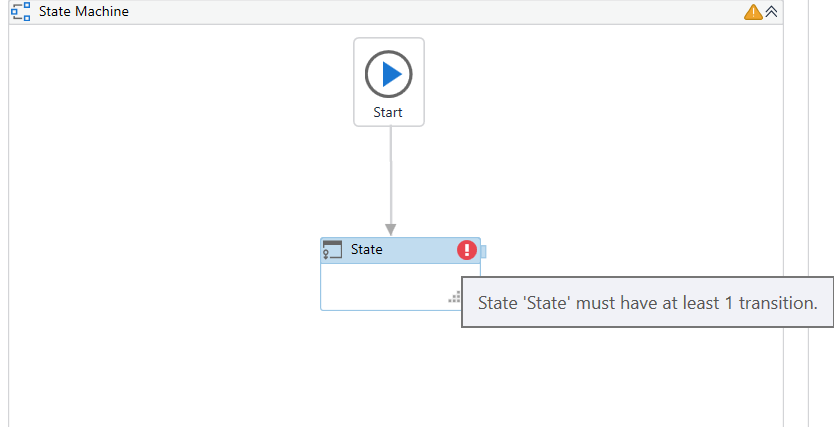
Please choose the incorrect statement about the usage of the State Machine activity.
Correct
Correct statements: You can only create one initial state, yet it is possible to have more than one Final State. You can only create one link from Start, so it is impossible to connect more than one initial state to it. However, you can connect a State activity to the different Final States depending on the required conditions. Every State Machine must have a Final State to avoid an infinite loop. If you interconnect States between each other without a Final State, then the process will enter an infinite loop, which would result in incorrect processing. Every State activity should have at least 1 transition. If you do not create a transition, a red symbol of an error will appear in the corner of the State.
Incorrect statement: You can directly connect Start and Final State. That is an incorrect statement, as Final State cannot be an initial state. UiPath Studio does not allow to create a link directly from Start to Final State.
UiPath Documentation Exam Topic: Describe how to use state machines versus flowcharts and sequences
Incorrect
Correct statements: You can only create one initial state, yet it is possible to have more than one Final State. You can only create one link from Start, so it is impossible to connect more than one initial state to it. However, you can connect a State activity to the different Final States depending on the required conditions. Every State Machine must have a Final State to avoid an infinite loop. If you interconnect States between each other without a Final State, then the process will enter an infinite loop, which would result in incorrect processing. Every State activity should have at least 1 transition. If you do not create a transition, a red symbol of an error will appear in the corner of the State.
Incorrect statement: You can directly connect Start and Final State. That is an incorrect statement, as Final State cannot be an initial state. UiPath Studio does not allow to create a link directly from Start to Final State.
UiPath Documentation Exam Topic: Describe how to use state machines versus flowcharts and sequences
Unattempted
Correct statements: You can only create one initial state, yet it is possible to have more than one Final State. You can only create one link from Start, so it is impossible to connect more than one initial state to it. However, you can connect a State activity to the different Final States depending on the required conditions. Every State Machine must have a Final State to avoid an infinite loop. If you interconnect States between each other without a Final State, then the process will enter an infinite loop, which would result in incorrect processing. Every State activity should have at least 1 transition. If you do not create a transition, a red symbol of an error will appear in the corner of the State.
Incorrect statement: You can directly connect Start and Final State. That is an incorrect statement, as Final State cannot be an initial state. UiPath Studio does not allow to create a link directly from Start to Final State.
UiPath Documentation Exam Topic: Describe how to use state machines versus flowcharts and sequences
Question 24 of 65
24. Question
What is the use of attribute when working with selectors?
Correct
Introducing Non-Greedy search in your selectors instructs it to search through all the active windows or browser instances that match the top-level tags of your selector, and not just the window instances in focus. Non-Greedy search makes use of the idx() attribute, which needs to be included in the top-level tag, as follows: searches through all active window instances for the element matching the top-level tag attributes. Please note that the option only searches through window instances in focus. UiPath Documentation Exam Topic: Describe how Tags and Attributes, Dynamic Selectors, Anchor Base, etc. are used in UI Explorer to create a robust selector in the Default, Active Accessibility, or UI Automation frameworks
Incorrect
Introducing Non-Greedy search in your selectors instructs it to search through all the active windows or browser instances that match the top-level tags of your selector, and not just the window instances in focus. Non-Greedy search makes use of the idx() attribute, which needs to be included in the top-level tag, as follows: searches through all active window instances for the element matching the top-level tag attributes. Please note that the option only searches through window instances in focus. UiPath Documentation Exam Topic: Describe how Tags and Attributes, Dynamic Selectors, Anchor Base, etc. are used in UI Explorer to create a robust selector in the Default, Active Accessibility, or UI Automation frameworks
Unattempted
Introducing Non-Greedy search in your selectors instructs it to search through all the active windows or browser instances that match the top-level tags of your selector, and not just the window instances in focus. Non-Greedy search makes use of the idx() attribute, which needs to be included in the top-level tag, as follows: searches through all active window instances for the element matching the top-level tag attributes. Please note that the option only searches through window instances in focus. UiPath Documentation Exam Topic: Describe how Tags and Attributes, Dynamic Selectors, Anchor Base, etc. are used in UI Explorer to create a robust selector in the Default, Active Accessibility, or UI Automation frameworks
Question 25 of 65
25. Question
A developer created automation in UiPath to process CVs of job candidates. This process is designed to help the HR team in their daily activities. Every day robot needs to process mails from the HR team sent to its Outlook account. Besides emails from HR, the robot also receives organizational emails and emails from other employees. There are several possible ways to set up the Get Outlook Mail Messages activity for the robot to only extract emails from the HR Team . Please choose the incorrect way.
Correct
There is no “From“ property in the Get Outlook Mail Messages activity, and all filtering needs to be done in the Filter property of the Get Outlook Mail Messages activity. All 3 strings can be used as a filter to get mails only from the HR Team. UiPath Documentation Exam Topic: Identify and describe how activities are used to automate actions in Excel, e-mail, and .pdfs.
Incorrect
There is no “From“ property in the Get Outlook Mail Messages activity, and all filtering needs to be done in the Filter property of the Get Outlook Mail Messages activity. All 3 strings can be used as a filter to get mails only from the HR Team. UiPath Documentation Exam Topic: Identify and describe how activities are used to automate actions in Excel, e-mail, and .pdfs.
Unattempted
There is no “From“ property in the Get Outlook Mail Messages activity, and all filtering needs to be done in the Filter property of the Get Outlook Mail Messages activity. All 3 strings can be used as a filter to get mails only from the HR Team. UiPath Documentation Exam Topic: Identify and describe how activities are used to automate actions in Excel, e-mail, and .pdfs.
Question 26 of 65
26. Question
Please choose the correct statement about automation processes.
Correct
A foreground process is used when your automation project needs to interact with UI elements. These processes heavily rely on UIAutomation activities. Please note that you can only execute one foreground process at a time. UiPath Documentation Exam Topic: Identify and describe how UI Automation activities and/or Excel activities can be configured to interact with background windows
Incorrect
A foreground process is used when your automation project needs to interact with UI elements. These processes heavily rely on UIAutomation activities. Please note that you can only execute one foreground process at a time. UiPath Documentation Exam Topic: Identify and describe how UI Automation activities and/or Excel activities can be configured to interact with background windows
Unattempted
A foreground process is used when your automation project needs to interact with UI elements. These processes heavily rely on UIAutomation activities. Please note that you can only execute one foreground process at a time. UiPath Documentation Exam Topic: Identify and describe how UI Automation activities and/or Excel activities can be configured to interact with background windows
Question 27 of 65
27. Question
A team of developers uses the TFS repository to store versions of a UiPath project. One of the developers wants to edit the project. What action ensures that no other developer changes the code in the meantime?
Correct
Once a file is checked out from the TFS repository, it is no longer available for check out by other users with access permissions. UiPath Documentation Exam Topic: Understand how GIT and TFS are used for version control
Incorrect
Once a file is checked out from the TFS repository, it is no longer available for check out by other users with access permissions. UiPath Documentation Exam Topic: Understand how GIT and TFS are used for version control
Unattempted
Once a file is checked out from the TFS repository, it is no longer available for check out by other users with access permissions. UiPath Documentation Exam Topic: Understand how GIT and TFS are used for version control
Question 28 of 65
28. Question
A developer wants to use a Basic recorder to capture several clicks on a website. What type of selectors will be generated during recording?
Correct
Basic recording type generates a full selector for each activity and no container. The resulted automation is slower than one that uses containers and is suitable for single activities. UiPath Documentation Exam Topic: Describe the differences between using full selectors versus using partial selectors
Incorrect
Basic recording type generates a full selector for each activity and no container. The resulted automation is slower than one that uses containers and is suitable for single activities. UiPath Documentation Exam Topic: Describe the differences between using full selectors versus using partial selectors
Unattempted
Basic recording type generates a full selector for each activity and no container. The resulted automation is slower than one that uses containers and is suitable for single activities. UiPath Documentation Exam Topic: Describe the differences between using full selectors versus using partial selectors
Question 29 of 65
29. Question
Please choose the correct statement about the usage of wildcards in selectors.
Correct
Wildcards are symbols that enable you to replace zero or multiple characters in a string. These can be quite useful when dealing with dynamically-changing attributes in a selector. Asterisk (*) replaces zero or more characters Question mark (?) replaces a single character UiPath Documentation Exam Topic: Determine and describe how robust selectors are created; for example, dynamic versus static selectors.
Incorrect
Wildcards are symbols that enable you to replace zero or multiple characters in a string. These can be quite useful when dealing with dynamically-changing attributes in a selector. Asterisk (*) replaces zero or more characters Question mark (?) replaces a single character UiPath Documentation Exam Topic: Determine and describe how robust selectors are created; for example, dynamic versus static selectors.
Unattempted
Wildcards are symbols that enable you to replace zero or multiple characters in a string. These can be quite useful when dealing with dynamically-changing attributes in a selector. Asterisk (*) replaces zero or more characters Question mark (?) replaces a single character UiPath Documentation Exam Topic: Determine and describe how robust selectors are created; for example, dynamic versus static selectors.
Question 30 of 65
30. Question
A developer implemented a Dispatcher process using the Robotic Enterprise Framework to upload items to a queue. According to the requirements from the Finance team, all items with Price>10000$ should be processed starting 1st of July 2021 at 8 am, when Q3 starts. For that, the developer uses an Add Queue Item activity inside an If. What is the correct setting for that activity?
Correct
To set date since when a transaction item should be processed, use Postpone property of Add Queue Item activity. This property can be filled in with relative dates such as DateTime.Now.AddHours(2), DateTime.Now.AddDays(10) and DateTime.Now.Add(New System.TimeSpan(5, 0, 0, 0)). Additionally, you can use the US notation to add an exact time, such as 12/10/2017 07:40:00. Automatically correcting this date is available. For example, if you write 8 9 2018 9:0, it is automatically transformed to 08/09/2018 09:00:00. In the United States, dates are traditionally written in the “month-day-year“ order, so 7 1 21 8:0 will result in item being postponed till 1st of July 2021, when 1 7 21 8:0 will postpone it to 1st of January 2021. Using DateTime.ParseExact(“1 July 2021 08:00“,“dd mmmm yyyy hh:mm“, System.Globalization.CultureInfo.InvariantCulture) will result in an error, as notation for month is capital MM, while mm represents minutes. UiPath Documentation Exam Topic: Describe the differences between Dispatcher and Performer, how the Dispatcher is used to upload transaction items, and how the Performer is used to consume the queues and process the transactions.
Incorrect
To set date since when a transaction item should be processed, use Postpone property of Add Queue Item activity. This property can be filled in with relative dates such as DateTime.Now.AddHours(2), DateTime.Now.AddDays(10) and DateTime.Now.Add(New System.TimeSpan(5, 0, 0, 0)). Additionally, you can use the US notation to add an exact time, such as 12/10/2017 07:40:00. Automatically correcting this date is available. For example, if you write 8 9 2018 9:0, it is automatically transformed to 08/09/2018 09:00:00. In the United States, dates are traditionally written in the “month-day-year“ order, so 7 1 21 8:0 will result in item being postponed till 1st of July 2021, when 1 7 21 8:0 will postpone it to 1st of January 2021. Using DateTime.ParseExact(“1 July 2021 08:00“,“dd mmmm yyyy hh:mm“, System.Globalization.CultureInfo.InvariantCulture) will result in an error, as notation for month is capital MM, while mm represents minutes. UiPath Documentation Exam Topic: Describe the differences between Dispatcher and Performer, how the Dispatcher is used to upload transaction items, and how the Performer is used to consume the queues and process the transactions.
Unattempted
To set date since when a transaction item should be processed, use Postpone property of Add Queue Item activity. This property can be filled in with relative dates such as DateTime.Now.AddHours(2), DateTime.Now.AddDays(10) and DateTime.Now.Add(New System.TimeSpan(5, 0, 0, 0)). Additionally, you can use the US notation to add an exact time, such as 12/10/2017 07:40:00. Automatically correcting this date is available. For example, if you write 8 9 2018 9:0, it is automatically transformed to 08/09/2018 09:00:00. In the United States, dates are traditionally written in the “month-day-year“ order, so 7 1 21 8:0 will result in item being postponed till 1st of July 2021, when 1 7 21 8:0 will postpone it to 1st of January 2021. Using DateTime.ParseExact(“1 July 2021 08:00“,“dd mmmm yyyy hh:mm“, System.Globalization.CultureInfo.InvariantCulture) will result in an error, as notation for month is capital MM, while mm represents minutes. UiPath Documentation Exam Topic: Describe the differences between Dispatcher and Performer, how the Dispatcher is used to upload transaction items, and how the Performer is used to consume the queues and process the transactions.
Question 31 of 65
31. Question
A developer automates a project for Finance Team. As the first step, robot needs to capture ticket numbers from a Sharepoint site and then search them in SalesForce application. However, on Sharepoint all ticket numbers contain 7 characters and start with zeros e.g. 0000728, 0011430, 0003219. While in SalesForce, zeros in front are removed e.g. 728, 11430, 3219. How can robot overcome this inconsistency?
Correct
TrimStart method would remove all zeroes only at the start of the ticket number . Trim method would remove zeroes at the start and at the end of the ticket number (incorrect). Replace(“0“) would remove zeroes from the whole string, even in the middle (incorrect). Substring(3) would work only for ticket numbers with 3 zeroes at the start (incorrect). Microsoft Documentation UiPath Forum Exam Topic: Identify how methods, activities, and the RegEx Builder are used for string manipulation and regular expressions
Incorrect
TrimStart method would remove all zeroes only at the start of the ticket number . Trim method would remove zeroes at the start and at the end of the ticket number (incorrect). Replace(“0“) would remove zeroes from the whole string, even in the middle (incorrect). Substring(3) would work only for ticket numbers with 3 zeroes at the start (incorrect). Microsoft Documentation UiPath Forum Exam Topic: Identify how methods, activities, and the RegEx Builder are used for string manipulation and regular expressions
Unattempted
TrimStart method would remove all zeroes only at the start of the ticket number . Trim method would remove zeroes at the start and at the end of the ticket number (incorrect). Replace(“0“) would remove zeroes from the whole string, even in the middle (incorrect). Substring(3) would work only for ticket numbers with 3 zeroes at the start (incorrect). Microsoft Documentation UiPath Forum Exam Topic: Identify how methods, activities, and the RegEx Builder are used for string manipulation and regular expressions
Question 32 of 65
32. Question
A developer initialized the following dictionary: sampleDictionary = New Dictionary(Of String, String) From { {HUB Academy, RPA}, {UiPath, Certificate} } How to return the value Certificate from this dictionary?
Correct
To get a value by key from a dictionary, use (““) You can also get the value if you know its index, however, remember, that dictionary is zero-based. So in this example, it is possible to return the value “Certificate“ by using sampleDictionary.Values(1) UiPath Forum Exam Topic: Describe how to work with complex data structures and data manipulation; for example, datatables and collections
Incorrect
To get a value by key from a dictionary, use (““) You can also get the value if you know its index, however, remember, that dictionary is zero-based. So in this example, it is possible to return the value “Certificate“ by using sampleDictionary.Values(1) UiPath Forum Exam Topic: Describe how to work with complex data structures and data manipulation; for example, datatables and collections
Unattempted
To get a value by key from a dictionary, use (““) You can also get the value if you know its index, however, remember, that dictionary is zero-based. So in this example, it is possible to return the value “Certificate“ by using sampleDictionary.Values(1) UiPath Forum Exam Topic: Describe how to work with complex data structures and data manipulation; for example, datatables and collections
Question 33 of 65
33. Question
A developer runs a Dispatcher process to upload 5 queue items to Orchestrator and then runs a Performer to process them. However, the developer forgot to use the Set Transaction Status activity, which resulted in all 5 items changing their status to In Progress.2 days later, the developer checks the status of transactions in Orchestrator. What will be their status?
Correct
Items that remained in the In Progress status for a long period of time (approx. 24 hours) without being processed change their status to Abandoned. UiPath Documentation Exam Topic: Describe how to work with Orchestrator queues and assets
Incorrect
Items that remained in the In Progress status for a long period of time (approx. 24 hours) without being processed change their status to Abandoned. UiPath Documentation Exam Topic: Describe how to work with Orchestrator queues and assets
Unattempted
Items that remained in the In Progress status for a long period of time (approx. 24 hours) without being processed change their status to Abandoned. UiPath Documentation Exam Topic: Describe how to work with Orchestrator queues and assets
Question 34 of 65
34. Question
A developer uses REFramework to create complex process automation. In the InitAllSettings state, the robot retrieves all required assets from the Orchestrator. All values are stored in a Config dictionary which is passed between workflows. What happens if, during the processing of a queue item, the value of one of the assets was changed in Orchestrator?
Correct
If the Config file is used to store values from the Orchestrator at the beginning of the process, any changes in assets will not affect the robot, as all values were retrieved prior to the change. However, if robot uses the Get Asset activity each time before using the asset, then robot will use the latest value of the asset. UiPath Documentation Exam Topic: Describe how to work with Orchestrator queues and assets.
Incorrect
If the Config file is used to store values from the Orchestrator at the beginning of the process, any changes in assets will not affect the robot, as all values were retrieved prior to the change. However, if robot uses the Get Asset activity each time before using the asset, then robot will use the latest value of the asset. UiPath Documentation Exam Topic: Describe how to work with Orchestrator queues and assets.
Unattempted
If the Config file is used to store values from the Orchestrator at the beginning of the process, any changes in assets will not affect the robot, as all values were retrieved prior to the change. However, if robot uses the Get Asset activity each time before using the asset, then robot will use the latest value of the asset. UiPath Documentation Exam Topic: Describe how to work with Orchestrator queues and assets.
Question 35 of 65
35. Question
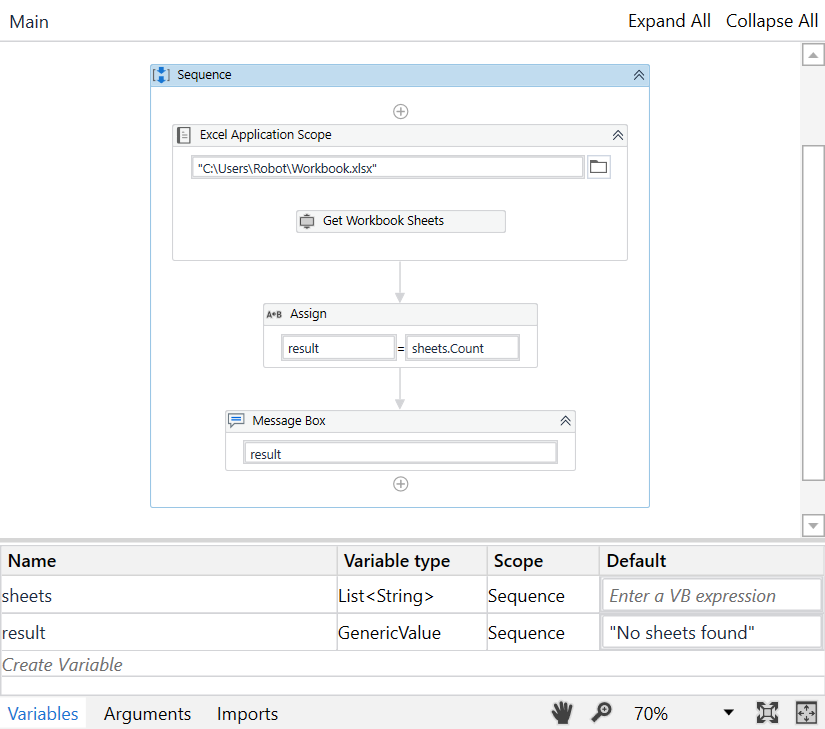
A developer created a UiPath Process to find out, how many worksheets an Excel file stores. What will be the result of the processing if the indicated workbook does not exist?
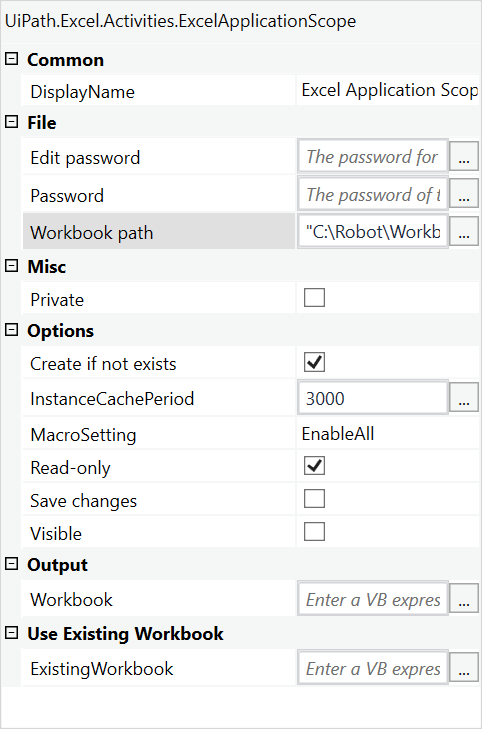
Please find the properties of the Get Workbook Sheets activity below:
Correct
When Create if not exists property is checked, if the workbook cannot be found at the specified path, a new Excel workbook is created with the name specified in the Workbook path property field. When not checked, if the workbook cannot be found at the specified path, an exception is thrown, informing the user. In this case, Create if not exists property is checked, so a new workbook with a default 1 worksheet will be created. As a result, a Message Box will display “1“. UiPath Documentation Exam Topic: Identify and describe how activities are used to automate actions in Excel, e-mail, and .pdfs.
Incorrect
When Create if not exists property is checked, if the workbook cannot be found at the specified path, a new Excel workbook is created with the name specified in the Workbook path property field. When not checked, if the workbook cannot be found at the specified path, an exception is thrown, informing the user. In this case, Create if not exists property is checked, so a new workbook with a default 1 worksheet will be created. As a result, a Message Box will display “1“. UiPath Documentation Exam Topic: Identify and describe how activities are used to automate actions in Excel, e-mail, and .pdfs.
Unattempted
When Create if not exists property is checked, if the workbook cannot be found at the specified path, a new Excel workbook is created with the name specified in the Workbook path property field. When not checked, if the workbook cannot be found at the specified path, an exception is thrown, informing the user. In this case, Create if not exists property is checked, so a new workbook with a default 1 worksheet will be created. As a result, a Message Box will display “1“. UiPath Documentation Exam Topic: Identify and describe how activities are used to automate actions in Excel, e-mail, and .pdfs.
Question 36 of 65
36. Question
A developer is working with a newer application using UiExplorer. Unfortunately, UiExplorer does not recognize the required selectors. What UI Framework is recommended for the developer to choose in such a situation?
Correct
In UiExplorer, you can choose one of three UI Frameworks to change the technology used to determine UI elements and their selectors. The following options are available: – Default UiPath proprietary method. Usually works fine with all types of user interfaces. – Active Accessibility an earlier solution from Microsoft for making apps accessible. It is recommended that you use this option with legacy software when the Default one does not work. – UI Automation the improved accessibility model from Microsoft. It is recommended that you use this option with newer apps when the Default one does not work. UiPath Documentation Exam Topic: Describe how Tags and Attributes, Dynamic Selectors, Anchor Base, etc. are used in UI Explorer to create a robust selector in the Default, Active Accessibility, or UI Automation frameworks
Incorrect
In UiExplorer, you can choose one of three UI Frameworks to change the technology used to determine UI elements and their selectors. The following options are available: – Default UiPath proprietary method. Usually works fine with all types of user interfaces. – Active Accessibility an earlier solution from Microsoft for making apps accessible. It is recommended that you use this option with legacy software when the Default one does not work. – UI Automation the improved accessibility model from Microsoft. It is recommended that you use this option with newer apps when the Default one does not work. UiPath Documentation Exam Topic: Describe how Tags and Attributes, Dynamic Selectors, Anchor Base, etc. are used in UI Explorer to create a robust selector in the Default, Active Accessibility, or UI Automation frameworks
Unattempted
In UiExplorer, you can choose one of three UI Frameworks to change the technology used to determine UI elements and their selectors. The following options are available: – Default UiPath proprietary method. Usually works fine with all types of user interfaces. – Active Accessibility an earlier solution from Microsoft for making apps accessible. It is recommended that you use this option with legacy software when the Default one does not work. – UI Automation the improved accessibility model from Microsoft. It is recommended that you use this option with newer apps when the Default one does not work. UiPath Documentation Exam Topic: Describe how Tags and Attributes, Dynamic Selectors, Anchor Base, etc. are used in UI Explorer to create a robust selector in the Default, Active Accessibility, or UI Automation frameworks
Question 37 of 65
37. Question
A Business Exception occurs in an isolated workflow. What exception is returned to the outer workflow?
Correct
Business Exceptions are not supported in an isolated workflow, all exceptions return as System Exceptions. UiPath Documentation Exam Topic: Differentiate between using Application Exceptions and Business Rule Exceptions.
Incorrect
Business Exceptions are not supported in an isolated workflow, all exceptions return as System Exceptions. UiPath Documentation Exam Topic: Differentiate between using Application Exceptions and Business Rule Exceptions.
Unattempted
Business Exceptions are not supported in an isolated workflow, all exceptions return as System Exceptions. UiPath Documentation Exam Topic: Differentiate between using Application Exceptions and Business Rule Exceptions.
Question 38 of 65
38. Question
A developer implemented a Performer using the Robotic Enterprise Framework to process items from the queue. Each transaction item contains a file path to a specific file on Shared Drive. Robot uses Path Exists activity to check if a required file exists. If the path exists, robot needs to copy the file to its local folder. If the path does not exist, robot sets a status Failed with a Business Rule Exception to this transaction item. Robot does not retry these items during processing. What is the correct reason for that?
Correct
Using the Set Transaction Status activity, a queue item‘s status can be set to Successful or Failed. Keep in mind that only the Failed items with Application ErrorType will be retried if configured. By default, Orchestrator does not retry transactions which are failed due to Business Exceptions. This happens because an inconsistency between the transaction value and the business requirement means that there might be errors in the initial data which the queue items were created from. UiPath Documentation UiPath Documentation 2 Exam Topic: Describe the differences between Dispatcher and Performer, how the Dispatcher is used to upload transaction items, and how the Performer is used to consume the queues and process the transactions. Differentiate between using Application Exceptions and Business Rule Exceptions.
Incorrect
Using the Set Transaction Status activity, a queue item‘s status can be set to Successful or Failed. Keep in mind that only the Failed items with Application ErrorType will be retried if configured. By default, Orchestrator does not retry transactions which are failed due to Business Exceptions. This happens because an inconsistency between the transaction value and the business requirement means that there might be errors in the initial data which the queue items were created from. UiPath Documentation UiPath Documentation 2 Exam Topic: Describe the differences between Dispatcher and Performer, how the Dispatcher is used to upload transaction items, and how the Performer is used to consume the queues and process the transactions. Differentiate between using Application Exceptions and Business Rule Exceptions.
Unattempted
Using the Set Transaction Status activity, a queue item‘s status can be set to Successful or Failed. Keep in mind that only the Failed items with Application ErrorType will be retried if configured. By default, Orchestrator does not retry transactions which are failed due to Business Exceptions. This happens because an inconsistency between the transaction value and the business requirement means that there might be errors in the initial data which the queue items were created from. UiPath Documentation UiPath Documentation 2 Exam Topic: Describe the differences between Dispatcher and Performer, how the Dispatcher is used to upload transaction items, and how the Performer is used to consume the queues and process the transactions. Differentiate between using Application Exceptions and Business Rule Exceptions.
Question 39 of 65
39. Question
Please choose the correct statement about selectors in UiPath.
Correct
When a selector is built, the Case-Sensitive property makes it possible to identify elements by also taking into consideration the casing of an attribute‘s value. In order to enable identification of attributes by casing, the case-sensitive() attribute needs to be included in the selector, in the tag of the target attribute: casesensitive:=‘false‘ Enables you to validate a selector by also including an attribute‘s value casing. By default, the value of this option is set to true. If set to false, the casing of the attribute‘s value is not taken into account. Example: The following selector will be recognized by UI Explorer: If capital letters are changed to lowercase, UI Explorer will not recognize this selector: However, you can set to ignore case sensitivity of the title attribute in the following way: UiPath Documentation Exam Topic: Describe how Tags and Attributes, Dynamic Selectors, Anchor Base, etc. are used in UI Explorer to create a robust selector in the Default, Active Accessibility, or UI Automation frameworks
Incorrect
When a selector is built, the Case-Sensitive property makes it possible to identify elements by also taking into consideration the casing of an attribute‘s value. In order to enable identification of attributes by casing, the case-sensitive() attribute needs to be included in the selector, in the tag of the target attribute: casesensitive:=‘false‘ Enables you to validate a selector by also including an attribute‘s value casing. By default, the value of this option is set to true. If set to false, the casing of the attribute‘s value is not taken into account. Example: The following selector will be recognized by UI Explorer: If capital letters are changed to lowercase, UI Explorer will not recognize this selector: However, you can set to ignore case sensitivity of the title attribute in the following way: UiPath Documentation Exam Topic: Describe how Tags and Attributes, Dynamic Selectors, Anchor Base, etc. are used in UI Explorer to create a robust selector in the Default, Active Accessibility, or UI Automation frameworks
Unattempted
When a selector is built, the Case-Sensitive property makes it possible to identify elements by also taking into consideration the casing of an attribute‘s value. In order to enable identification of attributes by casing, the case-sensitive() attribute needs to be included in the selector, in the tag of the target attribute: casesensitive:=‘false‘ Enables you to validate a selector by also including an attribute‘s value casing. By default, the value of this option is set to true. If set to false, the casing of the attribute‘s value is not taken into account. Example: The following selector will be recognized by UI Explorer: If capital letters are changed to lowercase, UI Explorer will not recognize this selector: However, you can set to ignore case sensitivity of the title attribute in the following way: UiPath Documentation Exam Topic: Describe how Tags and Attributes, Dynamic Selectors, Anchor Base, etc. are used in UI Explorer to create a robust selector in the Default, Active Accessibility, or UI Automation frameworks
Question 40 of 65
40. Question
When is it recommended to use full selectors?
Correct
Full selectors contain all the elements needed to identify a UI element, including the top-level window. Recommended when switching between multiple windows. UiPath Documentation Exam Topic: Describe the differences between using full selectors versus using partial selectors
Incorrect
Full selectors contain all the elements needed to identify a UI element, including the top-level window. Recommended when switching between multiple windows. UiPath Documentation Exam Topic: Describe the differences between using full selectors versus using partial selectors
Unattempted
Full selectors contain all the elements needed to identify a UI element, including the top-level window. Recommended when switching between multiple windows. UiPath Documentation Exam Topic: Describe the differences between using full selectors versus using partial selectors
Question 41 of 65
41. Question
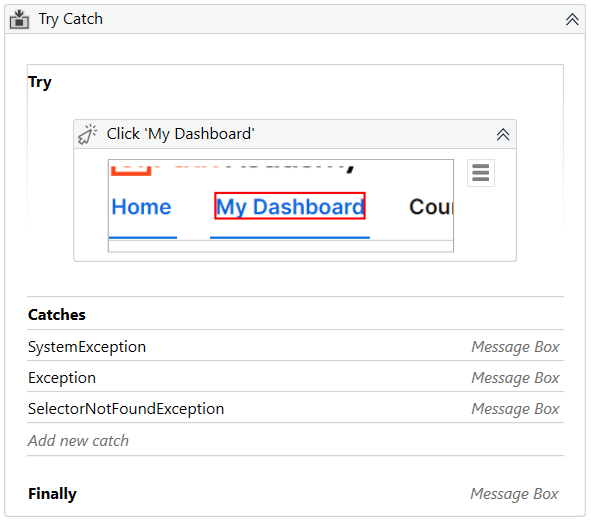
What will be executed in the following Try Catch activity if the required selector for Click activity is not found?
Catch block contains catches in the following order:
1. System.SystemException
2. System.Exception
3. UiPath.Core.SelectorNotFound
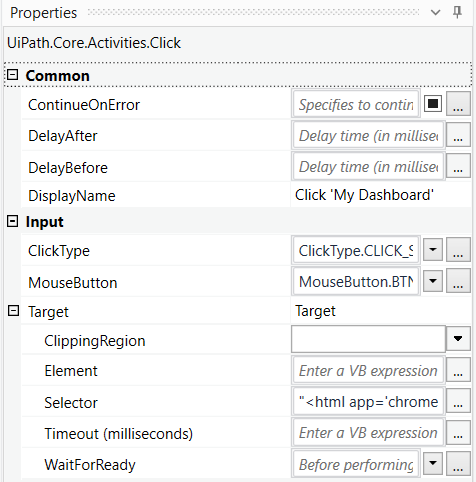
Please find below the properties of the Click activity
Correct
There can be multiple Catches and, in case of an exception, only the most specific Exception will be caught and its handler executed. In this case, UiPath.Core.SelectorNotFound is the most specific exception. Activities in Finally to be performed after the Try and Catches blocks are executed. This section is executed only when no exceptions are thrown or when an error occurs and is caught in the Catches section. So in this case, Finally block is executed, as the exception was caught. UiPath Documentation Geekhours Exam Topic: Identify and describe the use of the error handling activities such as Try Catch, Throw, Rethrow, Retry Scope, and Global Exception Handler
Incorrect
There can be multiple Catches and, in case of an exception, only the most specific Exception will be caught and its handler executed. In this case, UiPath.Core.SelectorNotFound is the most specific exception. Activities in Finally to be performed after the Try and Catches blocks are executed. This section is executed only when no exceptions are thrown or when an error occurs and is caught in the Catches section. So in this case, Finally block is executed, as the exception was caught. UiPath Documentation Geekhours Exam Topic: Identify and describe the use of the error handling activities such as Try Catch, Throw, Rethrow, Retry Scope, and Global Exception Handler
Unattempted
There can be multiple Catches and, in case of an exception, only the most specific Exception will be caught and its handler executed. In this case, UiPath.Core.SelectorNotFound is the most specific exception. Activities in Finally to be performed after the Try and Catches blocks are executed. This section is executed only when no exceptions are thrown or when an error occurs and is caught in the Catches section. So in this case, Finally block is executed, as the exception was caught. UiPath Documentation Geekhours Exam Topic: Identify and describe the use of the error handling activities such as Try Catch, Throw, Rethrow, Retry Scope, and Global Exception Handler
Question 42 of 65
42. Question
A process is created using UiPath REFramework. By default, if the maximum number of retries is reached, what steps are executed next?
Correct
If the maximum number of retries is reached, the io_RetryNumber is reseted and the next transaction is executed.
UiPath Documentation Exam Topic: Modify the REFramework to use any datatype for TransactionItem (for example, QueueItem, String, DataTable, etc.), how queues or tabular data are used within the REFramework, how to adapt the template to execute a linear process, and the difference between transactional, iterative, and linear processes
Incorrect
If the maximum number of retries is reached, the io_RetryNumber is reseted and the next transaction is executed.
UiPath Documentation Exam Topic: Modify the REFramework to use any datatype for TransactionItem (for example, QueueItem, String, DataTable, etc.), how queues or tabular data are used within the REFramework, how to adapt the template to execute a linear process, and the difference between transactional, iterative, and linear processes
Unattempted
If the maximum number of retries is reached, the io_RetryNumber is reseted and the next transaction is executed.
UiPath Documentation Exam Topic: Modify the REFramework to use any datatype for TransactionItem (for example, QueueItem, String, DataTable, etc.), how queues or tabular data are used within the REFramework, how to adapt the template to execute a linear process, and the difference between transactional, iterative, and linear processes
Question 43 of 65
43. Question
A developer creates a process using a State Machine. What section(s) does the State activity contain?
Correct
The State activity contains three sections, Entry, Exit and Transition(s), while the Final State only contains one section, Entry. UiPath Documentation Exam Topic: Describe how to use state machines versus flowcharts and sequences
Incorrect
The State activity contains three sections, Entry, Exit and Transition(s), while the Final State only contains one section, Entry. UiPath Documentation Exam Topic: Describe how to use state machines versus flowcharts and sequences
Unattempted
The State activity contains three sections, Entry, Exit and Transition(s), while the Final State only contains one section, Entry. UiPath Documentation Exam Topic: Describe how to use state machines versus flowcharts and sequences
Question 44 of 65
44. Question
A developer automated a process with the following logic: each queue item contains a filepath to an Excel file. If the required file exists, robot needs to upload it on Sharepoint. Otherwise, the transaction cannot be considered a success. What is the best approach if the required file does not exist?
Correct
A Business Exception describes an error rooted in the fact that certain data which the automation project depends on is incomplete or missing. Retrying the transaction does not yield any chance of solving the issue, and there are other better courses of action, such as notifying the human user of this error. By default, Orchestrator does not retry transactions which are failed due to Business Exceptions. This happens because an inconsistency between the transaction value and the business requirement means that there might be errors in the initial data which the queue items were created from. Additional actions by human users might be required to fix this type of issue, and logging this type of exception and notifying the responsible person can be useful. UiPath Documentation Exam Topic: Describe the differences between Dispatcher and Performer, how the Dispatcher is used to upload transaction items, and how the Performer is used to consume the queues and process the transactions. Differentiate between using Application Exceptions and Business Rule Exceptions.
Incorrect
A Business Exception describes an error rooted in the fact that certain data which the automation project depends on is incomplete or missing. Retrying the transaction does not yield any chance of solving the issue, and there are other better courses of action, such as notifying the human user of this error. By default, Orchestrator does not retry transactions which are failed due to Business Exceptions. This happens because an inconsistency between the transaction value and the business requirement means that there might be errors in the initial data which the queue items were created from. Additional actions by human users might be required to fix this type of issue, and logging this type of exception and notifying the responsible person can be useful. UiPath Documentation Exam Topic: Describe the differences between Dispatcher and Performer, how the Dispatcher is used to upload transaction items, and how the Performer is used to consume the queues and process the transactions. Differentiate between using Application Exceptions and Business Rule Exceptions.
Unattempted
A Business Exception describes an error rooted in the fact that certain data which the automation project depends on is incomplete or missing. Retrying the transaction does not yield any chance of solving the issue, and there are other better courses of action, such as notifying the human user of this error. By default, Orchestrator does not retry transactions which are failed due to Business Exceptions. This happens because an inconsistency between the transaction value and the business requirement means that there might be errors in the initial data which the queue items were created from. Additional actions by human users might be required to fix this type of issue, and logging this type of exception and notifying the responsible person can be useful. UiPath Documentation Exam Topic: Describe the differences between Dispatcher and Performer, how the Dispatcher is used to upload transaction items, and how the Performer is used to consume the queues and process the transactions. Differentiate between using Application Exceptions and Business Rule Exceptions.
Question 45 of 65
45. Question
Please select the correct statement about Global Exception Handler.
Correct
The Global Exception Handler is a type of workflow designed to determine the projects behavior when encountering an execution error. Only one Global Exception Handler can be set per automation project. UiPath Documentation Exam Topic: Identify and describe the use of the error handling activities such as Try Catch, Throw, Rethrow, Retry Scope, and Global Exception Handler
Incorrect
The Global Exception Handler is a type of workflow designed to determine the projects behavior when encountering an execution error. Only one Global Exception Handler can be set per automation project. UiPath Documentation Exam Topic: Identify and describe the use of the error handling activities such as Try Catch, Throw, Rethrow, Retry Scope, and Global Exception Handler
Unattempted
The Global Exception Handler is a type of workflow designed to determine the projects behavior when encountering an execution error. Only one Global Exception Handler can be set per automation project. UiPath Documentation Exam Topic: Identify and describe the use of the error handling activities such as Try Catch, Throw, Rethrow, Retry Scope, and Global Exception Handler
Question 46 of 65
46. Question
A developer wants to automate a process in an internal ERP system. The robot needs to log in to the system using login and password. What is the correct approach to using credentials in UiPath?
Correct
Gets a specified Orchestrator credential by using a provided AssetName, and returns a username and a secure password. UiPath Documentation Exam Topic: Describe how to work with Orchestrator queues and assets
Incorrect
Gets a specified Orchestrator credential by using a provided AssetName, and returns a username and a secure password. UiPath Documentation Exam Topic: Describe how to work with Orchestrator queues and assets
Unattempted
Gets a specified Orchestrator credential by using a provided AssetName, and returns a username and a secure password. UiPath Documentation Exam Topic: Describe how to work with Orchestrator queues and assets
Question 47 of 65
47. Question
Which of the following activities searches for a UI element by using a position relative to a fixed element?
Correct
Find Relative Element – searches for a UI element by using a position relative to a fixed element. This should be used when a reliable selector is not available. Anchor Base – searches for a UI element by using other UI elements as anchors. This should be used when a reliable selector is not available. Find Element – waits for the specified UI element to appear on the screen (to be in the foreground) and returns it as a UiElement variable. Element Exists – enables you to verify if a UI element exists, even if it is not visible, and returns a Boolean value. UiPath Documentation Exam Topic: Describe how Tags and Attributes, Dynamic Selectors, Anchor Base, etc. are used in UI Explorer to create a robust selector in the Default, Active Accessibility, or UI Automation frameworks
Incorrect
Find Relative Element – searches for a UI element by using a position relative to a fixed element. This should be used when a reliable selector is not available. Anchor Base – searches for a UI element by using other UI elements as anchors. This should be used when a reliable selector is not available. Find Element – waits for the specified UI element to appear on the screen (to be in the foreground) and returns it as a UiElement variable. Element Exists – enables you to verify if a UI element exists, even if it is not visible, and returns a Boolean value. UiPath Documentation Exam Topic: Describe how Tags and Attributes, Dynamic Selectors, Anchor Base, etc. are used in UI Explorer to create a robust selector in the Default, Active Accessibility, or UI Automation frameworks
Unattempted
Find Relative Element – searches for a UI element by using a position relative to a fixed element. This should be used when a reliable selector is not available. Anchor Base – searches for a UI element by using other UI elements as anchors. This should be used when a reliable selector is not available. Find Element – waits for the specified UI element to appear on the screen (to be in the foreground) and returns it as a UiElement variable. Element Exists – enables you to verify if a UI element exists, even if it is not visible, and returns a Boolean value. UiPath Documentation Exam Topic: Describe how Tags and Attributes, Dynamic Selectors, Anchor Base, etc. are used in UI Explorer to create a robust selector in the Default, Active Accessibility, or UI Automation frameworks
Question 48 of 65
48. Question
A developer executes the following Type Into activity to enter some text into a Notepad. What will be written in the Notepad once the activity is executed?
Please find below the properties of the Type Into activity
Please find below the running Notepad
Correct
When the Empty Field check box is selected, all previously-existing content in the UI element is erased before writing your text. In this case, the Empty Field is not checked, however, the Simulate Type property is set to True. When using Simulate Type, the field is automatically emptied, even if the Empty Field is set to False.
UiPath Documentation Exam Topic: Differentiate between using Simulate versus Send Window Message versus Default in the Classic Design experience
Incorrect
When the Empty Field check box is selected, all previously-existing content in the UI element is erased before writing your text. In this case, the Empty Field is not checked, however, the Simulate Type property is set to True. When using Simulate Type, the field is automatically emptied, even if the Empty Field is set to False.
UiPath Documentation Exam Topic: Differentiate between using Simulate versus Send Window Message versus Default in the Classic Design experience
Unattempted
When the Empty Field check box is selected, all previously-existing content in the UI element is erased before writing your text. In this case, the Empty Field is not checked, however, the Simulate Type property is set to True. When using Simulate Type, the field is automatically emptied, even if the Empty Field is set to False.
UiPath Documentation Exam Topic: Differentiate between using Simulate versus Send Window Message versus Default in the Classic Design experience
Question 49 of 65
49. Question
What UiPath tool ensures that your project meets high quality and reliability standards?
Correct
Workflow Analyzer is a static code analyzer that ensures your project meets high quality and reliability standards. A static code analyzer checks for inconsistencies without actually executing the project, as opposed to dynamic analyzers which step in during execution. Workflow Analyzer uses a set of rules to check for various inconsistencies unrelated to project execution. The rules are based on Automation Best Practices and take into consideration variable and argument naming, empty sequences or workflows, package restrictions, and so on. The analyzer does not identify errors in execution or compilation. UiPath Documentation Exam Topic: Describe the functionality of the Workflow Analyzer and how to create new rules
Incorrect
Workflow Analyzer is a static code analyzer that ensures your project meets high quality and reliability standards. A static code analyzer checks for inconsistencies without actually executing the project, as opposed to dynamic analyzers which step in during execution. Workflow Analyzer uses a set of rules to check for various inconsistencies unrelated to project execution. The rules are based on Automation Best Practices and take into consideration variable and argument naming, empty sequences or workflows, package restrictions, and so on. The analyzer does not identify errors in execution or compilation. UiPath Documentation Exam Topic: Describe the functionality of the Workflow Analyzer and how to create new rules
Unattempted
Workflow Analyzer is a static code analyzer that ensures your project meets high quality and reliability standards. A static code analyzer checks for inconsistencies without actually executing the project, as opposed to dynamic analyzers which step in during execution. Workflow Analyzer uses a set of rules to check for various inconsistencies unrelated to project execution. The rules are based on Automation Best Practices and take into consideration variable and argument naming, empty sequences or workflows, package restrictions, and so on. The analyzer does not identify errors in execution or compilation. UiPath Documentation Exam Topic: Describe the functionality of the Workflow Analyzer and how to create new rules
Question 50 of 65
50. Question
A developer is using UiExplorer to modify selectors. The Highlight button is present in UiExplorer. What is its functionality and when does this button appear?
Correct
The general Highlight button in UiExplorer brings the target element in the foreground. The highlight stays on until it‘s switched off. The button is enabled only if the selector is valid. Highlight button in Visual Tree panel highlights the selected element from the Visual Tree in real time. The highlight stays on until it‘s switched off.
UiPath Documentation Exam Topic: Describe how Tags and Attributes, Dynamic Selectors, Anchor Base, etc. are used in UI Explorer to create a robust selector in the Default, Active Accessibility, or UI Automation frameworks
Incorrect
The general Highlight button in UiExplorer brings the target element in the foreground. The highlight stays on until it‘s switched off. The button is enabled only if the selector is valid. Highlight button in Visual Tree panel highlights the selected element from the Visual Tree in real time. The highlight stays on until it‘s switched off.
UiPath Documentation Exam Topic: Describe how Tags and Attributes, Dynamic Selectors, Anchor Base, etc. are used in UI Explorer to create a robust selector in the Default, Active Accessibility, or UI Automation frameworks
Unattempted
The general Highlight button in UiExplorer brings the target element in the foreground. The highlight stays on until it‘s switched off. The button is enabled only if the selector is valid. Highlight button in Visual Tree panel highlights the selected element from the Visual Tree in real time. The highlight stays on until it‘s switched off.
UiPath Documentation Exam Topic: Describe how Tags and Attributes, Dynamic Selectors, Anchor Base, etc. are used in UI Explorer to create a robust selector in the Default, Active Accessibility, or UI Automation frameworks
Question 51 of 65
51. Question
A developer uses a Lookup Data Table activity to return an email address of a person. What will be the result of the execution of the following seqeunce?
Please find the Build Data Table activity below
Please find the properties of Lookup Data Table activity below
Correct
Data Table is zero-based, so ColumnIndex 1 is actually the second column of the data table, “Last Name“ column. Lookup Data Table activity returns the first result of the search, so as there are 2 rows with Last Name equl to “Joe“, the value from the first found row will be returned – [email protected]. UiPath Documentation Exam Topic: Describe how to work with complex data structures and data manipulation; for example, datatables and collections
Incorrect
Data Table is zero-based, so ColumnIndex 1 is actually the second column of the data table, “Last Name“ column. Lookup Data Table activity returns the first result of the search, so as there are 2 rows with Last Name equl to “Joe“, the value from the first found row will be returned – [email protected]. UiPath Documentation Exam Topic: Describe how to work with complex data structures and data manipulation; for example, datatables and collections
Unattempted
Data Table is zero-based, so ColumnIndex 1 is actually the second column of the data table, “Last Name“ column. Lookup Data Table activity returns the first result of the search, so as there are 2 rows with Last Name equl to “Joe“, the value from the first found row will be returned – [email protected]. UiPath Documentation Exam Topic: Describe how to work with complex data structures and data manipulation; for example, datatables and collections
Question 52 of 65
52. Question
A developer wants to execute a macro stored in the UiPath_Raport2021.xlsm file. What will be the value of the result variable once the following sequence is executed?
Please find the properties of Execute Macro activity below
Please fin the macro Calculate below
Correct
This macro will not return any value to UiPath, so result variable will be a null. To return a value to UiPath, the developer needs to add Calculate = Result at the end of the macro. In this way, result variable will be be returned the value of th calculation – 6.
UiPath Documentation UiPath Forum Exam Topic: Identify and describe how activities are used to automate actions in Excel, e-mail, and .pdfs
Incorrect
This macro will not return any value to UiPath, so result variable will be a null. To return a value to UiPath, the developer needs to add Calculate = Result at the end of the macro. In this way, result variable will be be returned the value of th calculation – 6.
UiPath Documentation UiPath Forum Exam Topic: Identify and describe how activities are used to automate actions in Excel, e-mail, and .pdfs
Unattempted
This macro will not return any value to UiPath, so result variable will be a null. To return a value to UiPath, the developer needs to add Calculate = Result at the end of the macro. In this way, result variable will be be returned the value of th calculation – 6.
UiPath Documentation UiPath Forum Exam Topic: Identify and describe how activities are used to automate actions in Excel, e-mail, and .pdfs
Question 53 of 65
53. Question
Which input method has the highest speed?
Correct
Simulate Type/Click method is the fastest of the three and works in the background. If this does not work for you, try the SendWindowMessages method and then the Default one, as it is the slowest.
UiPath Documentation Exam Topic: Differentiate between using Simulate versus Send Window Message versus Default in the Classic Design experience
Incorrect
Simulate Type/Click method is the fastest of the three and works in the background. If this does not work for you, try the SendWindowMessages method and then the Default one, as it is the slowest.
UiPath Documentation Exam Topic: Differentiate between using Simulate versus Send Window Message versus Default in the Classic Design experience
Unattempted
Simulate Type/Click method is the fastest of the three and works in the background. If this does not work for you, try the SendWindowMessages method and then the Default one, as it is the slowest.
UiPath Documentation Exam Topic: Differentiate between using Simulate versus Send Window Message versus Default in the Classic Design experience
Question 54 of 65
54. Question
Please select the incorrect statement about partial selectors.
Correct
Partial selectors are generated by the Desktop recorder. They contain information about the top-level window and are enclosed in Attach Window or Attach Browser activities. It is recommended to use partial selectors when performing multiple actions in the same window. UiPath Documentation Exam Topic: Describe the differences between using full selectors versus using partial selectors
Incorrect
Partial selectors are generated by the Desktop recorder. They contain information about the top-level window and are enclosed in Attach Window or Attach Browser activities. It is recommended to use partial selectors when performing multiple actions in the same window. UiPath Documentation Exam Topic: Describe the differences between using full selectors versus using partial selectors
Unattempted
Partial selectors are generated by the Desktop recorder. They contain information about the top-level window and are enclosed in Attach Window or Attach Browser activities. It is recommended to use partial selectors when performing multiple actions in the same window. UiPath Documentation Exam Topic: Describe the differences between using full selectors versus using partial selectors
Question 55 of 65
55. Question
A developer wants to use an Anchor Base activity to search for a UI element by using another UI element as an anchor. What activity can be used to provide an anchor?
Correct
Find Image would return a UI element that can be used as an anchor. UiPath Documentation Exam Topic: Describe how Tags and Attributes, Dynamic Selectors, Anchor Base, etc. are used in UI Explorer to create a robust selector in the Default, Active Accessibility, or UI Automation frameworks
Incorrect
Find Image would return a UI element that can be used as an anchor. UiPath Documentation Exam Topic: Describe how Tags and Attributes, Dynamic Selectors, Anchor Base, etc. are used in UI Explorer to create a robust selector in the Default, Active Accessibility, or UI Automation frameworks
Unattempted
Find Image would return a UI element that can be used as an anchor. UiPath Documentation Exam Topic: Describe how Tags and Attributes, Dynamic Selectors, Anchor Base, etc. are used in UI Explorer to create a robust selector in the Default, Active Accessibility, or UI Automation frameworks
Question 56 of 65
56. Question
A developer creates an automation solution that processes a specific file stored in a Shared location. A developer uses Add Log Fields activity to add a field that indicates which file is being processed during each run. Which name of the field would cause the logging process to become corrupted?
Correct
Creating custom log fields that have the same name as a default log field causes the logging process to become corrupted and may cause issues in the workflow you are running. For example, creating a custom log field called fileName causes this issue, as fileName is a log field that is generated by default. Default fields These log fields are present in all execution type logs, such as SQL (if configured), Elasticsearch (if configured), and the default EventViewer Logs: Message – The log message. Level – Defines the log severity. Timestamp – The exact date and time the action was performed. FileName – The name of the .xaml file being executed. jobId – The key of the job running the process. processName – The name of the process that triggered the logging. processVersion – The version number of the process. windowsIdentity – The name of the user that performed the action that was logged. robotName – The name of the robot (as defined in Orchestrator). UiPath Documentation Exam Topic: Describe how to write coherent log messages (default or user-defined), and how to use them to diagnose and debug a production process running in UiPath Studio
Incorrect
Creating custom log fields that have the same name as a default log field causes the logging process to become corrupted and may cause issues in the workflow you are running. For example, creating a custom log field called fileName causes this issue, as fileName is a log field that is generated by default. Default fields These log fields are present in all execution type logs, such as SQL (if configured), Elasticsearch (if configured), and the default EventViewer Logs: Message – The log message. Level – Defines the log severity. Timestamp – The exact date and time the action was performed. FileName – The name of the .xaml file being executed. jobId – The key of the job running the process. processName – The name of the process that triggered the logging. processVersion – The version number of the process. windowsIdentity – The name of the user that performed the action that was logged. robotName – The name of the robot (as defined in Orchestrator). UiPath Documentation Exam Topic: Describe how to write coherent log messages (default or user-defined), and how to use them to diagnose and debug a production process running in UiPath Studio
Unattempted
Creating custom log fields that have the same name as a default log field causes the logging process to become corrupted and may cause issues in the workflow you are running. For example, creating a custom log field called fileName causes this issue, as fileName is a log field that is generated by default. Default fields These log fields are present in all execution type logs, such as SQL (if configured), Elasticsearch (if configured), and the default EventViewer Logs: Message – The log message. Level – Defines the log severity. Timestamp – The exact date and time the action was performed. FileName – The name of the .xaml file being executed. jobId – The key of the job running the process. processName – The name of the process that triggered the logging. processVersion – The version number of the process. windowsIdentity – The name of the user that performed the action that was logged. robotName – The name of the robot (as defined in Orchestrator). UiPath Documentation Exam Topic: Describe how to write coherent log messages (default or user-defined), and how to use them to diagnose and debug a production process running in UiPath Studio
Question 57 of 65
57. Question
Please select the incorrect statement about Rethrow activity.
Correct
Rethrow activity is used when additional activities need to be added before the exception is thrown. You cannot specify the type of error to be thrown. Instead, you place Rethrow activity in the Catch handler of a TryCatch, and the type of the error is the same as the type of the previously caught error. Please note, that the Finally block is not executed if the error was rethrown. Example: Before an unexpected System Exception is thrown, the error is caught in TryCatch activity, a mail message is sent to the IT support team, and then the error is rethrown to end the execution.
UiPath Forum Exam Topic: Identify and describe the use of the error handling activities such as Try Catch, Throw, Rethrow, Retry Scope, and Global Exception Handler
Incorrect
Rethrow activity is used when additional activities need to be added before the exception is thrown. You cannot specify the type of error to be thrown. Instead, you place Rethrow activity in the Catch handler of a TryCatch, and the type of the error is the same as the type of the previously caught error. Please note, that the Finally block is not executed if the error was rethrown. Example: Before an unexpected System Exception is thrown, the error is caught in TryCatch activity, a mail message is sent to the IT support team, and then the error is rethrown to end the execution.
UiPath Forum Exam Topic: Identify and describe the use of the error handling activities such as Try Catch, Throw, Rethrow, Retry Scope, and Global Exception Handler
Unattempted
Rethrow activity is used when additional activities need to be added before the exception is thrown. You cannot specify the type of error to be thrown. Instead, you place Rethrow activity in the Catch handler of a TryCatch, and the type of the error is the same as the type of the previously caught error. Please note, that the Finally block is not executed if the error was rethrown. Example: Before an unexpected System Exception is thrown, the error is caught in TryCatch activity, a mail message is sent to the IT support team, and then the error is rethrown to end the execution.
UiPath Forum Exam Topic: Identify and describe the use of the error handling activities such as Try Catch, Throw, Rethrow, Retry Scope, and Global Exception Handler
Question 58 of 65
58. Question
What is the valid value for the priority when using Bulk Add Queue Items activity?
Correct
Bulk Add Queue Items activity adds a collection of items from a specified DataTable to a specified queue in Orchestrator. Once added to the queue, the items‘ statuses are changed to New. Priority column must be populated with one of the following values: – Low or 1 – Normal or 2 – High or 3 UiPath Documentation Exam Topic: Describe the differences between Dispatcher and Performer, how the Dispatcher is used to upload transaction items, and how the Performer is used to consume the queues and process the transactions
Incorrect
Bulk Add Queue Items activity adds a collection of items from a specified DataTable to a specified queue in Orchestrator. Once added to the queue, the items‘ statuses are changed to New. Priority column must be populated with one of the following values: – Low or 1 – Normal or 2 – High or 3 UiPath Documentation Exam Topic: Describe the differences between Dispatcher and Performer, how the Dispatcher is used to upload transaction items, and how the Performer is used to consume the queues and process the transactions
Unattempted
Bulk Add Queue Items activity adds a collection of items from a specified DataTable to a specified queue in Orchestrator. Once added to the queue, the items‘ statuses are changed to New. Priority column must be populated with one of the following values: – Low or 1 – Normal or 2 – High or 3 UiPath Documentation Exam Topic: Describe the differences between Dispatcher and Performer, how the Dispatcher is used to upload transaction items, and how the Performer is used to consume the queues and process the transactions
Question 59 of 65
59. Question
A developer is working with a legacy system using UiExplorer. Unfortunately, UiExplorer does not recognize the required selectors. What UI Framework is recommended for the developer to choose in such a situation?
Correct
In UiExplorer, you can choose one of three UI Frameworks to change the technology used to determine UI elements and their selectors. The following options are available: – Default UiPath proprietary method. Usually works fine with all types of user interfaces. – Active Accessibility an earlier solution from Microsoft for making apps accessible. It is recommended that you use this option with legacy software when the Default one does not work. – UI Automation the improved accessibility model from Microsoft. It is recommended that you use this option with newer apps when the Default one does not work. UiPath Documentation Exam Topic: Describe how Tags and Attributes, Dynamic Selectors, Anchor Base, etc. are used in UI Explorer to create a robust selector in the Default, Active Accessibility, or UI Automation frameworks
Incorrect
In UiExplorer, you can choose one of three UI Frameworks to change the technology used to determine UI elements and their selectors. The following options are available: – Default UiPath proprietary method. Usually works fine with all types of user interfaces. – Active Accessibility an earlier solution from Microsoft for making apps accessible. It is recommended that you use this option with legacy software when the Default one does not work. – UI Automation the improved accessibility model from Microsoft. It is recommended that you use this option with newer apps when the Default one does not work. UiPath Documentation Exam Topic: Describe how Tags and Attributes, Dynamic Selectors, Anchor Base, etc. are used in UI Explorer to create a robust selector in the Default, Active Accessibility, or UI Automation frameworks
Unattempted
In UiExplorer, you can choose one of three UI Frameworks to change the technology used to determine UI elements and their selectors. The following options are available: – Default UiPath proprietary method. Usually works fine with all types of user interfaces. – Active Accessibility an earlier solution from Microsoft for making apps accessible. It is recommended that you use this option with legacy software when the Default one does not work. – UI Automation the improved accessibility model from Microsoft. It is recommended that you use this option with newer apps when the Default one does not work. UiPath Documentation Exam Topic: Describe how Tags and Attributes, Dynamic Selectors, Anchor Base, etc. are used in UI Explorer to create a robust selector in the Default, Active Accessibility, or UI Automation frameworks
Question 60 of 65
60. Question
A developer added six Queue Items to your queue on 15.04.2021. What is the correct sequence in which these Queue Items will be processed?
Correct
Within any given queue the transactions are processed in a hierarchical manner, according to this order: Items that have a Deadline, as follows: a. in order of Priority; and b. according to the set Deadline for items with the same Priority. Items with no Deadline, in order of Priority, and a. according to the rule First In, First Out for items with the same Priority. UiPath Documentation Exam Topic: Describe how to work with Orchestrator queues and assets
Incorrect
Within any given queue the transactions are processed in a hierarchical manner, according to this order: Items that have a Deadline, as follows: a. in order of Priority; and b. according to the set Deadline for items with the same Priority. Items with no Deadline, in order of Priority, and a. according to the rule First In, First Out for items with the same Priority. UiPath Documentation Exam Topic: Describe how to work with Orchestrator queues and assets
Unattempted
Within any given queue the transactions are processed in a hierarchical manner, according to this order: Items that have a Deadline, as follows: a. in order of Priority; and b. according to the set Deadline for items with the same Priority. Items with no Deadline, in order of Priority, and a. according to the rule First In, First Out for items with the same Priority. UiPath Documentation Exam Topic: Describe how to work with Orchestrator queues and assets
Question 61 of 65
61. Question
A developer executes the following Parallel activity. What is the result of the execution if neither the Udemy website is launched after 4 seconds, but the UiPath website is never launched?
Please find the Parallel activity below
Please find properties of On Element Appear Udemy Logo below
Please find properties of On Element Appear UiPath Logo below
Correct
As both activities have the same Timeout, the outcome of both will be executed. So first, Message Box “Udemy website got launched“, as the website was launched in 4 seconds, and Timeout is 5 seconds. Then an error is thrown by On Element Appear ‘UiPath Logo‘, as the website was not launched in 5 seconds. UiPath Forum Exam Topic: Describe the use of various Classic UI synchronization activities; for example, ElementExists, FindElement, and FindText
Incorrect
As both activities have the same Timeout, the outcome of both will be executed. So first, Message Box “Udemy website got launched“, as the website was launched in 4 seconds, and Timeout is 5 seconds. Then an error is thrown by On Element Appear ‘UiPath Logo‘, as the website was not launched in 5 seconds. UiPath Forum Exam Topic: Describe the use of various Classic UI synchronization activities; for example, ElementExists, FindElement, and FindText
Unattempted
As both activities have the same Timeout, the outcome of both will be executed. So first, Message Box “Udemy website got launched“, as the website was launched in 4 seconds, and Timeout is 5 seconds. Then an error is thrown by On Element Appear ‘UiPath Logo‘, as the website was not launched in 5 seconds. UiPath Forum Exam Topic: Describe the use of various Classic UI synchronization activities; for example, ElementExists, FindElement, and FindText
Question 62 of 65
62. Question
A developer extracts data about employees from an Excel workbook. The developer uses the following expression to filter the extracted datatable.
extractedDataTable.Select([Age]>=21 AND ([Education]=Master OR [Salary]>100000) AND [Education]=Bachelor‘)
How many rows will be returned as the result of the filtering?
Please find below the worksheet with data
Correct
The expression [Education]=‘Master‘ OR [Salary]>100000 would return all rows except for 4 and 9. Next, [Age]>=21 would also eliminate rows 8 and 10. Out of the remaining rows, only row 3 has a Bachelor degree, so [Education]=‘Bachelor‘ would leave only that 1 row. UiPath forum Exam Topic: Describe how to initialize variables such as lists and datatables, and how to filter datatables
Incorrect
The expression [Education]=‘Master‘ OR [Salary]>100000 would return all rows except for 4 and 9. Next, [Age]>=21 would also eliminate rows 8 and 10. Out of the remaining rows, only row 3 has a Bachelor degree, so [Education]=‘Bachelor‘ would leave only that 1 row. UiPath forum Exam Topic: Describe how to initialize variables such as lists and datatables, and how to filter datatables
Unattempted
The expression [Education]=‘Master‘ OR [Salary]>100000 would return all rows except for 4 and 9. Next, [Age]>=21 would also eliminate rows 8 and 10. Out of the remaining rows, only row 3 has a Bachelor degree, so [Education]=‘Bachelor‘ would leave only that 1 row. UiPath forum Exam Topic: Describe how to initialize variables such as lists and datatables, and how to filter datatables
Question 63 of 65
63. Question
A developer uses Invoke Process activity to execute a child process. How can the developer differentiate logs of the child process from logs of the parent process?
Correct
Logs generated by the child processes only contain the outcome of the execution and errors, and are written in the same place as the ones from the parent and can be differentiated by the ProcessName field in local logs and Process column in Orchestrator. UiPath Documentation Exam Topic: Describe how to write coherent log messages (default or user-defined), and how to use them to diagnose and debug a production process running in UiPath Studio
Incorrect
Logs generated by the child processes only contain the outcome of the execution and errors, and are written in the same place as the ones from the parent and can be differentiated by the ProcessName field in local logs and Process column in Orchestrator. UiPath Documentation Exam Topic: Describe how to write coherent log messages (default or user-defined), and how to use them to diagnose and debug a production process running in UiPath Studio
Unattempted
Logs generated by the child processes only contain the outcome of the execution and errors, and are written in the same place as the ones from the parent and can be differentiated by the ProcessName field in local logs and Process column in Orchestrator. UiPath Documentation Exam Topic: Describe how to write coherent log messages (default or user-defined), and how to use them to diagnose and debug a production process running in UiPath Studio
Question 64 of 65
64. Question
What types of assets can be created in Orchestrator?
Correct
here are four types of assets: Text – stores only strings (it is not required to add quotation marks) Bool – supports true or false values Integer – stores only whole numbers Credential – contains usernames and passwords that the Robot requires to execute particular processes, such as login details for SAP or SalesForce. UiPath Documentation Exam Topic: Describe how to work with Orchestrator queues and assets
Incorrect
here are four types of assets: Text – stores only strings (it is not required to add quotation marks) Bool – supports true or false values Integer – stores only whole numbers Credential – contains usernames and passwords that the Robot requires to execute particular processes, such as login details for SAP or SalesForce. UiPath Documentation Exam Topic: Describe how to work with Orchestrator queues and assets
Unattempted
here are four types of assets: Text – stores only strings (it is not required to add quotation marks) Bool – supports true or false values Integer – stores only whole numbers Credential – contains usernames and passwords that the Robot requires to execute particular processes, such as login details for SAP or SalesForce. UiPath Documentation Exam Topic: Describe how to work with Orchestrator queues and assets
Question 65 of 65
65. Question
A developer uses a State Machine for his process automation project. The developer wants to define conditions under which the automation project can pass from one State to another. What is the possible way to do so?
Correct
The Transition activity cannot be dragged from the Activities Panel, like a conventional activity. It is generated when you link a State to another State or to a Final State, within a State Machine container. This activity helps you input conditions under which the automation project can pass from one State to another. UiPath Documentation Exam Topic: Describe how to use state machines versus flowcharts and sequences
Incorrect
The Transition activity cannot be dragged from the Activities Panel, like a conventional activity. It is generated when you link a State to another State or to a Final State, within a State Machine container. This activity helps you input conditions under which the automation project can pass from one State to another. UiPath Documentation Exam Topic: Describe how to use state machines versus flowcharts and sequences
Unattempted
The Transition activity cannot be dragged from the Activities Panel, like a conventional activity. It is generated when you link a State to another State or to a Final State, within a State Machine container. This activity helps you input conditions under which the automation project can pass from one State to another. UiPath Documentation Exam Topic: Describe how to use state machines versus flowcharts and sequences
X
Use Page numbers below to navigate to other practice tests

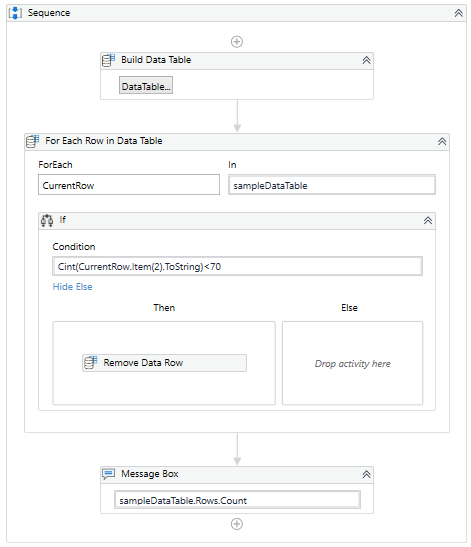
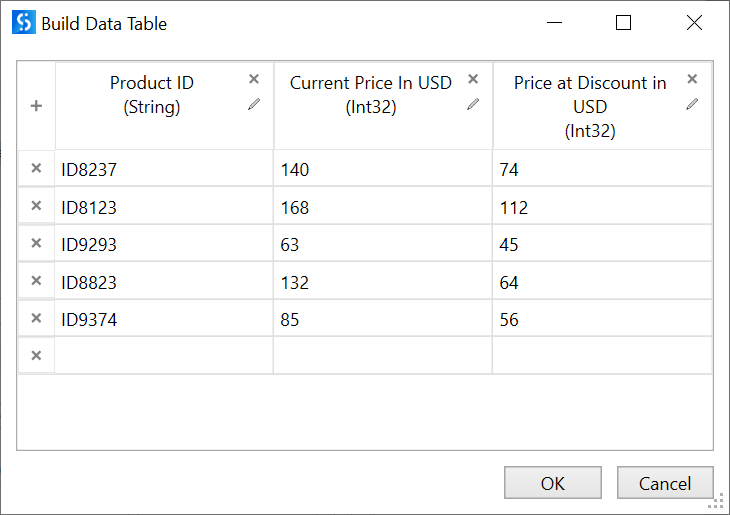
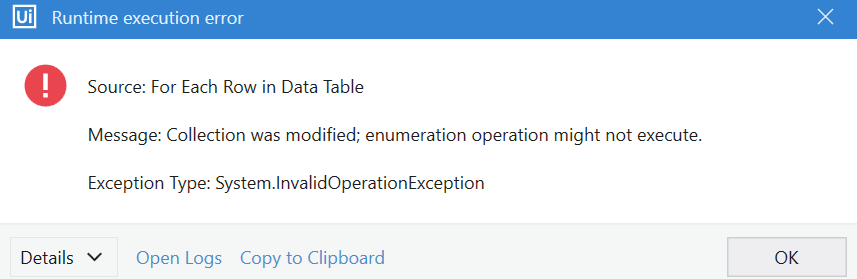
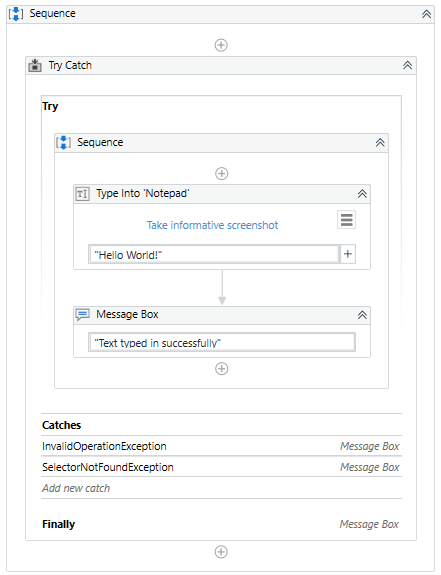
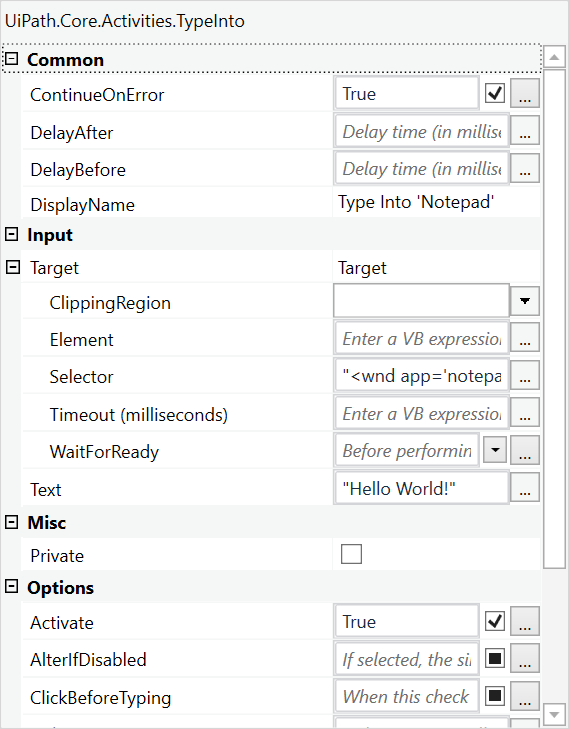
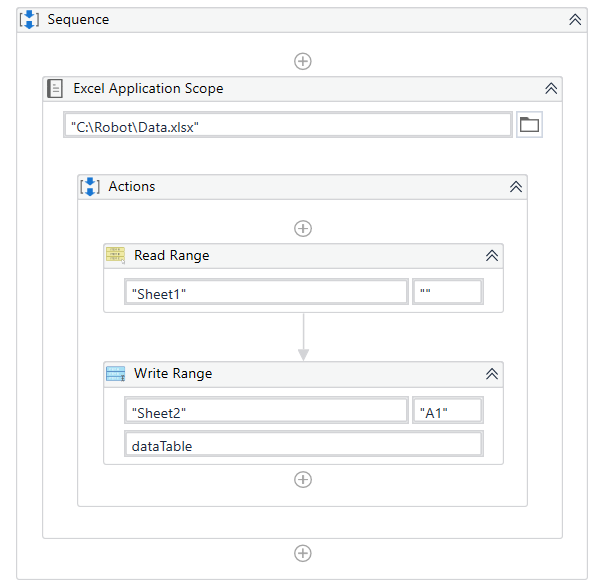
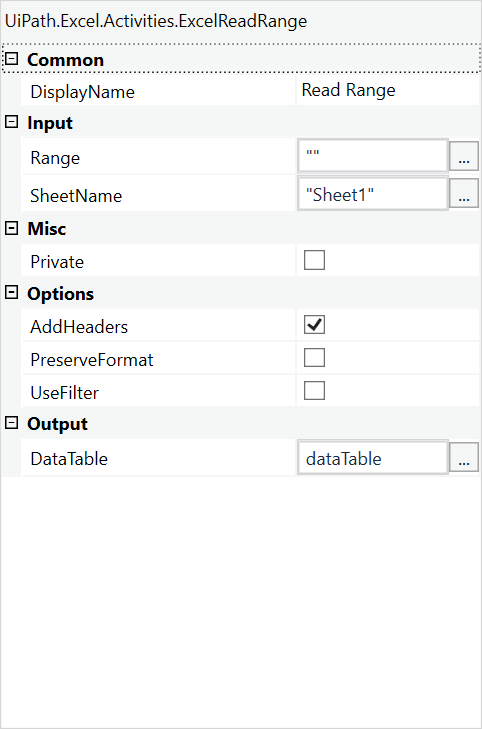
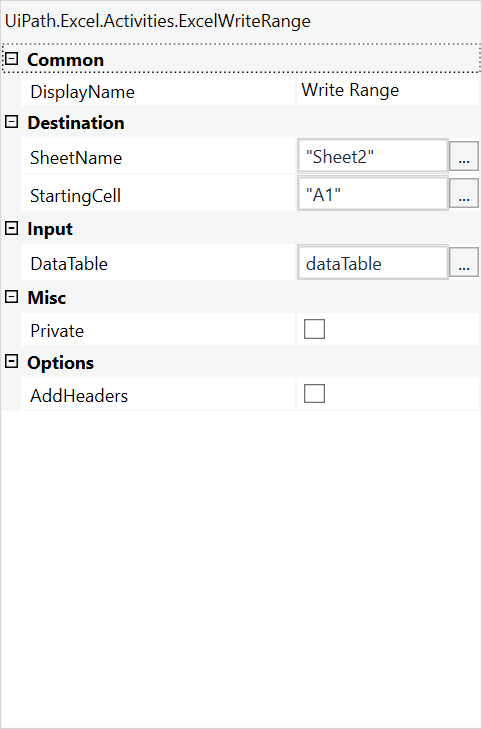
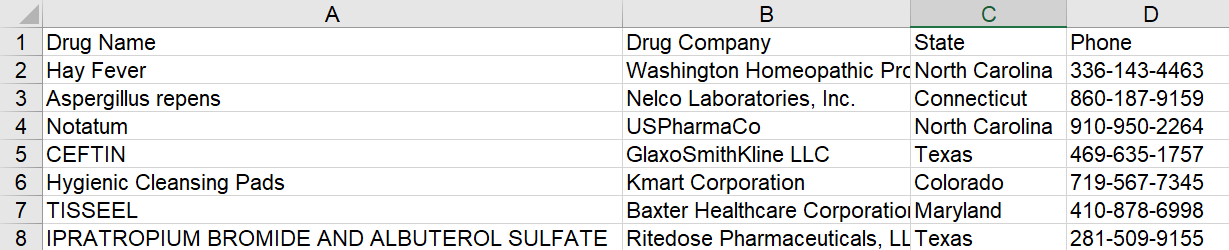
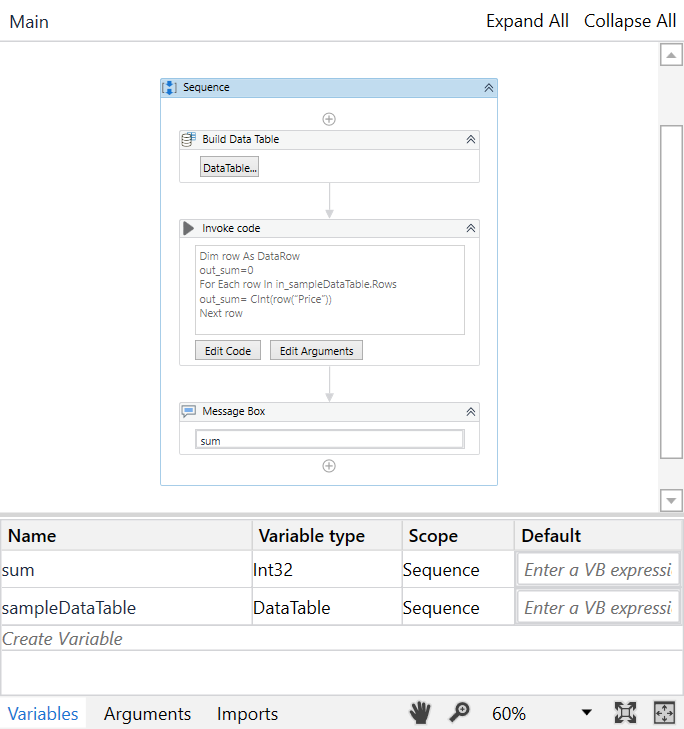
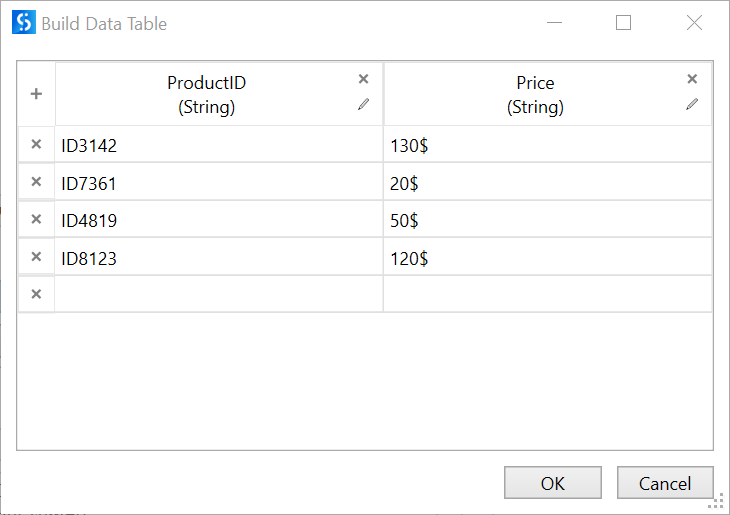
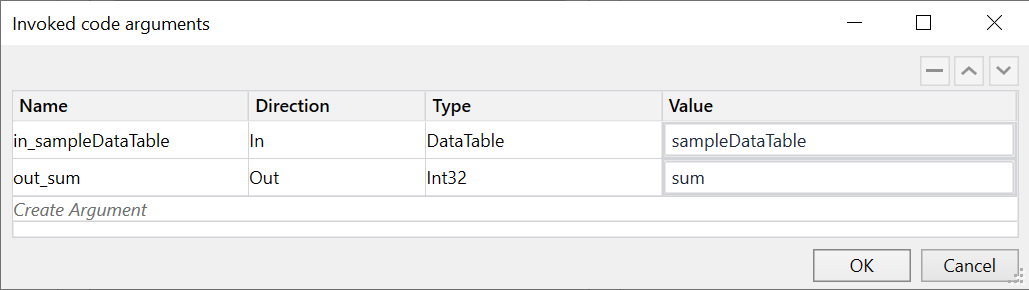
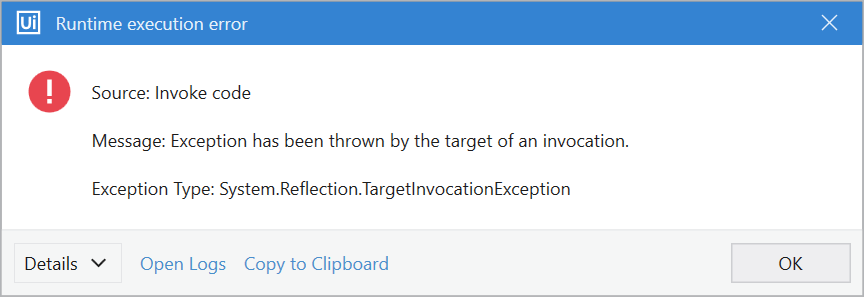
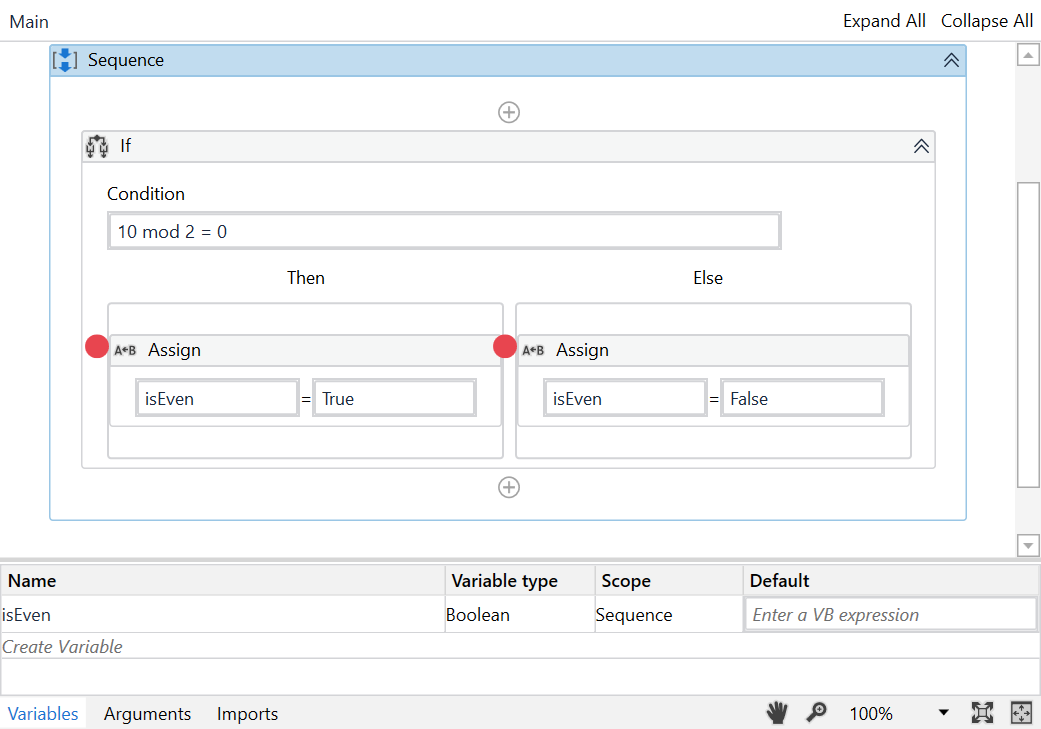
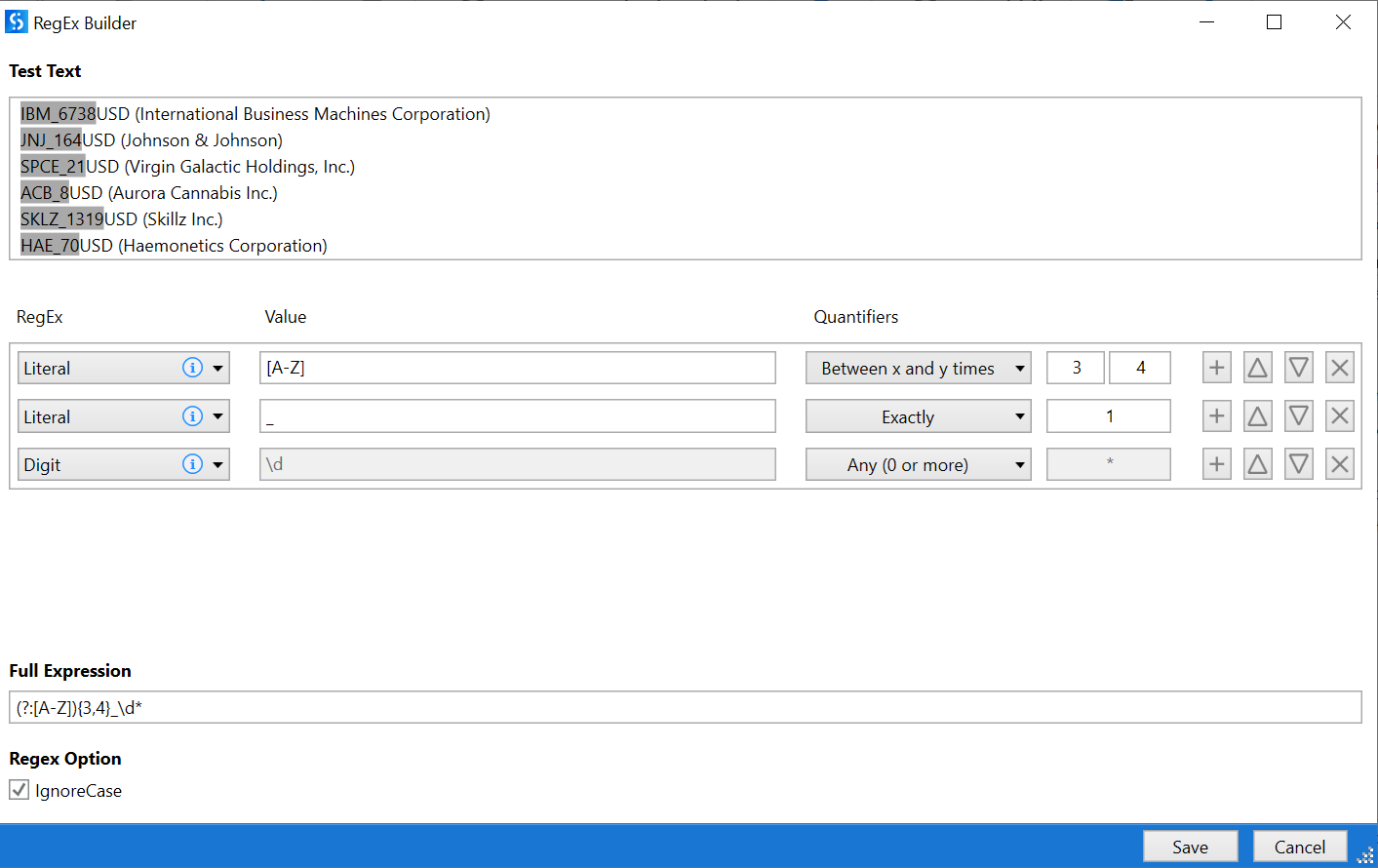
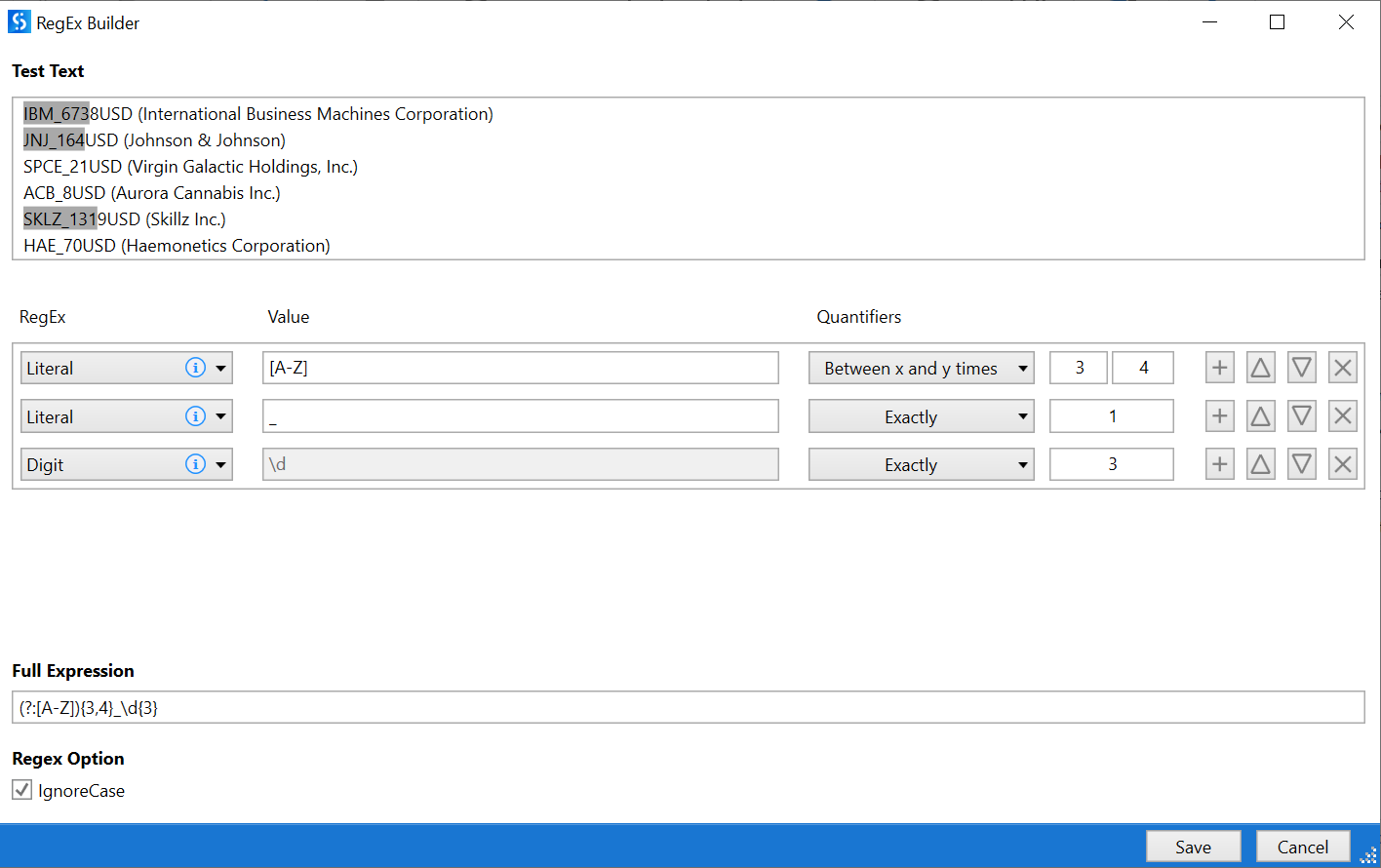 UiPath Documentation Exam Topic: Identify how methods, activities, and the RegEx Builder are used for string manipulation and regular expressions.