You have already completed the Test before. Hence you can not start it again.
Test is loading...
You must sign in or sign up to start the Test.
You have to finish following quiz, to start this Test:
Your results are here!! for" UiPath ADPv1 Practice Test 2 "
0 of 35 questions answered correctly
Your time:
Time has elapsed
Your Final Score is : 0
You have attempted : 0
Number of Correct Questions : 0 and scored 0
Number of Incorrect Questions : 0 and Negative marks 0
Average score
Your score
UiPath ADPv1
You have attempted: 0
Number of Correct Questions: 0 and scored 0
Number of Incorrect Questions: 0 and Negative marks 0
UiPath ADPv1
You have attempted: 0
Number of Correct Questions: 0 and scored 0
Number of Incorrect Questions: 0 and Negative marks 0
You can review your answers by clicking view questions. Important Note : Open Reference Documentation Links in New Tab (Right Click and Open in New Tab).
Answer Review
1
2
3
4
5
6
7
8
9
10
11
12
13
14
15
16
17
18
19
20
21
22
23
24
25
26
27
28
29
30
31
32
33
34
35
Answer
Review
Unattempted
Correct
Incorrect
Unattempted
Every question in this attempt was answered correctly.
Question 1 of 35
1. Question
A developer uses Screen Scraping to extract unstructured data from a webpage. How can the developer transform the unstructured data into a datatable?
Correct
Generate Data Table activity generates a DataTable variable from unstructured data. This activity enables you to select column and row separators according to which the table is generated. This activity is automatically generated when using the Generate Table feature in the Screen Scraping window.
UiPath Documentation
Exam Topic: Describe how to work with complex data structures and data manipulation; for example, datatables and collections
Incorrect
Generate Data Table activity generates a DataTable variable from unstructured data. This activity enables you to select column and row separators according to which the table is generated. This activity is automatically generated when using the Generate Table feature in the Screen Scraping window.
UiPath Documentation
Exam Topic: Describe how to work with complex data structures and data manipulation; for example, datatables and collections
Unattempted
Generate Data Table activity generates a DataTable variable from unstructured data. This activity enables you to select column and row separators according to which the table is generated. This activity is automatically generated when using the Generate Table feature in the Screen Scraping window.
UiPath Documentation
Exam Topic: Describe how to work with complex data structures and data manipulation; for example, datatables and collections
Question 2 of 35
2. Question
Which button in the Debug ribbon should be enabled to highlight the currently executed step?
Correct
The Execution Trail ribbon button is disabled by default. When enabled, it shows the exact execution path at debugging. As the process is executed, each activity is highlighted and marked in the Designer panel, showing you the execution as it happens:
– executed activities are marked and highlighted in green;
– activities that were not executed are not marked in any way;
– activities that threw an exception are marked and highlighted in red.
UiPath Documentation
Exam Topic: Examine and describe the activities and/or features used to troubleshoot and debug projects
Incorrect
The Execution Trail ribbon button is disabled by default. When enabled, it shows the exact execution path at debugging. As the process is executed, each activity is highlighted and marked in the Designer panel, showing you the execution as it happens:
– executed activities are marked and highlighted in green;
– activities that were not executed are not marked in any way;
– activities that threw an exception are marked and highlighted in red.
UiPath Documentation
Exam Topic: Examine and describe the activities and/or features used to troubleshoot and debug projects
Unattempted
The Execution Trail ribbon button is disabled by default. When enabled, it shows the exact execution path at debugging. As the process is executed, each activity is highlighted and marked in the Designer panel, showing you the execution as it happens:
– executed activities are marked and highlighted in green;
– activities that were not executed are not marked in any way;
– activities that threw an exception are marked and highlighted in red.
UiPath Documentation
Exam Topic: Examine and describe the activities and/or features used to troubleshoot and debug projects
Question 3 of 35
3. Question
Which of the following Rules belongs to the Naming Rules category?
Correct
NMG – shows that the rule is part of the Naming Rules category. Rules part of Project Anatomy Rules category have the ANA abbreviation, those part of Design Best Practices the DBP, and so on.
UiPath Documentation
Exam Topic: Describe the functionality of the Workflow Analyzer and how to create new rules
Incorrect
NMG – shows that the rule is part of the Naming Rules category. Rules part of Project Anatomy Rules category have the ANA abbreviation, those part of Design Best Practices the DBP, and so on.
UiPath Documentation
Exam Topic: Describe the functionality of the Workflow Analyzer and how to create new rules
Unattempted
NMG – shows that the rule is part of the Naming Rules category. Rules part of Project Anatomy Rules category have the ANA abbreviation, those part of Design Best Practices the DBP, and so on.
UiPath Documentation
Exam Topic: Describe the functionality of the Workflow Analyzer and how to create new rules
Question 4 of 35
4. Question
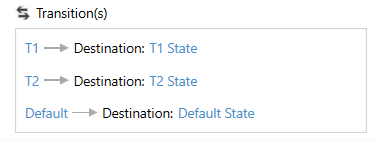
A developer implements a state machine for his automation solution. What happens if a condition both for T1 and T2 is True?
Correct
If conditions of multiple transitions are met, the first in order is executed. In this case, the T1 transition is executed.
UiPath Forum
Exam Topic: Describe how to use state machines versus flowcharts and sequences
Incorrect
If conditions of multiple transitions are met, the first in order is executed. In this case, the T1 transition is executed.
UiPath Forum
Exam Topic: Describe how to use state machines versus flowcharts and sequences
Unattempted
If conditions of multiple transitions are met, the first in order is executed. In this case, the T1 transition is executed.
UiPath Forum
Exam Topic: Describe how to use state machines versus flowcharts and sequences
Question 5 of 35
5. Question
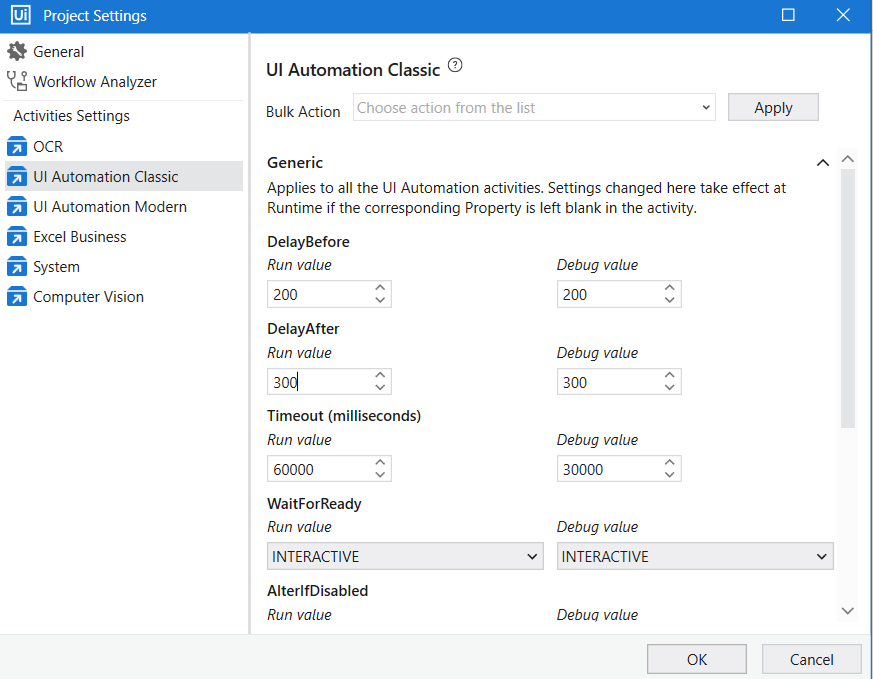
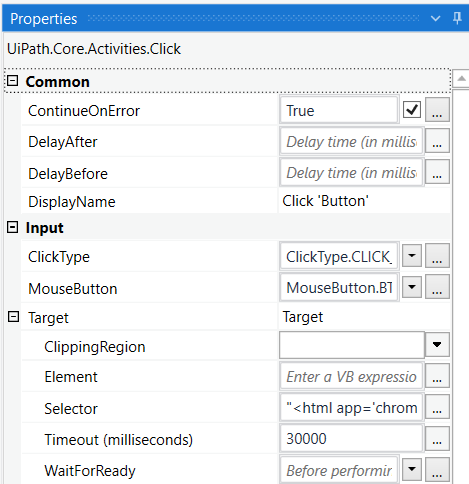
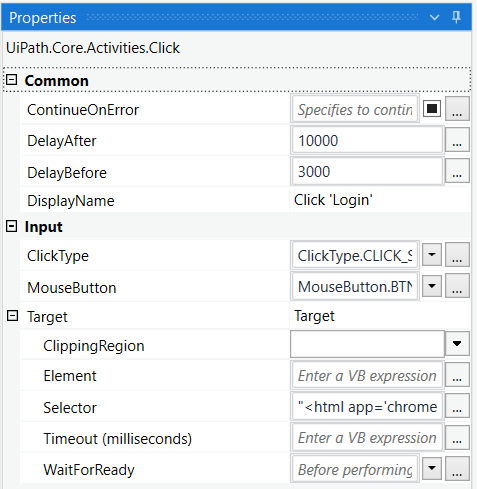
A developer has configured the Activity Project Settings for UI automation and a Click activity as shown below. The required selector does not exist. What Timeout value will be used by the robot once executed in Run Mode?
Please find the properties of the Click activity below.
Correct
Settings changed in Project Settings take effect if the corresponding property is left blank in the activity. If in the same project an activity has the Timeout property manually set (even if the value 30000 milliseconds is the same as the default one), then the value set in the property panel overwrites any other value configured in the Activity Project Settings window.
UiPath Documentation
Exam Topic: Describe how to use and configure Activity Project Settings and Libraries
Incorrect
Settings changed in Project Settings take effect if the corresponding property is left blank in the activity. If in the same project an activity has the Timeout property manually set (even if the value 30000 milliseconds is the same as the default one), then the value set in the property panel overwrites any other value configured in the Activity Project Settings window.
UiPath Documentation
Exam Topic: Describe how to use and configure Activity Project Settings and Libraries
Unattempted
Settings changed in Project Settings take effect if the corresponding property is left blank in the activity. If in the same project an activity has the Timeout property manually set (even if the value 30000 milliseconds is the same as the default one), then the value set in the property panel overwrites any other value configured in the Activity Project Settings window.
UiPath Documentation
Exam Topic: Describe how to use and configure Activity Project Settings and Libraries
Question 6 of 35
6. Question
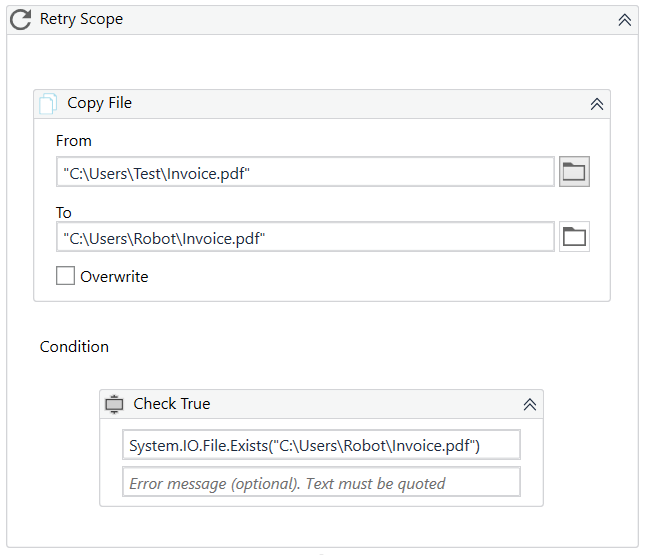
Which activity cannot be used as a Condition in a Retry Scope activity?
Correct
Retry Scope condition can be one of the activities that return a boolean. Even though the Path Exists activity also returns a Boolean value, it cannot be used in Retry Scope, it is an exception.
Instead of using Path Exists activity, you can use a Check True activity and as a condition place System.IO.File.Exists(filepath).
UiPath Documentation
UiPath Forum
Exam Topic: Identify and describe the use of the error handling activities such as Try Catch, Throw, Rethrow, Retry Scope, and Global Exception Handler.
Incorrect
Retry Scope condition can be one of the activities that return a boolean. Even though the Path Exists activity also returns a Boolean value, it cannot be used in Retry Scope, it is an exception.
Instead of using Path Exists activity, you can use a Check True activity and as a condition place System.IO.File.Exists(filepath).
UiPath Documentation
UiPath Forum
Exam Topic: Identify and describe the use of the error handling activities such as Try Catch, Throw, Rethrow, Retry Scope, and Global Exception Handler.
Unattempted
Retry Scope condition can be one of the activities that return a boolean. Even though the Path Exists activity also returns a Boolean value, it cannot be used in Retry Scope, it is an exception.
Instead of using Path Exists activity, you can use a Check True activity and as a condition place System.IO.File.Exists(filepath).
UiPath Documentation
UiPath Forum
Exam Topic: Identify and describe the use of the error handling activities such as Try Catch, Throw, Rethrow, Retry Scope, and Global Exception Handler.
Question 7 of 35
7. Question
A developer uses Send Outlook Mail Message activity to send a notification mail to the Finance team. A developer wants to change the font color of the mail message to red. How can it be achieved?
Correct
IsBodyHtml property specifies whether the body of the message is written in HTML format. Using HTML notation, it is possible to edit font color, text alignment, font and many other visual properties of the mail text.
UiPath Documentation
Exam Topic: Identify and describe how activities are used to automate actions in Excel, e-mail, and .pdfs
Incorrect
IsBodyHtml property specifies whether the body of the message is written in HTML format. Using HTML notation, it is possible to edit font color, text alignment, font and many other visual properties of the mail text.
UiPath Documentation
Exam Topic: Identify and describe how activities are used to automate actions in Excel, e-mail, and .pdfs
Unattempted
IsBodyHtml property specifies whether the body of the message is written in HTML format. Using HTML notation, it is possible to edit font color, text alignment, font and many other visual properties of the mail text.
UiPath Documentation
Exam Topic: Identify and describe how activities are used to automate actions in Excel, e-mail, and .pdfs
Question 8 of 35
8. Question
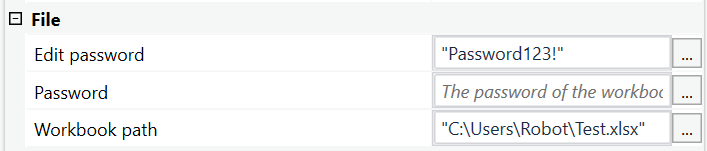
A developer wants to use a Write Cell and Read Range activities to work with an Excel file. The Excel file is protected for any modifications by a password, so unauthorized users can only read data. What should be done in order to ensure that the robot is able to write and read data from this file?
Correct
Edit password property stores the password required for editing password-protected Excel workbooks, if necessary. Only String variables and strings are supported.
While the Password property stores the password required for opening password-protected Excel workbooks, if necessary. Only String variables and strings are supported.
In this case, the password is set only for editing, and authorized users can read the file, but not write any data, meaning that the password for opening is not set. For that reason, only Edit password property should be filled in.
UiPath Documentation
Exam Topic: Identify and describe how activities are used to automate actions in Excel, e-mail, and .pdfs
Incorrect
Edit password property stores the password required for editing password-protected Excel workbooks, if necessary. Only String variables and strings are supported.
While the Password property stores the password required for opening password-protected Excel workbooks, if necessary. Only String variables and strings are supported.
In this case, the password is set only for editing, and authorized users can read the file, but not write any data, meaning that the password for opening is not set. For that reason, only Edit password property should be filled in.
UiPath Documentation
Exam Topic: Identify and describe how activities are used to automate actions in Excel, e-mail, and .pdfs
Unattempted
Edit password property stores the password required for editing password-protected Excel workbooks, if necessary. Only String variables and strings are supported.
While the Password property stores the password required for opening password-protected Excel workbooks, if necessary. Only String variables and strings are supported.
In this case, the password is set only for editing, and authorized users can read the file, but not write any data, meaning that the password for opening is not set. For that reason, only Edit password property should be filled in.
UiPath Documentation
Exam Topic: Identify and describe how activities are used to automate actions in Excel, e-mail, and .pdfs
Question 9 of 35
9. Question
A developer wants to pass a value of a variable to a workflow and modify it inside. However, after the workflow is finished, developer wants to use the original value of the variable.
What should be the direction of the argument?
Correct
The following directions are available:
In the argument can only be used within the given project. If the variable is modified inside the workflow, its value is not changed in the main workflow.
Out the argument can be used to pass data outside of a given project.
In/Out the arguments can be used both within and outside of a given project.
UiPath Documentation
Exam Topic: Explain how to use the Invoke Code, Invoke Method, and Invoke Workflow activities and how arguments are used to pass data
Incorrect
The following directions are available:
In the argument can only be used within the given project. If the variable is modified inside the workflow, its value is not changed in the main workflow.
Out the argument can be used to pass data outside of a given project.
In/Out the arguments can be used both within and outside of a given project.
UiPath Documentation
Exam Topic: Explain how to use the Invoke Code, Invoke Method, and Invoke Workflow activities and how arguments are used to pass data
Unattempted
The following directions are available:
In the argument can only be used within the given project. If the variable is modified inside the workflow, its value is not changed in the main workflow.
Out the argument can be used to pass data outside of a given project.
In/Out the arguments can be used both within and outside of a given project.
UiPath Documentation
Exam Topic: Explain how to use the Invoke Code, Invoke Method, and Invoke Workflow activities and how arguments are used to pass data
Question 10 of 35
10. Question
A developer wants to assign a value to a two-dimensional array of strings named newArray. What expression can be used in the Assign activity?
Correct
newArray = {({“UiPath”,”Udemy”}), ({“HUB Academy”, “RPA”})} is the correct way to initialize a two-dimensial array of strings.
UiPath Documentation
UiPath Forum
Exam Topic: Describe how to work with complex data structures and data manipulation; for example, datatables and collections
Incorrect
newArray = {({“UiPath”,”Udemy”}), ({“HUB Academy”, “RPA”})} is the correct way to initialize a two-dimensial array of strings.
UiPath Documentation
UiPath Forum
Exam Topic: Describe how to work with complex data structures and data manipulation; for example, datatables and collections
Unattempted
newArray = {({“UiPath”,”Udemy”}), ({“HUB Academy”, “RPA”})} is the correct way to initialize a two-dimensial array of strings.
UiPath Documentation
UiPath Forum
Exam Topic: Describe how to work with complex data structures and data manipulation; for example, datatables and collections
Question 11 of 35
11. Question
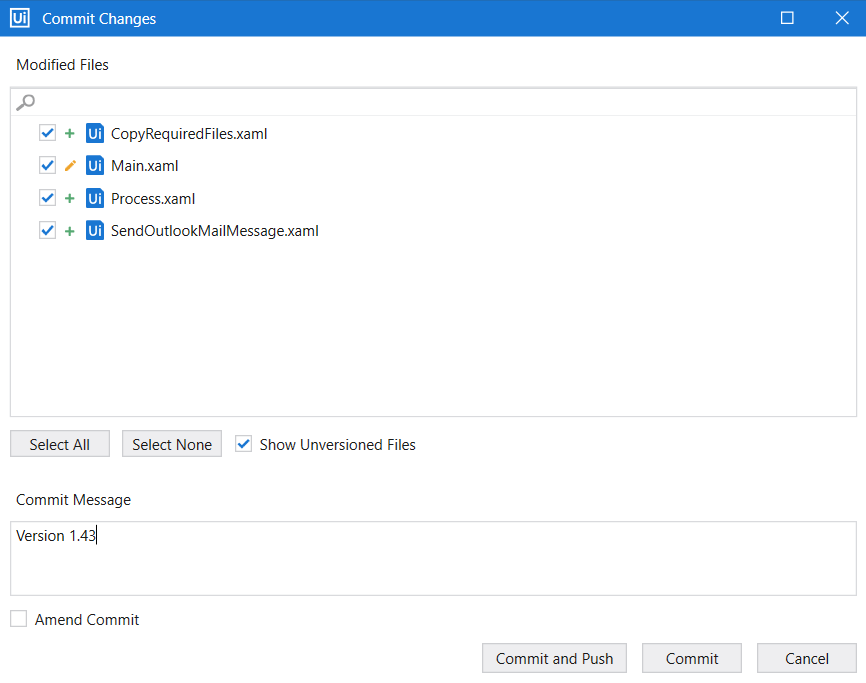
A developer uses a GIT repository for version control of his project. Which of the following buttons ensures that the changes are applied to the local Git repository?
Correct
Commit button allows to commit the changes to the local Git repository.
Commit and Push button allows to commit the changes and push them to the remote repository.
UiPath Documentation
Exam Topic: Understand how GIT and TFS are used for version control
Incorrect
Commit button allows to commit the changes to the local Git repository.
Commit and Push button allows to commit the changes and push them to the remote repository.
UiPath Documentation
Exam Topic: Understand how GIT and TFS are used for version control
Unattempted
Commit button allows to commit the changes to the local Git repository.
Commit and Push button allows to commit the changes and push them to the remote repository.
UiPath Documentation
Exam Topic: Understand how GIT and TFS are used for version control
Question 12 of 35
12. Question
A developer uses the following selector to extract the title of the invoice opened in the Chrome browser.
Which of the following documents would not be recognized by UiPath?
Correct
Wildcards are symbols that enable you to replace zero or multiple characters in a string. These can be quite useful when dealing with dynamically-changing attributes in a selector.
Asterisk (*) replaces zero or more characters
Question mark (?) replaces a single character
Invoice 4324 – 2.06.2021.pdf wouldn’t work with Invoice *- ??.??.*.pdf, because it has only 1 character of the day in date, instead of the required 2 characters.
UiPath Documentation
Exam Topic: Determine and describe how robust selectors are created; for example, dynamic versus static selectors
Incorrect
Wildcards are symbols that enable you to replace zero or multiple characters in a string. These can be quite useful when dealing with dynamically-changing attributes in a selector.
Asterisk (*) replaces zero or more characters
Question mark (?) replaces a single character
Invoice 4324 – 2.06.2021.pdf wouldn’t work with Invoice *- ??.??.*.pdf, because it has only 1 character of the day in date, instead of the required 2 characters.
UiPath Documentation
Exam Topic: Determine and describe how robust selectors are created; for example, dynamic versus static selectors
Unattempted
Wildcards are symbols that enable you to replace zero or multiple characters in a string. These can be quite useful when dealing with dynamically-changing attributes in a selector.
Asterisk (*) replaces zero or more characters
Question mark (?) replaces a single character
Invoice 4324 – 2.06.2021.pdf wouldn’t work with Invoice *- ??.??.*.pdf, because it has only 1 character of the day in date, instead of the required 2 characters.
UiPath Documentation
Exam Topic: Determine and describe how robust selectors are created; for example, dynamic versus static selectors
Question 13 of 35
13. Question
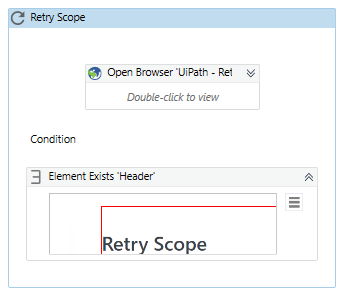
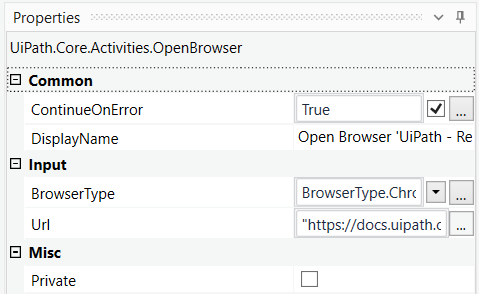
A developer uses Open Browser activity to launch UiPath Docs website. However, as the internet connection is unstable, the developer wraps it in a Retry Scope activity. Please choose the correct statement about this solution.
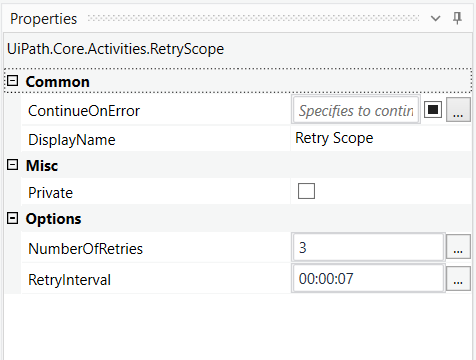
Please find the properties of Retry Scope activity below
Please find the properties of Open Browser activity below
Correct
NumberOfRetries property indicates how many times the activity will be executed overall. It is often misunderstood as 1 try + 3 retries (like in Orchestrator queues), however, it actually is simply 3 tries.
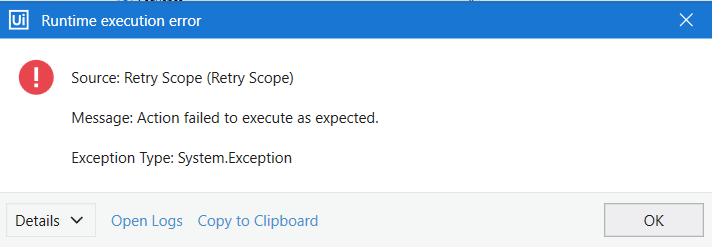
Even if Open Browser activity has ContinueOnError property set to True, it doesn’t affect the Retry Scope, because Retry Scope activity has ContinueOnError set to False. So after 3 tries, if the required element still doesn’t exist, the Retry Scope activity will throw an error.
UiPath Documentation
Exam Topic: Identify and describe the use of the error handling activities such as Try Catch, Throw, Rethrow, Retry Scope, and Global Exception Handler
Incorrect
NumberOfRetries property indicates how many times the activity will be executed overall. It is often misunderstood as 1 try + 3 retries (like in Orchestrator queues), however, it actually is simply 3 tries.
Even if Open Browser activity has ContinueOnError property set to True, it doesn’t affect the Retry Scope, because Retry Scope activity has ContinueOnError set to False. So after 3 tries, if the required element still doesn’t exist, the Retry Scope activity will throw an error.
UiPath Documentation
Exam Topic: Identify and describe the use of the error handling activities such as Try Catch, Throw, Rethrow, Retry Scope, and Global Exception Handler
Unattempted
NumberOfRetries property indicates how many times the activity will be executed overall. It is often misunderstood as 1 try + 3 retries (like in Orchestrator queues), however, it actually is simply 3 tries.
Even if Open Browser activity has ContinueOnError property set to True, it doesn’t affect the Retry Scope, because Retry Scope activity has ContinueOnError set to False. So after 3 tries, if the required element still doesn’t exist, the Retry Scope activity will throw an error.
UiPath Documentation
Exam Topic: Identify and describe the use of the error handling activities such as Try Catch, Throw, Rethrow, Retry Scope, and Global Exception Handler
Question 14 of 35
14. Question
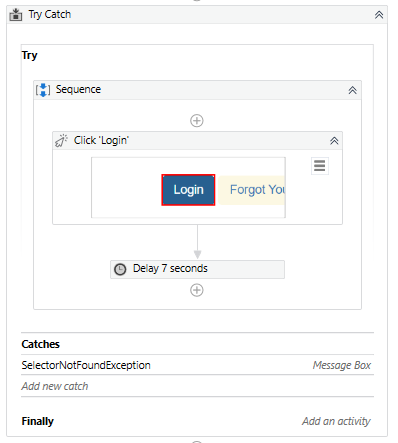
A developer configured the properties for a Click activity on an element inside a web page as shown in the following graphic. During runtime, the selector is invalid and does not match any element on the web page. What occurs during the execution of the sequence?
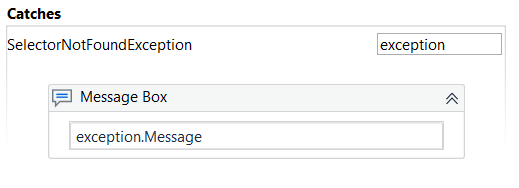
Please find the Catch below
Please find the properties of the Click activity below
Correct
1. Even if the activity is executed as the first one, the robot waits before its execution. By default, for 200 milliseconds, but in this case, the value in DelayBefore is set for 3 seconds.
2. If the corresponding selector cannot be found on the screen, the robot waits by default for 30 seconds for it to appear. If the corresponding selector cannot be found during those 30 seconds, an error is thrown. If ContinueOnError is set to True, then the error is ignored and the error message does not appear. In this case, ContinueOnError is False so the error is thrown.
3.After executing the activity, the robot waits before executing the following activity. By default, for 300 milliseconds, but in this case, the value in DelayAfter is set for 30 seconds.
However, as the corresponding selector is not found, an error is thrown and the robot does not wait for DelayAfter and does not execute the following Delay activity of 7 seconds. Instead, the error is caught as a SelectorNotFoundException and the error exception is displayed with a Message Box.
UiPath Documentation
Exam Topic: Identify and describe the key UI Activities properties; for example, ContinueOnError, DelayBefore, DelayAfter, and Target
Incorrect
1. Even if the activity is executed as the first one, the robot waits before its execution. By default, for 200 milliseconds, but in this case, the value in DelayBefore is set for 3 seconds.
2. If the corresponding selector cannot be found on the screen, the robot waits by default for 30 seconds for it to appear. If the corresponding selector cannot be found during those 30 seconds, an error is thrown. If ContinueOnError is set to True, then the error is ignored and the error message does not appear. In this case, ContinueOnError is False so the error is thrown.
3.After executing the activity, the robot waits before executing the following activity. By default, for 300 milliseconds, but in this case, the value in DelayAfter is set for 30 seconds.
However, as the corresponding selector is not found, an error is thrown and the robot does not wait for DelayAfter and does not execute the following Delay activity of 7 seconds. Instead, the error is caught as a SelectorNotFoundException and the error exception is displayed with a Message Box.
UiPath Documentation
Exam Topic: Identify and describe the key UI Activities properties; for example, ContinueOnError, DelayBefore, DelayAfter, and Target
Unattempted
1. Even if the activity is executed as the first one, the robot waits before its execution. By default, for 200 milliseconds, but in this case, the value in DelayBefore is set for 3 seconds.
2. If the corresponding selector cannot be found on the screen, the robot waits by default for 30 seconds for it to appear. If the corresponding selector cannot be found during those 30 seconds, an error is thrown. If ContinueOnError is set to True, then the error is ignored and the error message does not appear. In this case, ContinueOnError is False so the error is thrown.
3.After executing the activity, the robot waits before executing the following activity. By default, for 300 milliseconds, but in this case, the value in DelayAfter is set for 30 seconds.
However, as the corresponding selector is not found, an error is thrown and the robot does not wait for DelayAfter and does not execute the following Delay activity of 7 seconds. Instead, the error is caught as a SelectorNotFoundException and the error exception is displayed with a Message Box.
UiPath Documentation
Exam Topic: Identify and describe the key UI Activities properties; for example, ContinueOnError, DelayBefore, DelayAfter, and Target
Question 15 of 35
15. Question
A foreground process is running on the user’s machine. A developer starts a new background process on the same machine while the foreground process is still running. What will happen in such situation?
Correct
A background process doesn’t need to interact with UI elements on the screen but rather relies on background processes to pass along information. UIAutomation activities should not be used in these project types. Multiple such processes can simultaneously run on a machine, even if a foreground process is already running.
The type of process is generally dictated by the type of activities it uses (whether or not they interact with UI elements). However, you can specify the type when you create a new process from Studio. By default, all processes are marked as foreground, unless specified otherwise.
UiPath Documentation
Exam Topic: Identify and describe how UI Automation activities and/or Excel activities can be configured to interact with background windows
Incorrect
A background process doesn’t need to interact with UI elements on the screen but rather relies on background processes to pass along information. UIAutomation activities should not be used in these project types. Multiple such processes can simultaneously run on a machine, even if a foreground process is already running.
The type of process is generally dictated by the type of activities it uses (whether or not they interact with UI elements). However, you can specify the type when you create a new process from Studio. By default, all processes are marked as foreground, unless specified otherwise.
UiPath Documentation
Exam Topic: Identify and describe how UI Automation activities and/or Excel activities can be configured to interact with background windows
Unattempted
A background process doesn’t need to interact with UI elements on the screen but rather relies on background processes to pass along information. UIAutomation activities should not be used in these project types. Multiple such processes can simultaneously run on a machine, even if a foreground process is already running.
The type of process is generally dictated by the type of activities it uses (whether or not they interact with UI elements). However, you can specify the type when you create a new process from Studio. By default, all processes are marked as foreground, unless specified otherwise.
UiPath Documentation
Exam Topic: Identify and describe how UI Automation activities and/or Excel activities can be configured to interact with background windows
Question 16 of 35
16. Question
How does UiPath recognize elements on screen?
Correct
Incorrect
Unattempted
Question 17 of 35
17. Question
What recording wizard would you use to generate partial selectors?
Correct
Web recording, Desktop recording, use to generate partial selectors.
Incorrect
Web recording, Desktop recording, use to generate partial selectors.
Unattempted
Web recording, Desktop recording, use to generate partial selectors.
Question 18 of 35
18. Question
By using the fulltext scraping method, the robot is able to_________________________.
Correct
By using the Full Text scraping method, the robot is able to get entire visible text, editable text and hidden datas
Incorrect
By using the Full Text scraping method, the robot is able to get entire visible text, editable text and hidden datas
Unattempted
By using the Full Text scraping method, the robot is able to get entire visible text, editable text and hidden datas
Question 19 of 35
19. Question
What activity can you use to read an entire sheet from an excel file?
Correct
Incorrect
Unattempted
Question 20 of 35
20. Question
What is considered a best practice in large projects?
Correct
Encapsulating most used activities in single-activity workflows that can be invoked from other workflows.
By using In arguments.
By using In/Out arguments.
By using the Output property of the Invoke Workflow File activity.
By using Out arguments.
Incorrect
Encapsulating most used activities in single-activity workflows that can be invoked from other workflows.
By using In arguments.
By using In/Out arguments.
By using the Output property of the Invoke Workflow File activity.
By using Out arguments.
Unattempted
Encapsulating most used activities in single-activity workflows that can be invoked from other workflows.
By using In arguments.
By using In/Out arguments.
By using the Output property of the Invoke Workflow File activity.
By using Out arguments.
Question 21 of 35
21. Question
What happens if you try to use write range activity to a .xls file that does not exist?
Correct
Incorrect
Unattempted
Question 22 of 35
22. Question
What activity allows you to customize the name of the sender when you are sending an email?
Correct
Incorrect
Unattempted
Question 23 of 35
23. Question
What is an argument?
Correct
Incorrect
Unattempted
Question 24 of 35
24. Question
Which of the following text scraping methods preserve the text position?
Correct
Incorrect
Unattempted
Question 25 of 35
25. Question
What kind of workflow should you create to define business rule?
Correct
Flowchart
A flowchart is a graphical representation of a process in which each step is represented by different symbols connected with arrows.
Flowchart is one of the best among the three layout diagrams of UiPath workflow because it is flexible and tend to lay out a workflow in two-dimensional manner. They can showcase decision points within a process very efficiently owing to their visual appeal.
Sequence
Mostly used layout diagram in UiPath workflow design is sequence. A sequence is a simple linear representation that generally flows from top to bottom, and tells the order in which commands are to be executed.
Sequences are best in simple scenarios when activities pursue each other. The most important thing about sequence is that they are very simple and easy to understand.
State Machine
State machine is a complex structure that stores the status of something at a given point of time. It can be finite or infinite in nature. State machine are represented by using state diagrams or in other words they are flowcharts with conditional arrows called transitions. Structures like state machines are best suited for a standard high-level process diagram of transactional business process templates.
Incorrect
Flowchart
A flowchart is a graphical representation of a process in which each step is represented by different symbols connected with arrows.
Flowchart is one of the best among the three layout diagrams of UiPath workflow because it is flexible and tend to lay out a workflow in two-dimensional manner. They can showcase decision points within a process very efficiently owing to their visual appeal.
Sequence
Mostly used layout diagram in UiPath workflow design is sequence. A sequence is a simple linear representation that generally flows from top to bottom, and tells the order in which commands are to be executed.
Sequences are best in simple scenarios when activities pursue each other. The most important thing about sequence is that they are very simple and easy to understand.
State Machine
State machine is a complex structure that stores the status of something at a given point of time. It can be finite or infinite in nature. State machine are represented by using state diagrams or in other words they are flowcharts with conditional arrows called transitions. Structures like state machines are best suited for a standard high-level process diagram of transactional business process templates.
Unattempted
Flowchart
A flowchart is a graphical representation of a process in which each step is represented by different symbols connected with arrows.
Flowchart is one of the best among the three layout diagrams of UiPath workflow because it is flexible and tend to lay out a workflow in two-dimensional manner. They can showcase decision points within a process very efficiently owing to their visual appeal.
Sequence
Mostly used layout diagram in UiPath workflow design is sequence. A sequence is a simple linear representation that generally flows from top to bottom, and tells the order in which commands are to be executed.
Sequences are best in simple scenarios when activities pursue each other. The most important thing about sequence is that they are very simple and easy to understand.
State Machine
State machine is a complex structure that stores the status of something at a given point of time. It can be finite or infinite in nature. State machine are represented by using state diagrams or in other words they are flowcharts with conditional arrows called transitions. Structures like state machines are best suited for a standard high-level process diagram of transactional business process templates.
Question 26 of 35
26. Question
Having an app in a Citrix environment with multiple text-boxes that look the same (size/style), how can you identify one of them to type into?
Correct
Incorrect
Unattempted
Question 27 of 35
27. Question
Which of the scraping method can get you the hidden text in the element?
Correct
Incorrect
Unattempted
Question 28 of 35
28. Question
What activities can you use to send an email message?
Correct
The Internet Message Access Protocol (IMAP) can be used for receiving e-mails, marking them as read or moving them between folders.
Incorrect
The Internet Message Access Protocol (IMAP) can be used for receiving e-mails, marking them as read or moving them between folders.
Unattempted
The Internet Message Access Protocol (IMAP) can be used for receiving e-mails, marking them as read or moving them between folders.
Question 29 of 35
29. Question
Is it possible to reprocess a transaction in a Queue after its failure due to an application exception?
Correct
Incorrect
Unattempted
Question 30 of 35
30. Question
How can a process be executed on three different robots?
Correct
Incorrect
Unattempted
Question 31 of 35
31. Question
If a large item collection is processed using For Each, which activity enables you to efficiently exit the loop after a specific moment?
Correct
Incorrect
Unattempted
Question 32 of 35
32. Question
What do the Item in the Orchestrator queues consist of?
Correct
Orchestrator queues – Used for assigning line items from datatable to a particular queue in orchestraotor so that particular line item from the queue can be accessed and be processed by multiple bots.
Incorrect
Orchestrator queues – Used for assigning line items from datatable to a particular queue in orchestraotor so that particular line item from the queue can be accessed and be processed by multiple bots.
Unattempted
Orchestrator queues – Used for assigning line items from datatable to a particular queue in orchestraotor so that particular line item from the queue can be accessed and be processed by multiple bots.
Question 33 of 35
33. Question
What activity should you use if you want to add to the existing .xslx document? (Select two)
Correct
Incorrect
Unattempted
Question 34 of 35
34. Question
The most important advantages of the fulltext method are:
Correct
Accurate, Fast and Background Automation support are the main advantages of FullText method.
Incorrect
Accurate, Fast and Background Automation support are the main advantages of FullText method.
Unattempted
Accurate, Fast and Background Automation support are the main advantages of FullText method.
Question 35 of 35
35. Question
How should an RPA developer address runtime exception in the workflow?
Correct
Incorrect
Unattempted
X
Use Page numbers below to navigate to other practice tests